





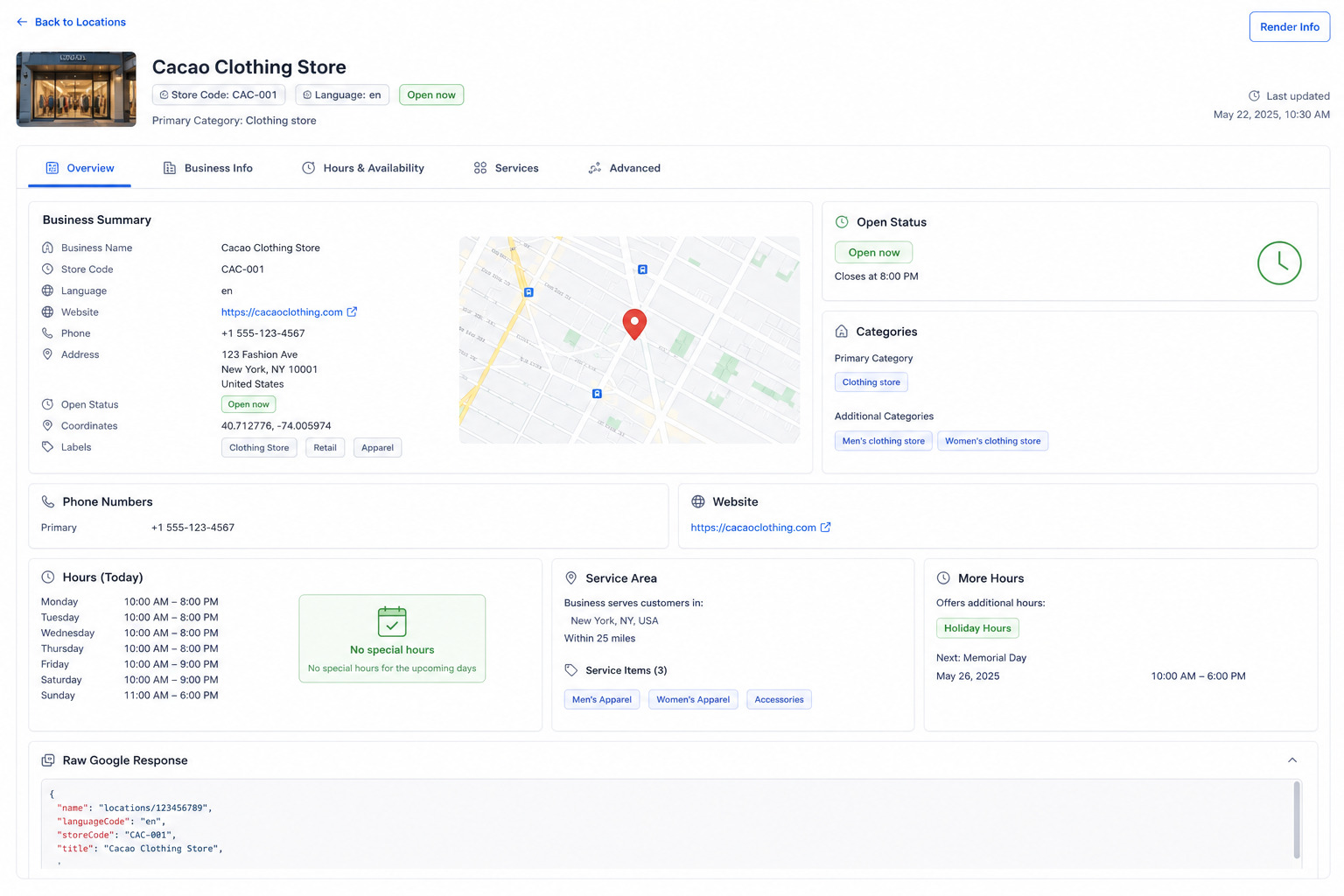
Manage every Google Business Profile from one place
Cacao brings every Google Business Profile into a single dashboard so marketing and local SEO teams can understand which locations are complete, updated, verified, duplicated, suspended, or at risk.
Instead of opening each profile manually, teams can review the full network, filter by location, and act on the profiles that need attention first.
- view every Google profile in one place
- identify incomplete or outdated listings
- monitor profile status, verification, suspensions, and duplicates
- organize work by location, region, country, or brand
Monitor profile completeness and status
For multi-location teams, the first problem is knowing which Google profiles are actually complete. Cacao calculates its own profile completeness score based on missing information, so teams can quickly see whether a location is 100%, 80%, 60%, or still missing important fields.
The same dashboard helps teams monitor operational status across the network, including verified and unverified profiles, suspended profiles, duplicate profiles, and incomplete listings that need attention.
- Cacao completeness scoring based on missing profile information
- verified and unverified profile status
- suspended and duplicate profile detection
- alerts when a profile is suspended or incomplete
Edit Google listings directly from Cacao
Cacao lets teams update business information directly in Google from the same platform they already use to manage reviews and local performance. Changes are published through the Google Business Profile API.
For brands with dozens or hundreds of locations, bulk editing helps keep essential profile data consistent without repeating the same task profile by profile. Teams can still edit individual locations when a profile needs local context.
If your team is comparing broader local marketing suites, see how multi-location marketing platforms for review management should combine listings consistency with reviews, permissions, AI responses, and reporting.
- individual edits for name, address, main category, secondary categories, description, phone, hours, attributes, social links, services, menus, photos, Q&A, and posts
- bulk updates for main category, secondary categories, hours, menus, photos, and services
- direct publishing through the Google Business Profile API
- audit history for profile changes
Detect profile issues before they hurt local visibility
A location can have strong reviews and still lose performance if its Google profile has wrong hours, missing categories, outdated photos, or unresolved listing issues.
Cacao helps local SEO teams spot problems that can affect discovery, customer trust, and conversion from Google Search and Google Maps.
Data consistency
Find inconsistent profile data across locations before customers or search engines rely on outdated information.
Profile health
Monitor completeness, verification, suspension, duplicate profiles, and profile-quality signals that require attention.
Operational visibility
Give corporate, district, and local teams a clear view of which locations need updates.
Control who can edit each Google profile
Google listing management gets harder when every team member can see or edit every location. Cacao uses role-based access so the right people can act on the right profiles without losing central control.
The main user can edit every profile, district users can edit only the profiles assigned to them, and local users can edit only their own location profile.
- main users can manage the full location network
- district users can manage assigned profiles
- local users can manage only their own profile
- audit history helps teams understand what changed and who changed it
Analyze Google profile metrics by location
Google Business Profile management should not stop at editing. Cacao also centralizes the metrics that show how each location performs in Google.
Teams can review historical performance, compare locations, and understand where visibility or conversion is changing over time.
- monthly interactions, website clicks, calls, direction requests, searches, and views
- historical trends by location, region, country, or brand
- ranking of best and worst performing profiles
- alerts when a location loses momentum or needs attention
Connect Google listings with review performance
Review management and Google listing management solve different problems, but they are stronger together. Review management helps teams collect, monitor, respond to, and analyze reviews. Google Business Profile management keeps the profiles themselves accurate, complete, and visible.
A profile with many positive reviews but outdated hours, missing categories, or inconsistent information can still underperform in Google. Cacao connects reputation and local presence so teams can manage both from one place. Teams deciding which type of platform they need can also use this Google reputation management software guide to compare Google-first workflows with broader reputation suites.
The strongest local SEO strategy usually combines complete Google profiles with a constant flow of real customer reviews. Profiles help customers find and understand each location; fresh reviews help them choose it.
Built for brands that manage local SEO at scale
Cacao is built for teams that need to keep local presence consistent across many locations, not just for teams managing one Google profile.
Restaurant groups, retail chains, service brands, franchises, healthcare networks, and agencies can use the same workspace to manage listings, reviews, AI responses, alerts, and reporting.
Restaurant teams comparing software can also review this guide to compare Google Business Profile and reputation management platforms before deciding whether they need a full local presence platform, a review workflow, or both.
- included in Cacao
- built for multi-location operations
- works with review management and reporting workflows
- Google-first alternative to heavier local presence suites
- useful for brands such as El Grupo Popular and other location-based businesses
Manage Google Business Profiles and reviews in one platform
Book a demo to see how Cacao helps multi-location teams keep profiles updated, track local performance, and manage Google reviews from the same dashboard.
Frequently asked questions
What is Google Business Profile management software?
Google Business Profile management software helps businesses manage Google profiles across multiple locations. It can centralize profile data, edit listings, monitor completeness, manage Q&A, detect issues, monitor verification status, and analyze performance metrics such as monthly interactions, calls, website clicks, and direction requests.
How do you manage Google Business Profiles for multiple locations?
Multi-location businesses usually use a centralized platform to connect all Google Business Profiles, update business data, monitor profile health, and compare performance by location, region, or country. This avoids managing each profile manually.
Can I edit Google Business Profiles in bulk?
Yes. Cacao supports bulk editing workflows for main category, secondary categories, hours, menus, photos, and services. Teams can also edit individual profiles for fields such as name, address, description, phone, attributes, social links, Q&A, and posts.
How does Cacao calculate profile completeness?
Cacao calculates profile completeness with its own scoring based on missing profile information. Teams can quickly identify profiles that are complete, partially complete, or missing important fields before those gaps affect local visibility or conversion.
Can Cacao manage Google Q&A?
Yes. Cacao includes Google Q&A management as part of the same workflow used for profile editing, Google Posts, review generation, AI responses, alerts, and reporting.
Can teams control who edits each Google profile?
Yes. Cacao supports role-based access. The main user can edit all profiles, district users can edit only assigned profiles, and local users can edit only their own location profile.
What Google Business Profile metrics should I track?
Important metrics include monthly interactions, calls, website clicks, direction requests, and historical performance by location. Multi-location teams should also compare profiles to detect drops, outliers, and opportunities.
Why do updated Google listings matter for local SEO?
Updated Google listings help customers and search engines understand each location. Accurate hours, categories, photos, services, and contact details can improve trust, conversion, and local visibility. A profile with many reviews can still underperform if its business information is outdated.
What is the difference between review management and Google Business Profile management?
Review management focuses on collecting, monitoring, responding to, and analyzing customer reviews. Google Business Profile management focuses on keeping the business profiles accurate, complete, updated, and measurable. Cacao connects both workflows in one platform.
Does Cacao include Google listing management?
Yes. Google listing management is included in Cacao, so multi-location teams can manage Google Business Profiles, monitor profile completeness and issues, edit profiles individually or in bulk, manage Q&A, track local performance, and connect those insights with review management.
Is Cacao a Google-first alternative to enterprise local presence platforms?
Yes, when the priority is managing Google profiles, Q&A, completeness, alerts, review generation, AI responses, and location-level performance. If the main requirement is broad multi-directory distribution outside Google, an enterprise local presence platform may still be a better fit.