




Connect your profiles and regain control
Connect all your Google Business Profiles to Cacao and bring your locations together in one place.









Steren centralized review management and Google Business Profile operations across an enterprise retail network in 9 countries. The team responds to approximately 300 reviews each day while maintaining corporate visibility and human oversight where required.
Compare locations through AI-categorized feedback, find recurring issues, and open the original reviews. Explore all five views below.
Interactive demonstration · fictional data
Google reviews · September volume, ratings and topics.
Review count by September date range
The final date range covers 2 days, rather than a full week.
All ratings for the period · n=648
Comments with complaints, including mixed feedback
n=392 · A comment may mention multiple topics.
Comments with praise, including those with complaints
Customize categories to fit your business.
Among locations with at least 10 reviews. This demo includes data for 10 locations.
| Location | Reviews | Rating /5 | 1–3 stars | With a comment | Top complaint topic |
|---|---|---|---|---|---|
| 104 | 4.28 | 17.3% · 18 | 74 | Product (6) | |
| 86 | 4.38 | 12.8% · 11 | 55 | Operations (5) | |
| 78 | 4.45 | 10.3% · 8 | 49 | Operations (3) | |
| 72 | 4.50 | 8.3% · 6 | 46 | Operations (4) | |
| 68 | 4.52 | 7.4% · 5 | 42 | Operations (3) | |
| 61 | 4.50 | 6.6% · 4 | 36 | Product (3) | |
| 55 | 4.55 | 5.5% · 3 | 30 | Operations (3) | |
| 48 | 4.58 | 4.2% · 2 | 24 | Product (2) | |
| 34 | 4.55 | 2.9% · 1 | 15 | Operations (1) | |
| 42 | 4.59 | 2.4% · 1 | 21 | Operations (2) |
Darker shades indicate a higher share. Each cell shows the percentage and comment count.
Scroll horizontally to compare all categories.
| Location / comments | Product | Operations | Marketing | Delivery Apps | Systems |
|---|---|---|---|---|---|
| Downtown Locationn=74 | |||||
| Park Locationn=55 | |||||
| North Locationn=49 | |||||
| Riverside Locationn=46 | |||||
| Garden Locationn=42 | |||||
| West Locationn=36 | |||||
| Alameda Locationn=30 | |||||
| Plaza Locationn=24 | |||||
| Promenade Locationn=15 | |||||
| Forest Locationn=21 |
Google · All locations
A review may cover multiple topics. Percentages do not add up to 100%. Calculations use the available written comments.
Sample data illustrating categories and subcategories.
Historical Google rating and review count in each date range
Based on 74 comments. A review may include praise and criticism.
| Category | With praise | With complaints |
|---|---|---|
| Operations | 62 | |
| Product | 24 | |
| Marketing | 3 | |
| Delivery Apps | 0 | |
| Systems | 0 |
Google · Sample review
1 / 5 stars“The food was delicious and the dining room is pleasant. However, we waited a long time for service and had to ask for the bill several times. We would like them to improve service coordination.”
The comment praises the food but highlights issues with wait times and coordination. Categorization helps identify which area needs to improve.
Fictional comment created to illustrate topic analysis; separate from the demo counts.
Scroll horizontally to read comments and original ratings.
| Date / ID | Location | Complaint category | Review text · excerpt | Original rating |
|---|---|---|---|---|
| Sep 28R0963 | Park Location | The food was very good, but we were left waiting at the entrance. The food tasted good, although the temperature and preparation could improve. | 4/5 | |
| Sep 25R1133 | North Location | The food tasted good, although the temperature and preparation could improve. The payment system failed and we had to repeat the checkout process. | 5/5 | |
| Sep 22R0827 | Downtown Location | The food was excellent, but we waited a long time to be served. The food tasted good, although the temperature and preparation could improve. | 5/5 | |
| Sep 18R1286 | Garden Location | Service was friendly, but the wait and coordination could improve. The advertised offer did not match the price shown at checkout. | 5/5 | |
| Sep 14R1337 | West Location | Service was friendly, but the wait and coordination could improve. The advertised offer did not match the price shown at checkout. | 4/5 | |
| Sep 9R1184 | Riverside Location | Service was friendly, but the wait and coordination could improve. The advertised offer did not match the price shown at checkout. | 4/5 |
Fictional data for illustration. Stars rate the overall experience; complaints are identified in the text.
Custom categories can include Product, Operations and Marketing. Mixed comments can also reveal opportunities to improve.
Group, location, and date filters stay applied when switching views.
A simplified example of Cacao’s five views. Names, comments, and figures are fictional and do not represent customer results. The example categories are customizable.
Connect your profiles, set up alerts, respond with AI, and compare results. Then generate more reviews to improve visibility for each location.
Connect all your Google Business Profiles to Cacao and bring your locations together in one place.
Configure categories and recipients so negative reviews automatically reach the people who need to act.
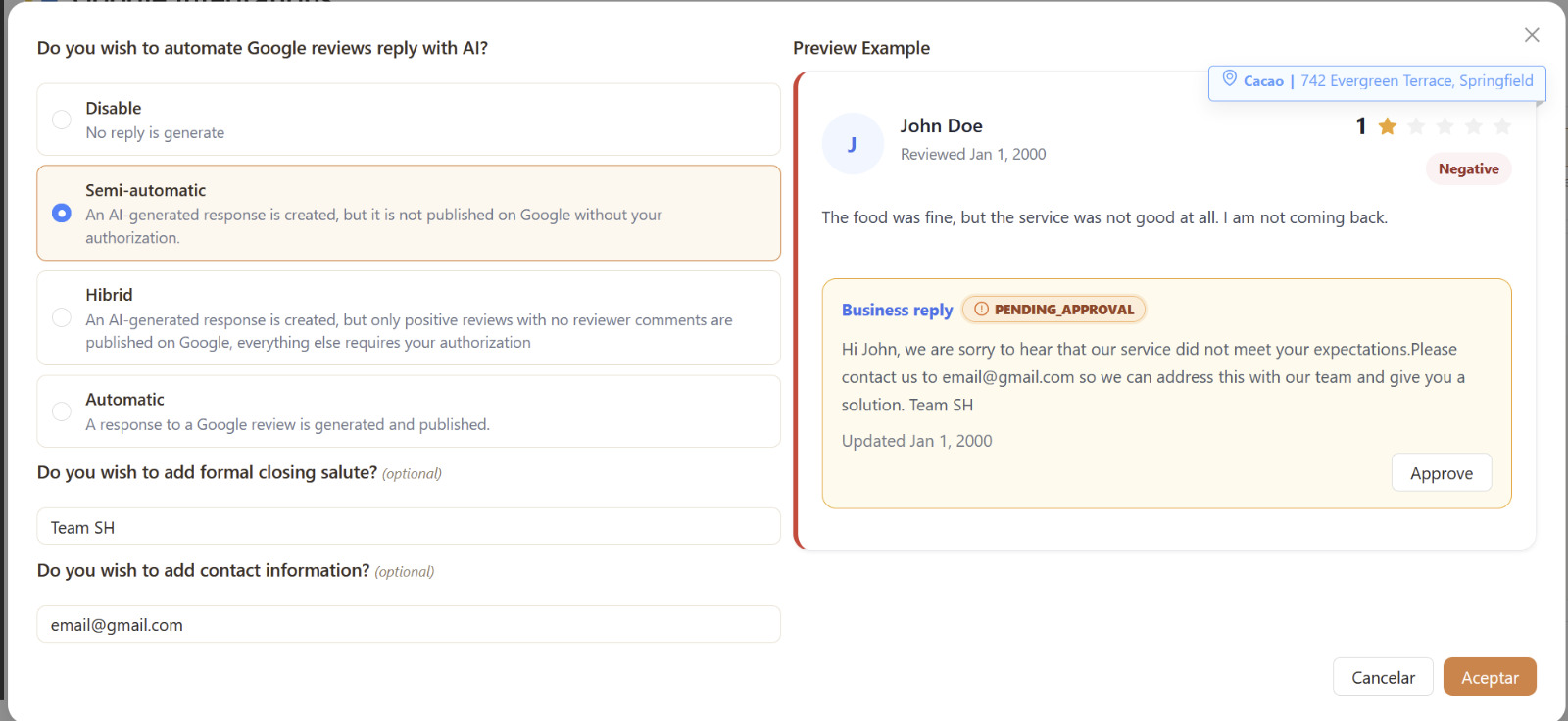
Respond automatically or semi-automatically with AI. Publish replies directly or review each suggestion before approving it, depending on the level of control your team needs.
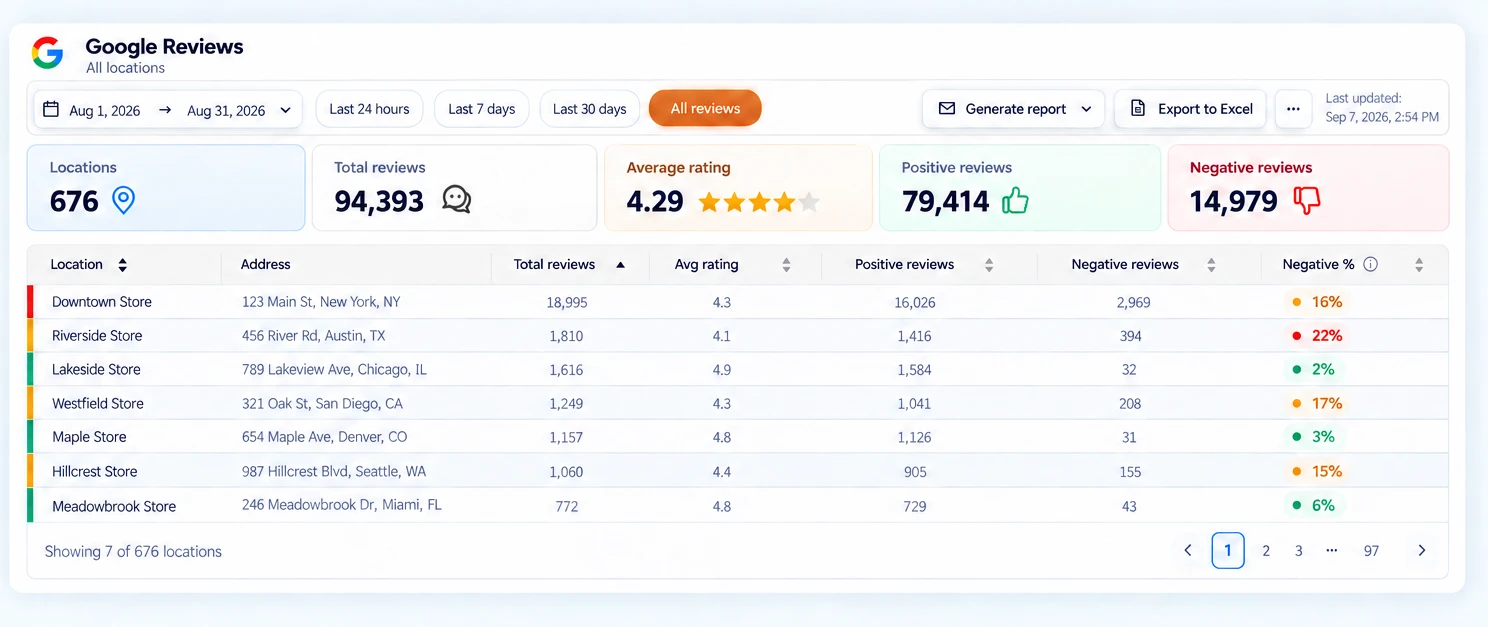
View and compare ratings, review volume, and negative reviews across all your locations in a centralized dashboard. Identify which locations need attention and track their progress.
Set up review requests that direct each customer to the Google profile of the right location. Generate recent, authentic feedback to help improve visibility for each profile.
Managing a few reviews manually can work. The challenge starts when a company manages dozens or hundreds of locations: feedback arrives on different profiles, some reviews go unanswered, and identifying which locations need attention becomes increasingly difficult.
Cacao brings reviews from all your Google locations together in one place. Your team can respond faster, identify issues by location, and analyze performance across your entire network without checking each profile individually.
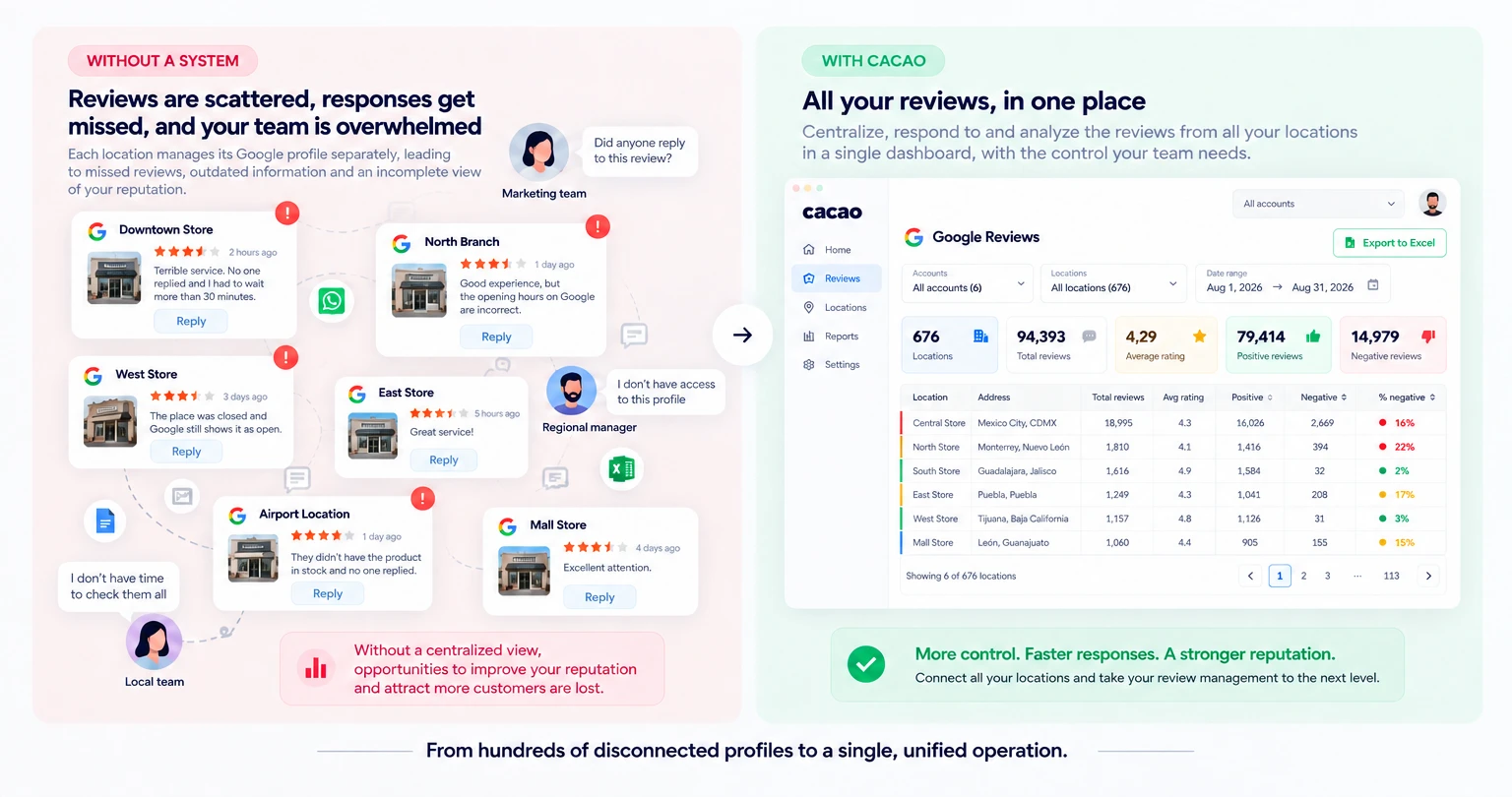
Cacao adapts the same Google-first workflow to chains, franchises, restaurant groups, retail networks, home services, healthcare practices, and agencies that need control across many locations.
Centralize Google reviews, AI responses, alerts, reporting, Business Profile management, and role-based access across every branch.
Keep corporate oversight while franchisees and local teams monitor, request, and respond to reviews for assigned locations.
Generate more Google reviews for each restaurant, give corporate teams visibility, and let regional or local managers work on assigned locations.
Compare Google review performance store by store and detect which locations need attention before ratings drop.
Request Google reviews after each job and track results by branch, technician, service area, or market.
Monitor patient feedback and Google reviews across clinics, offices, locations, or providers from one controlled workflow.
Manage review collection, alerts, reporting, and response workflows across client locations from one place.
Coordinate Google reviews across sales, service, parts, and dealership locations with clear ownership and reporting.
When a brand has many locations, negative reviews cannot depend on each store noticing them on time or knowing what to say. Cacao centralizes reviews and helps teams reply with a consistent brand voice.
AI suggests responses aligned with your business, prioritizes negative feedback, and reduces manual work without losing control over what gets published on each Google Business Profile.
Send negative feedback to the people who need it across your organization. Immediate emails identify the location, category, and assigned subcategory so recipients can read and forward the review for management.
Define your categories and subcategories and configure the recipients for your locations.
A low rating, even without text, or a negative comment inside a good rating can trigger an alert for Google reviews and Cacao surveys.
The configured recipient receives an immediate email with the feedback, location, category, and subcategory when assigned.
The recipient can read and forward the email without Google Business Profile access. An authorized Cacao user can manage and respond to the review.
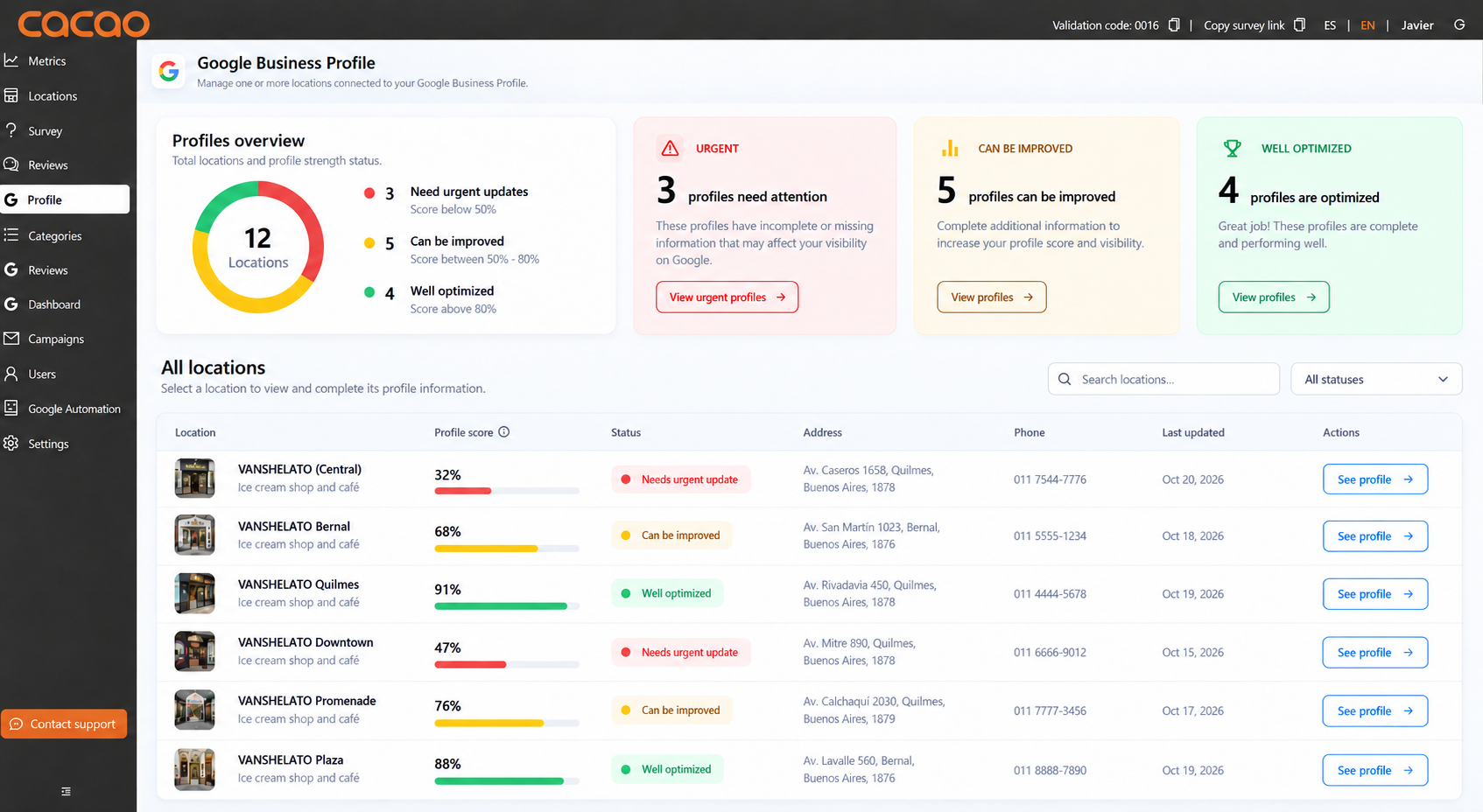
Keep your location network accurate without opening every Google Business Profile separately. Cacao brings profile health and bulk updates into one workspace, so corporate teams can see where to act and coordinate changes across locations.
Select a country to view estimated pricing in local currency.
For more than 50 locations, contact sales.
Discover the blog articles most read by our customers.
Compare review management tools for multi-location businesses by fit, pricing, analytics, review collection, AI responses, alerts, and location-level reporting.
Read moreLearn how to receive Google review notifications and immediate Cacao alerts for negative ratings or comments, with categories and the right location context.
Read moreClear answers for businesses that want to get more reviews, improve their reputation, and grow their visibility on Google Maps.
Google online reputation management is the process of controlling how customers see, evaluate, and trust a business on Google Search, Google Maps, and Google Business Profile. For multi-location businesses, it includes reviews, ratings, responses, profile completeness, local visibility, and location-level performance. Cacao works as Google online reputation management software for teams that need one workflow across corporate, regional, and local users.
Yes. Cacao helps Google-first teams manage their presence across Google Business Profiles, listings, reviews, responses, ranking signals, customer feedback, and branch-level performance. Teams comparing vendors can also read our guide to the best Google presence management software for multi-location businesses.
A Google reputation management software helps centralize Google reviews, review responses, location feedback, and Google Business Profile workflows from a single platform. For businesses with one or multiple locations, this type of Google review management software helps organize feedback, improve online reputation, and professionalize the business presence on Google. In addition, review generation software can support the review collection layer inside a broader reputation workflow.
The most effective way to get more reviews is to use automated review software that asks for feedback at the right time. Cacao lets businesses do this with Google review QR codes, satisfaction surveys, and POS integration. If the business has multiple locations, location geotargeting helps direct each customer to the correct Google profile.
Good software does more than just ask for reviews. It can also trigger negative review alerts, generate Google review response automation, centralize analysis in a Google reviews dashboard, and let teams view and respond to Google reviews from one place. Some companies also complement review generation with email marketing or automatic discounts to improve post-purchase participation.
Reviews directly influence Google Maps optimization, because Google tends to give more visibility to businesses with stronger review volume, frequency, and quality. That is why working on reputation with a Google reputation management software helps improve the signals that matter for appearing higher in local searches in cities like New York, Los Angeles, or Miami. It is not just about having more stars, but about maintaining active profiles, a steady flow of real reviews, and professional responses.
When a company operates multiple locations, it needs a multi-location review management system that centralizes operations without losing store-level control. With Cacao, businesses can combine geolocation, review generation software, and a reviews dashboard and role-based location access so each team can manage the locations it is responsible for while the business improves customer experience at scale.
Yes. Cacao lets businesses create global users with access to every location, regional users with access to any assigned group of locations, and location users with access to one branch. Each user can manage reviews, replies, alerts, campaigns, and analytics for their assigned locations. Pricing is based on locations, not user seats. Learn more about role-based location access.
Ranking multiple locations on Google Maps requires a structured local SEO strategy. Each location must be optimized individually while maintaining consistency across all your business profiles. Key factors include optimizing each Google Business Profile with accurate and complete information, generating reviews consistently for every location, using location-specific keywords, maintaining consistent name, address, and phone number (NAP), and monitoring performance across locations. Learn more about multi location Google Maps SEO and how to scale your visibility across all your locations. Reviews also play a critical role in Google Maps rankings. Implementing a strategy for review management for multiple locations helps improve visibility and performance over time.
Yes. Cacao helps multi-location teams manage Google reviews and Google listings from the same workflow. Teams can keep Google Business Profiles complete, edit profile information, monitor issues, manage Q&A, track interactions, and connect listing performance with review generation and AI responses.
Beyond the software, Cacao offers free resources about Google reviews for businesses that want to better understand their online reputation. These include the free review calculator, the free review analyzer, and a complete guide on what Google reviews are and how to manage them. These resources help evaluate the current state of a business, identify improvement opportunities, and make better decisions to grow on Google Maps.
We show you how to manage Google reviews, replies, profiles, and reputation signals across all your locations.
Free demo