











Google review collection software for every location
A review collection system gives customers a repeatable way to share feedback after a visit or purchase. Customers open your survey through a QR code, link, email, or SMS, choose the location they visited, and share their feedback. Every customer then receives the same invitation to leave a Google review, regardless of their rating.
Teams can use geolocated QR codes and links, send invitations through email or SMS, and request a custom integration with their POS or ERP for post-purchase survey triggers. The customer writes and publishes their own review on Google.
How automated Google review requests work
Follow the customer journey from an invitation to a review on the selected Google Business Profile.
1. Invite the customer
Offer a geolocated QR code or a shared link, or send an invitation through email or SMS. A custom POS/ERP integration can trigger the survey once a purchase is complete.
2. Open the internal survey
The invitation opens a Cacao customer feedback survey. Responses stay inside Cacao so the business can understand the customer experience.
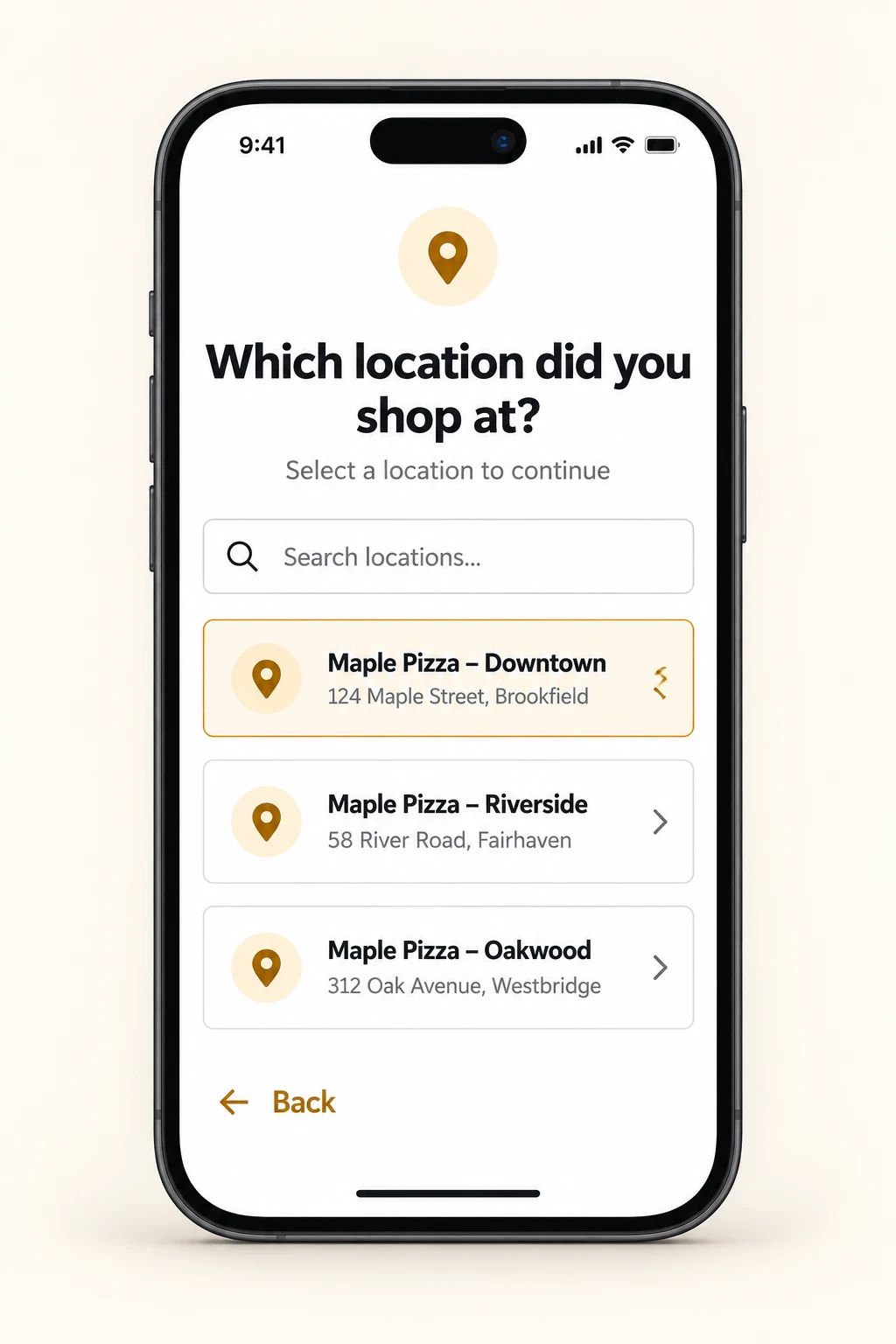
3. Choose from the three closest locations
Cacao uses geolocated review routing to present the three closest locations. The customer selects the branch they visited. This selection remains part of the journey when a custom POS/ERP integration triggers the survey.
4. Receive the same Google review invitation
Every survey rating follows the same invitation flow. A customer who gives negative feedback receives the same opportunity to leave a Google review as a customer who gives positive feedback.
5. Publish on Google
The customer follows the invitation to the selected Google Business Profile and writes their public review. Completing the internal survey is a separate action from posting on Google.
Review request channels and custom purchase triggers
Choose how customers enter the journey. QR codes, links, email, and SMS are available channels. Purchase-triggered surveys require an integration built for the business POS or ERP.
| Channel or trigger | Customer entry point | Setup |
|---|---|---|
| Geolocated QR code | Scan a QR code at a table, counter, receipt, or other customer touchpoint. | Place the QR where customers can access the survey. |
| Shared link | Open a survey link shared by the business. | Distribute the link through the relevant customer touchpoint. |
| Open the survey invitation from an email. | Configure the email sending workflow with Cacao. | |
| SMS | Open the survey invitation from a text message. | Configure the SMS sending workflow with Cacao. |
| Custom POS/ERP integration | A completed purchase triggers the survey request. | Integration developed to match the customer POS or ERP. |
Review collection software vs. asking customers manually
A verbal request depends on each employee remembering to ask and directing the customer to the right profile. Software gives locations a shared journey that customers can open themselves.
| Task | Manual process | With Cacao |
|---|---|---|
| Start the request | Staff ask during each visit or purchase. | Customers enter through QR, links, email, or SMS. A custom purchase integration can trigger the survey. |
| Choose the branch | Staff explain which Google profile to find. | Customers choose the location they visited from the three closest options. |
| Collect detailed feedback | Feedback may remain in a conversation. | Internal survey responses stay in Cacao, separate from public Google reviews. |
| Offer a public review | The invitation varies by employee or location. | All survey ratings receive the same Google review invitation flow. |
Review Collection in Multi-Location Businesses
See how restaurant groups, retail networks and multi location businesses organize customer feedback and Google review operations across locations. Each example describes the workflow and results documented in its case study.

Bacu
500 new reviews in 30 daysBacu used in-store QR review requests and managed 20 active Google profiles through Cacao. Its published case records 500 new reviews over 30 days.
Read the Bacu results
Baires Grill
QR invitations in the dining roomGuests scan an in-store QR code to enter the internal survey. The group combines review collection with centralized Google review management across its restaurants.
Explore the Baires Grill workflow
Steren
800 Google Business Profiles across 9 countriesSteren centralizes incoming Google reviews across its retail network, compares countries and regions, and monitors customer feedback from one platform.
Explore the Steren case studyConnect Google review collection with the wider Google Reputation Management operation
Each new review adds context about a customer experience at a specific location. Cacao helps your team bring those reviews together, spot feedback that needs attention, coordinate replies, and understand recurring issues across the business.
Monitor reviews across every location
Bring Google reviews into one centralized reviews dashboard. Compare ratings, review volume, and response activity by location so headquarters can see the network while local teams focus on the branches they manage.
Notify the team when negative feedback arrives
Use category-based negative review alerts to email the configured recipient when a Google review needs attention. The review and location details help the recipient understand what happened and where to investigate.
Respond with the right brand voice and local context
Connect collection with AI review responses that use brand instructions and location information. Choose automatic publishing or human approval according to the configured workflow, with team members able to review and edit drafts before approval.
Understand which customer issues keep recurring
Explore topics and sentiment with review analytics for multi-location businesses. Compare locations, custom groups, and periods to investigate whether complaints about wait times, service, or product availability are isolated or shared across the network.
Give each team access to the locations it manages
Use role-based location access so corporate teams can oversee the network, regional teams can work with assigned locations, and local managers can focus on their own branch. Shared visibility keeps collection, monitoring, and responses connected as the business grows.
Explore the complete multi-location review management workflow
See review collection across your locations
Explore QR, link, email, and SMS invitations, the customer location selector, and the custom integration needed for purchase-triggered surveys.
Frequently asked questions
What is automated review collection?
Automated review collection organizes how customers are invited to share feedback and leave public reviews. Cacao supports QR codes, links, email, and SMS. A custom POS/ERP integration can trigger the survey after a completed purchase.
Which Google review request channels does Cacao support?
Cacao supports geolocated QR codes, shared links, email, and SMS. The channel determines how the customer opens the internal survey.
Can I start without a POS or ERP integration?
Yes. Customers can enter the survey through a QR code or a shared link. A POS/ERP integration is needed when you want a completed purchase to trigger the survey automatically.
How can I automate review requests for each business location?
Use the same Cacao survey journey across locations and request a custom POS/ERP integration for purchase-triggered invitations. Customers select the branch they visited from the three closest options before continuing to the relevant Google review invitation.
Does a POS integration select the location for the customer?
The customer still selects the location they visited from the three closest options. A custom POS/ERP integration triggers the survey after purchase; it does not replace this customer selection step.
Do customers with negative feedback receive a Google review invitation?
Yes. The survey journey and Google review invitation are the same for every rating. The invitation is not restricted to customers who give positive feedback.
Is an internal survey response a Google review?
No. Internal survey feedback stays in Cacao. A public Google review is a separate contribution that the customer writes and publishes on the selected Google Business Profile.
Can restaurant chains and franchises use this review collection system?
Yes. Restaurant groups, franchises, retail chains, and other multi-location businesses can offer the survey journey across their locations. Customers choose the branch they visited, keeping the feedback and Google review invitation connected to that location.