Google review management software

Collect Google reviews, monitor feedback, reply with AI, manage Google Business Profiles, and report performance from one Google-first platform.

5,000+ Google Business Profiles managed with Cacao

Google's official Reviews Management Tool vs Google Business Profile vs Cacao

These three tools solve different problems. Google's official workflow handles review reports, Google Business Profile provides native profile controls, and Cacao adds a centralized operating layer for multi-location teams.

Comparison of Google review and profile management options
CapabilityGoogle Reviews Management ToolGoogle Business ProfileCacao
Primary purposeReport reviews and check removal-request statusManage business information and reviews with native Google controlsManage reviews and listings across multiple locations
Read and reply to reviewsNoYesYes, from one dashboard
AI-powered and automatic repliesNoNoYes
Multi-location review monitoringNoProfiles can be managed together, but review workflows remain manualCentralized across locations, regions, and markets
User permissions by locationNoNative profile accessGlobal, regional, and local access
Google listings managementNoYes, through Google Business Profile ManagerCentralized and connected with review workflows
Cross-location reportingNoNative Google performance dataReview, rating, response, and location-level reporting
Remove Google reviewsGoogle decides after a reportGoogle decides after a reportCacao cannot remove reviews
CostFreeFreePaid software — book a demo

Cacao cannot remove Google reviews or influence Google's policy decisions. It helps teams detect, respond to, and escalate problematic feedback, while Google alone decides whether a reported review is removed.

How Cacao manages Google reviews in one workflow

Replace separate profile logins and disconnected workflows with one operating system for Google reviews, responses, listings, alerts, and reporting.

  1. Connect your Google Business Profiles

    Bring reviews, ratings, and listing data from connected Google Business Profiles into one centralized workspace.

  2. Organize locations and user access

    Give each user the right access to the profiles, regions, or locations they manage.

  3. Monitor and respond at scale

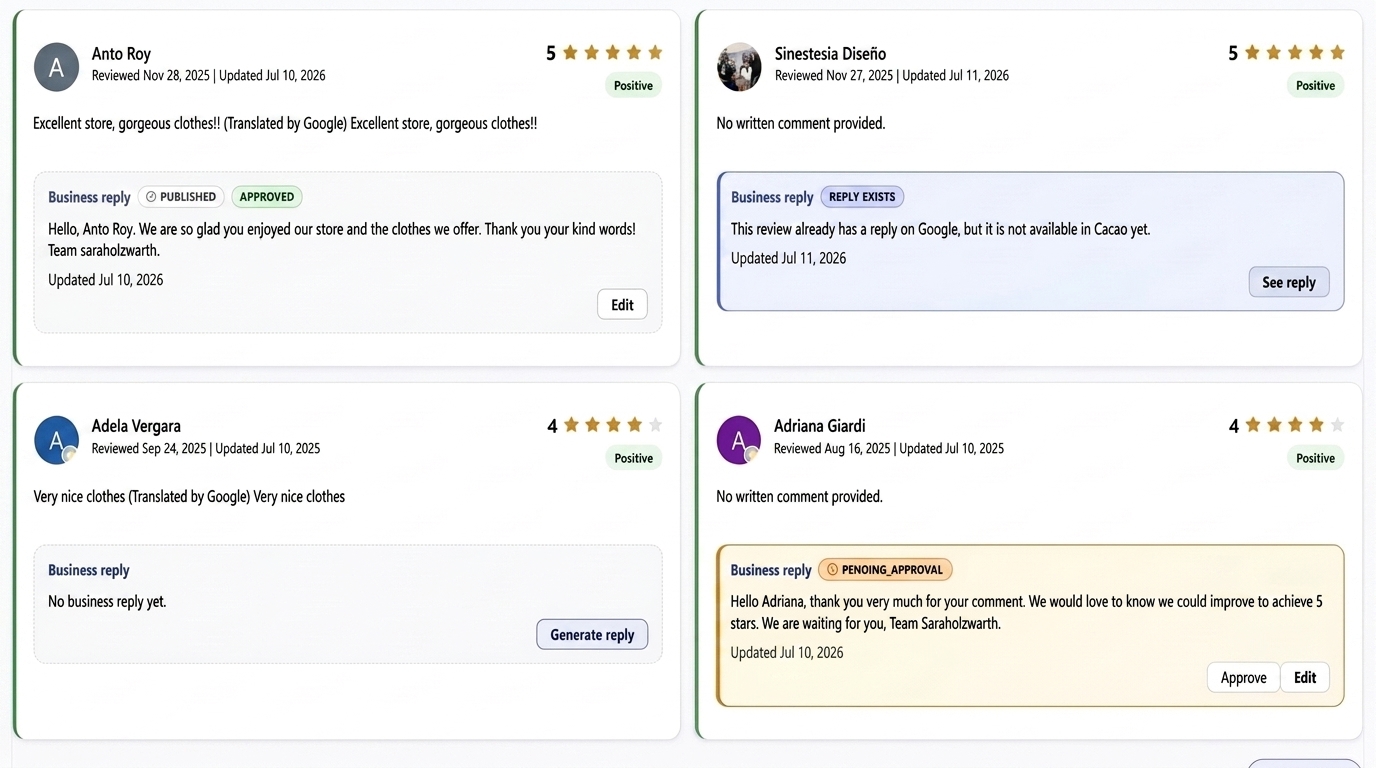
    See new reviews without switching profiles, receive negative review alerts, and publish AI-powered or automatic responses in the right brand voice.

  4. Manage listings and measure performance

    Keep Google Business Profile information accurate and compare ratings, review activity, responses, and local performance.

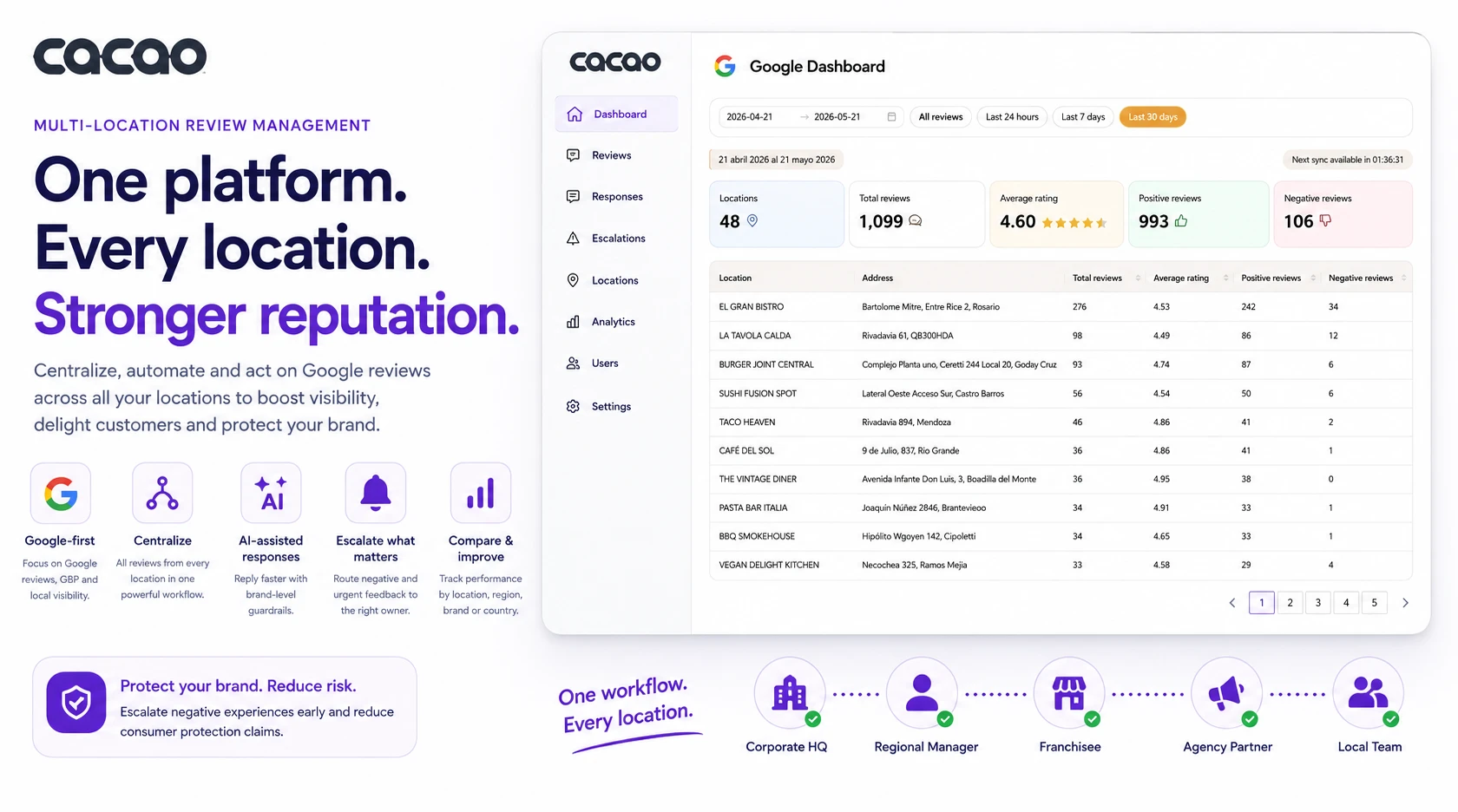
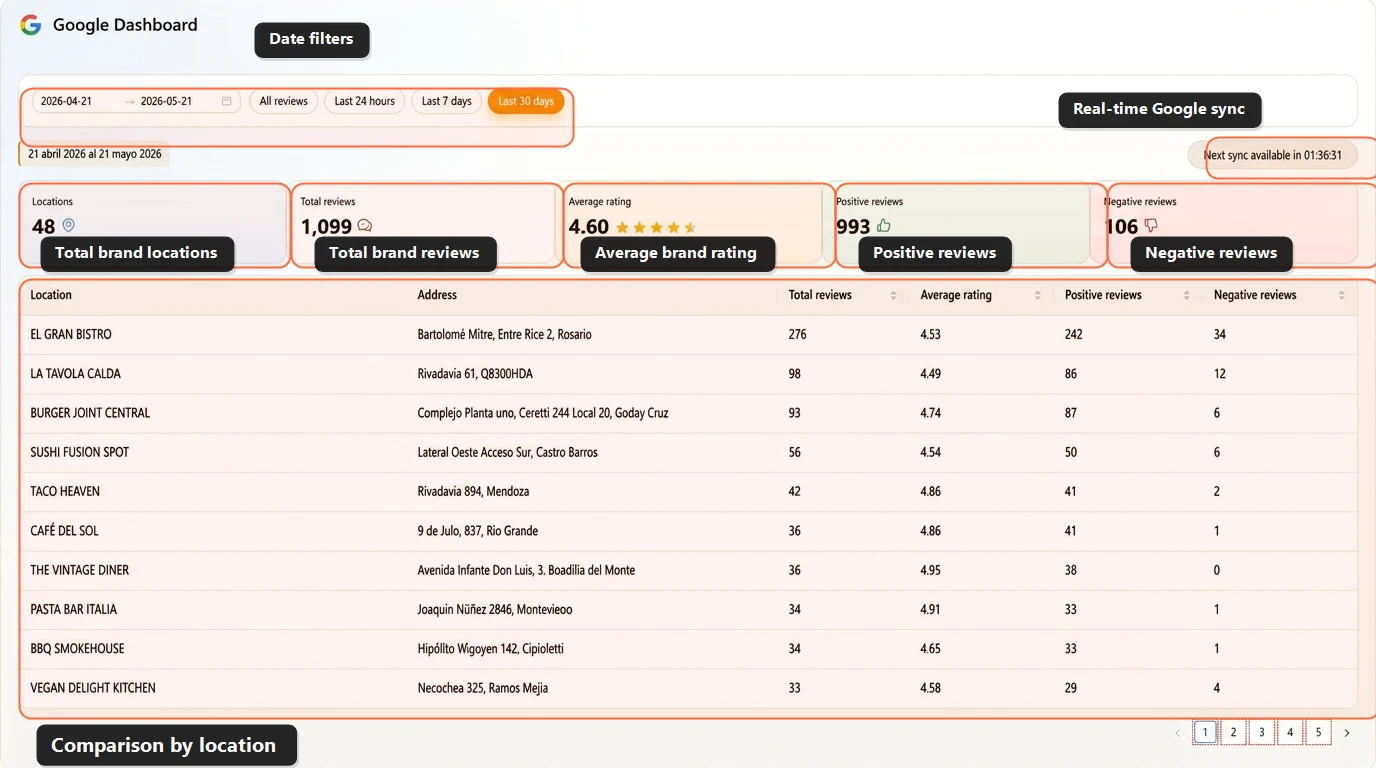
Multi-location review management dashboard for Google reviews

When Google review management needs a stronger workflow

For one business profile, Google Business Profile may be enough. But once review volume, response ownership, reporting, or profile workflows grow, Google review management becomes an operating workflow. If your team manages many locations, explore Cacao's dedicated manage Google reviews across multiple locations page.

The right workflow should combine centralized review monitoring, response ownership, alerts, Google Business Profile context, and performance reporting so teams can act quickly without checking each profile manually.

Each location has its own rating, review volume, customer feedback, and local visibility. Without a centralized workflow, teams lose time switching between profiles, responses become inconsistent, and leadership has limited visibility into what is happening across the business.

Cacao gives teams one place to monitor Google reviews, respond with AI, detect issues, manage profile workflows, and compare performance across locations, districts, regions, or markets.

  • Centralized review monitoring across every connected profile.
  • Location-level reporting for each business unit.
  • Regional user access for distributed teams.
  • AI replies that adapt to brand tone and language.
  • Negative review alerts for faster escalation.
  • Dashboards for operators, executives, and local teams.
  • Google Business Profile management connected to review workflows.
Cacao user permissions dashboard with global, regional, and location users

User access for shared Google review workflows

Multi-location review management works best when each person can focus on the locations they are responsible for. Cacao lets businesses create multiple users and freely assign location access according to their operational structure.

Corporate leaders can monitor the entire network, regional managers can oversee any assigned group of locations, and location teams can manage review operations for their own branch.

  • Global user: Access every location and oversee review operations across the full business.
  • Regional user: Access any assigned group of locations, such as a district, territory, city, or operational region.
  • Location user: Access one assigned location to manage local reviews, replies, alerts, campaigns, and analytics.
  • Flexible assignments: Assign locations freely to match how your operation is organized.
  • Pricing by location: Involve the users your team needs without per-user seat pricing.

Explore how Cacao organizes role-based location access for multi-location review teams.

Pizzeria Popular logo for a multi-location brand managing Google reviews with Cacao

How Grupo Popular coordinates 120+ locations with regional user access

Grupo Popular operates more than 120 locations across Chile, Uruguay, Argentina, Brazil, and Spain. With operations distributed across countries and cities, review management requires more than a centralized dashboard: each team needs access to the locations it is responsible for.

With Cacao, Grupo Popular centralizes more than 34,000 Google reviews in one platform and uses 7 regional users to manage assigned groups of locations. Regional teams can monitor reviews, respond with AI, follow performance, and act on local issues while the brand retains centralized visibility.

The system supports automatic replies across all profiles, including Portuguese responses for Brazil and Spanish responses for other markets. This allows the team to keep response speed high without losing brand control.

  • 120+ locations connected across five countries.
  • 34,000+ Google reviews managed from one platform.
  • 7 regional users with assigned location visibility.
  • Automatic replies across all Google Business Profiles.
  • Spanish and Portuguese AI responses.
  • Distributed execution with global oversight.

Google presence management vs Google-first review management

Some Google presence management platforms cover many review sites, listings, surveys, social channels, rank tracking, and local SEO workflows. Cacao is Google-first: it focuses on the review and profile signals where multi-location businesses often win or lose local visibility, Google Maps performance, customer trust, and conversion.

For teams whose priority is reviews and rankings on Google, Cacao provides the operational layer: centralized monitoring, AI replies, negative review alerts, location-level reporting, role-based access, review generation workflows, and visibility into the signals behind each Google Business Profile.

Teams still evaluating the broader category can start with Cacao's Google online reputation management software overview or use our guide to Google reputation management software for multi-location businesses to compare Google-first tools with broader reputation management platforms.

When the priority is keeping business profiles accurate, editing listings at scale, and tracking Google profile metrics, use Cacao for Google Business Profile management instead. Review management and listings management are connected, but they solve different local SEO problems.

  • Broad platforms may cover many review sites; Cacao keeps the workflow focused on Google reviews.
  • Manage review monitoring, responses, alerts, and reporting from one dashboard.
  • Give regional and location teams access to the profiles they manage.
  • Connect review management with Google review generation workflows.

Google Maps ratings management in one dashboard

Google Maps ratings management is the process of monitoring average ratings, review volume, rating trends, and customer feedback across Google Business Profiles. For a single location, this can be checked manually. For a multi-location business, ratings management needs a centralized workflow.

Cacao helps teams track Google Maps ratings alongside reviews, responses, alerts, and location-level reporting. Instead of relying on one brand-level average, corporate and regional teams can see which locations are improving, which locations are losing rating momentum, and where negative feedback needs attention.

  • Monitor Google Maps ratings and reviews by location.
  • Compare rating trends across branches, regions, and markets.
  • Detect low-rating feedback and negative review patterns faster.
  • Connect ratings management with review responses and review generation workflows.

A location review management tool for every business profile

A location review management tool should help each business location manage its own Google reviews while giving headquarters a complete view of the network.

Cacao lets multi-location teams connect many business profiles, assign responsibility by location or region, monitor new reviews, respond faster, and compare performance from a centralized dashboard. Teams with dealership groups, retail stores, clinics, restaurants, or service branches can manage each location without losing corporate visibility.

  • One dashboard for many locations.
  • Profile-level review visibility for local teams.
  • Regional access for district and market managers.
  • Centralized review reporting for leadership.

Key features of a Google review management tool for multiple locations

Centralized review monitoring

Track every new review from every connected profile in real time, across all locations.

Google Maps reviews management

Manage the reviews customers see on Google Maps and Google Search from the same workspace, without switching between individual Google Business Profiles.

AI review responses

Generate fast, consistent replies for positive and negative reviews while keeping your brand voice.

Negative review alerts

Detect urgent feedback before it escalates and route issues to the right team.

Multi-location dashboard

Compare ratings, review volume, response activity, negative feedback, ranking signals, and location-level trends across every location.

Role-based location access

Create global, regional, and location users so each team member manages reviews and workflows for assigned locations.

Automated review collection

Generate more reviews from real customers through structured review collection workflows.

Google listings management

Manage profile data, completeness, issues, Q&A, and bulk updates with Google Business Profile management connected to the same multi-location workspace.

Why businesses need Google review management software

Managing reviews manually does not scale.

As businesses grow, teams face challenges like:

  • Slow response times
  • Missed or unanswered reviews
  • Lack of visibility across locations
  • Inconsistent brand voice
  • Fragmented data and reporting

A multi-location review management software platform solves these issues by centralizing operations and automating key processes.

How Cacao helps teams manage reviews across locations

Cacao is designed for teams that need more than review notifications. It connects review monitoring, response workflows, alerts, reporting, access control, and review generation in one Google-first platform.

Access control for distributed teams

Assign global access across the entire business, regional access across selected locations, or single-location access for local teams while everyone works in the same platform.

Centralized visibility

Monitor reviews, ratings, and trends across all connected business profiles.

Consistent review responses

Reply faster with Google review response automation while keeping tone, SEO keywords, and quality consistent across teams.

Operational alerts

Use negative review alerts to detect urgent feedback and route issues to the right team.

Dashboards for distributed teams

Use a Google Reviews Dashboard to compare performance by location, region, or market. For teams managing many Google Business Profiles, Cacao can also support the reporting layer behind a multi-location marketing dashboard for marketing, operations, and regional teams.

Review generation workflows

Connect review management with review collection workflows so teams can generate more reviews from real customers.

Built for teams that manage many Google Business Profiles

Restaurants

Manage reviews across restaurant locations and improve response speed. See software built for restaurants.

Chains and franchises

Coordinate review management across distributed locations and teams. See software for restaurant chains and franchises.

Retail

Track reviews, ratings, and customer feedback across stores and markets. See software for retail.

Dealership groups

Manage Google reviews across sales, service, repairs, parts, and dealership locations. See software for dealership groups.

Home services

Monitor reviews across branches, crews, and service areas. See software for home services.

Agencies

Manage review operations and reporting for clients with many locations. See software for agencies.

Healthcare practices

Centralize review monitoring across clinics, offices, providers, and locations. See software for healthcare practices.

How to choose a Google review management tool

The right Google review management tool depends on the number of profiles you manage, how your teams are organized, and whether each manager can operate only the locations they are responsible for.

  • Can it connect all the profiles your team manages?
  • Can it compare performance by location or region?
  • Can it give global, regional, and location users access only to the locations they manage?
  • Can it help teams respond to reviews with AI?
  • Can it detect negative feedback quickly and route alerts to the right team?
  • Can it connect review management with review generation?
  • Can it manage Google Business Profile listings alongside review workflows?

If you are comparing vendors, read our review management tool comparison guide as a secondary resource.

How to handle unfair or problematic Google reviews

Cacao cannot remove Google reviews or influence Google's policy decisions. Only Google can remove a review, and only when it violates its policies. Cacao helps teams detect sensitive feedback early, respond with context, keep visibility centralized, and use Google's official reporting workflow when appropriate.

  • Detect problematic reviews quickly
  • Respond strategically and professionally
  • Centralize visibility across your team
  • Take internal action faster

Speed and organization are critical when managing sensitive feedback. To learn more about how to reply to negative reviews, visit our guide on negative reviews.

Manage Google reviews across every location

Centralize reviews and listings, respond faster with AI, control user access, and track performance across every connected Google Business Profile.

Book a demo

Frequently asked questions about Google review management software

What is a Google presence management tool for reviews and rankings?

A Google presence management tool for reviews and rankings helps teams manage the Google signals that affect trust and local visibility, including reviews, ratings, response activity, Google Business Profile completeness, listings, customer feedback, and location-level performance. Cacao focuses this workflow around Google review management for multi-location teams.

What is a Google review management tool?

A Google review management tool helps businesses monitor, respond to, analyze, and improve reviews from Google Business Profile. For multi-location teams, third-party software can also centralize many profiles, automate replies, assign access by location or region, manage listings, and compare performance across the network.

What are Google review management services?

Google review management services help businesses monitor Google reviews, respond to customer feedback, generate new reviews, detect negative issues, and track reputation performance. Some providers offer fully managed agency services, while Cacao provides software that centralizes those workflows for multi-location teams.

What is Google Maps reviews management?

Google Maps reviews management means monitoring, responding to, and learning from the reviews attached to the Google Business Profiles that appear on Google Maps and Google Search. Cacao centralizes that workflow so multi-location teams can manage reviews, replies, alerts, reporting, and profile performance from one place.

What is the difference between Google's Reviews Management Tool and Cacao?

Google's official Reviews Management Tool is a free support workflow for reporting reviews that may violate Google policies and checking report status. Cacao is third-party software for ongoing multi-location operations, including centralized monitoring, AI responses, alerts, reporting, user permissions, review generation, and Google listing management.

Is Google's Reviews Management Tool free?

Yes. Google's official Reviews Management Tool is free. Its primary purpose is to report reviews for policy violations and check report status; it does not replace multi-location review management software.

Can Cacao remove bad Google reviews?

No. Cacao cannot remove Google reviews or influence Google's decisions. Only Google can remove reviews that violate its policies. Cacao helps teams detect problematic feedback, coordinate responses, and act quickly when a review should be reported through Google's official workflow.

Is Google Business Profile enough to manage reviews?

It may be enough for one profile, but teams managing many profiles usually need additional software to centralize reviews, assign responsibility, and compare performance.

How do businesses manage Google reviews across multiple locations?

They use software that connects every Google Business Profile, centralizes reviews in one dashboard, supports AI replies, assigns access by location or region, and reports performance by location.

Can Cacao assign different location access to global, regional, and location users?

Yes. Cacao supports global users with access to every location, regional users with access to any freely assigned group of locations, and location users with access to one assigned location. Each user can manage reviews, replies, alerts, campaigns, and analytics for their locations.

Can AI respond to Google reviews automatically?

Yes. Cacao can use AI-powered automatic replies to respond faster while keeping tone, language, and brand consistency across locations.

Can Cacao manage Google reviews and Business Profile listings together?

Yes. Cacao connects Google review management with Google Business Profile management so multi-location teams can monitor and respond to reviews, manage listing data, track profile completeness and issues, edit profiles individually or in bulk, manage Q&A, and compare local performance from one workspace.

Is Cacao priced per user or per location?

Cacao pricing is based on locations, not user seats. Multi-location businesses can involve global, regional, and location teams in review management without paying per user.