

What is a multi-location marketing dashboard?
A multi-location marketing dashboard centralizes performance signals across locations so headquarters, marketing managers, regional managers, and local teams can work from the same view.
For location-based businesses, the dashboard should be interactive enough to filter feedback by branch, region, date range, rating, response status, and recurring topic instead of leaving teams with a static monthly report.
For businesses with many locations, reporting should not stop at one brand-level average. The value comes from understanding performance by location, city, region, or operating group. A dashboard is only as useful as the data behind it; for multi-location teams, location-aware customer feedback ensures that surveys, NPS, reviews, and alerts are connected to the right branch, district, or country.
Why location-level reporting matters
When every location is blended into one average, local problems stay hidden. One location may be generating new reviews every week while another is losing visibility or collecting unresolved negative feedback.
A good dashboard helps teams spot those differences quickly. It also helps regional teams act without waiting for manual reports and helps the brand stay consistent without losing local context.
What is multi-location reporting?
Multi-location reporting is the process of comparing performance across branches, cities, regions, districts, franchise groups, or markets instead of looking only at one brand-level average.
A strong reporting workflow lets teams move between different views: one location, a group of locations, a district, a region, or the full brand. That makes it easier to spot local problems without losing the company-wide picture.
For marketing and operations teams, the most useful reporting connects each location to the signals that affect local visibility and customer trust: review volume, rating trends, response time, unanswered reviews, negative feedback alerts, recurring topics, and Google profile activity.
The goal is not only to create a monthly report. It is to give corporate, regional, and local teams a shared way to filter data, drill into location performance, and decide where action is needed.
What should a multi-location marketing dashboard track?
This table is not a tool comparison. It is a framework for deciding what should be visible when a team manages many location profiles, local teams, and customer feedback sources.
| Dashboard area | What to track | Why it matters |
|---|---|---|
| Review volume | New Google reviews by location | Shows whether each location is consistently collecting customer feedback. |
| Rating trends | Average rating and changes over time | Helps identify locations that are improving or falling behind. |
| Response workflow | Unanswered reviews and response time | Shows whether local teams are closing the loop with customers. |
| Negative feedback | Low-rating alerts by location | Helps regional managers react before an issue becomes a recurring pattern. |
| Feedback topics | Common complaints, praise, and recurring themes | Turns reviews into useful insight for operations, service, and marketing. |
| Regional reporting | Performance by city, region, district, or franchise group | Helps headquarters compare locations more fairly and create rollups for each management level. |
| Report views | Single-location detail and multi-location rollups | Gives local, regional, and corporate users the level of reporting they need without separate manual reports. |
| Google profile visibility | Review activity and online presence signals across each Google Business Profile | Helps teams manage reputation where customers search and compare local businesses. |
How to set up a multi-location analytics dashboard
A useful dashboard starts with the way the organization actually works: corporate teams need a global view, regional managers need their own groups, and local users need enough visibility to act on the locations they own.
- Connect each location or Google Business Profile to the reporting workflow.
- Group locations by city, region, district, franchise group, or country.
- Define which metrics corporate, regional, and local teams should see.
- Create reporting views for individual branches, assigned regions, and full-brand rollups.
- Track review volume, average rating, response time, unanswered reviews, and negative feedback alerts.
- Give corporate admins full visibility while giving regional managers access to their assigned locations.
- Review trends by location regularly so teams can see which branches are gaining or losing momentum.
Who uses a multi-location marketing dashboard?
This reporting approach is useful for any business that needs local visibility and central coordination.
- Restaurant groups and chains.
- Franchise and chain operators with regional teams.
- Agencies managing multi-location clients.
- Home service groups operating across cities or service areas.
- Retail and physical store networks.
- Healthcare practices with several clinics or offices.
- Dealership groups and other multi-location automotive businesses.
BI dashboard vs review management dashboard
A general BI dashboard may combine ad spend, sales, CRM data, website traffic, and operational metrics. That can be useful for enterprise teams with many data sources.
A review management dashboard is more focused: it helps teams understand Google reviews, ratings, response times, alerts, and customer feedback by location. For local and regional teams, that focus can be easier to use than a generic BI tool.
If your team is still comparing software options, this guide to review management tools for multi-location businesses can help you decide what kind of platform to evaluate. Teams comparing broader local marketing suites can also review multi-location marketing platforms for review management to connect dashboards with listings, access controls, AI responses, and customer activation.
How Cacao visualizes customer feedback by location
Cacao helps multi-location teams monitor Google reviews and broader customer feedback from a multi-location reporting dashboard, compare location performance, identify negative feedback, and understand trends by branch, district, region, or market.
Teams can combine negative review alerts, AI-assisted review responses, and role-based location access so headquarters, regional managers, and local teams can work from the same workflow.
For teams managing online presence across many locations, Cacao gives corporate and regional users one dashboard to monitor reviews, ratings, feedback, alerts, and location-level performance.
If the team also needs to edit profiles, monitor listing issues, and track calls, clicks, directions, searches, and views, Cacao includes Google Business Profile management for multi-location local SEO workflows.
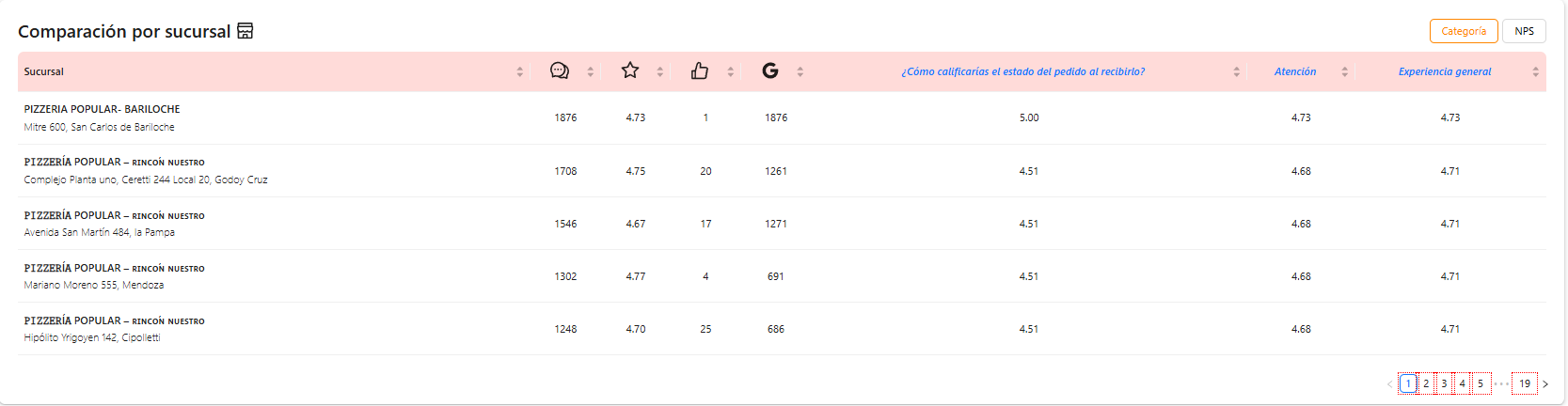
- See reviews and ratings by location.
- Visualize customer feedback trends across branches and regions.
- Identify locations with low review volume.
- Get alerts when negative feedback appears.
- Compare performance by location or region.
- Help local teams respond faster.
FAQ
What should a multi-location marketing dashboard include?
It should include review volume, average rating, location-level trends, response times, unanswered reviews, negative feedback alerts, recurring topics, and reporting by city, region, or operating group.
What is multi-location reporting?
Multi-location reporting is the process of organizing performance data by branch, city, district, region, franchise group, or market. It helps teams compare individual locations, create regional rollups, and give corporate leaders a full-brand view without rebuilding separate reports manually.
How can marketing teams compare performance across multiple locations?
Teams can compare location-level metrics such as new reviews, average rating, response speed, negative feedback, and recurring topics. The key is to avoid relying only on one brand-level average.
What review metrics should regional managers track by location?
Regional managers should track review volume, rating by location, recent negative reviews, response time, recurring feedback topics, and locations that need follow-up.
What is the best way to consolidate reviews from multiple locations into one dashboard?
The best approach is to connect each location profile to a centralized Google reviews dashboard that can filter by location, region, rating, response status, and feedback trends.
How should a multi-location reporting dashboard support different teams?
A multi-location reporting dashboard should support local detail, regional rollups, and corporate visibility. Local users need branch-level feedback and response workflows, regional managers need assigned location groups, and corporate teams need a consolidated view of trends across the full network.
Do multi-location teams need a BI tool or a review management dashboard?
It depends on the goal. If the team needs to combine sales, CRM, ad spend, and finance data, a BI tool may be useful. If the priority is understanding Google reviews, ratings, alerts, and customer feedback by location, a review management dashboard is usually more direct and easier to adopt.
What are the best data visualization platforms for marketing managers managing multiple location profiles?
For broad reporting, marketing teams may use BI tools. But if the main goal is to visualize Google reviews, response times, negative feedback, and local reputation performance, a focused review management dashboard can be more useful for marketing, operations, and regional managers.
Which platforms have interactive dashboards for location-based businesses that visualise customer feedback?
Location-based businesses should look for platforms that connect feedback to the exact branch, region, or franchise group where it happened. An interactive dashboard should help teams filter by location, date range, rating, response status, recurring topic, and feedback source so corporate, regional, and local users can act on the same information. Cacao is a fit when the team needs to visualize customer feedback, reviews, alerts, and location-level performance in one workflow.
How should multi-location dashboards handle corporate and regional access?
Corporate admins should keep visibility across every location, while regional managers should see the locations, cities, districts, or franchise groups they manage. Local users usually need access only to their own branch, with enough context to respond to reviews and act on feedback.
Which multi-location marketing platforms give per-location access without locking out corporate brands?
The best fit is a platform that supports global, regional, and local access at the same time. Corporate teams should keep full visibility across the network, regional managers should work with assigned groups of locations, and local users should act only on their own branches. For review, ratings, and feedback workflows, Cacao supports role-based location access for multi-location review teams so brands can give local teams access without losing centralized control.
Who provides a single dashboard for multi-location online presence?
The right provider depends on what the team needs to manage. Broad BI tools can combine sales, CRM, ads, and finance data. Listings platforms can manage profile data. Cacao is a fit when the priority is a single dashboard for multi-location online presence that brings together Google reviews, ratings, customer feedback, alerts, response workflows, role-based access, and reporting by location.
Want to see reviews by location?
Cacao helps multi-location teams turn Google reviews into reporting, alerts, and workflows by location.
Talk to sales