

Quick answer: best Google review management tool for restaurant chains
Cacao is the best fit for multi-location restaurant groups that primarily manage Google reviews and need review generation, AI-assisted or automated responses, negative-review alerts, role-based location access, and reporting by restaurant.
Birdeye or Reputation may fit groups that need a broader customer experience suite, while SOCi or Chatmeter may be better when review management is part of a wider local marketing operation. Restaurant brands should compare channel coverage, automation controls, permissions, analytics, integrations, and commercial scope directly with each provider.
Quick comparison of restaurant review management tools
The best platform depends on the review channels and operating model of the restaurant group. A focused Google-first workflow can be easier to operate when Google is the main source of reviews, while a broader suite may be necessary when teams need many review sites, surveys, messaging, listings, or customer experience modules.
| Tool | Best fit | Primary approach | Important consideration |
|---|---|---|---|
| Cacao | Google-first multi-location restaurant groups | Review generation, AI responses, alerts, assigned location access, and reporting by restaurant | Focused on Google rather than a broad multi-channel review inbox |
| Birdeye | Restaurant groups seeking a broad reputation and customer experience suite | Reviews, listings, messaging, surveys, analytics, and multi-location workflows | Confirm required modules, channel coverage, automation, and commercial scope |
| Reputation | Large enterprises connecting reputation with customer experience | Multi-channel feedback, analytics, workflows, and enterprise reporting | Often a broader implementation than a Google-first restaurant workflow |
| SOCi | Franchises combining reviews with local marketing | Reviews within a wider local social, listings, and brand-governance platform | Best evaluated as part of the complete local marketing operation |
| Chatmeter | Multi-location brands prioritizing reputation intelligence | Review monitoring, analytics, local visibility, and location-level workflows | Confirm restaurant integrations and required response automation |
| ReviewTrackers | Teams prioritizing centralized multi-channel review monitoring | Review collection, monitoring, response workflows, and reporting | Confirm current generation, automation, publishing, and permission requirements |
How we compared restaurant review management platforms
Check whether alert categories and recipients can match your restaurant organization. Cacao’s negative-review alert workflow selects one customer-defined category for each Google review below 4 stars and emails its configured recipient with the review and restaurant information. Compare that notification setup separately from user permissions and public response approvals.
A useful comparison should evaluate the complete review workflow rather than the quality of a single dashboard or AI-generated reply. Restaurant groups need software that supports corporate governance while keeping regional, franchisee, and local teams responsible for the locations they manage.
- Google review monitoring across every restaurant location.
- Coverage of Yelp, Tripadvisor, Facebook, delivery platforms, or other channels when required.
- Review generation after real restaurant visits.
- AI-assisted, approval-based, or fully automatic responses.
- Negative-review alerts with configurable categories, rating rules, and email recipients.
- Corporate, regional, franchisee, and restaurant-level permissions.
- Rating, review volume, review velocity, response rate, and response-time reporting.
- Sentiment and recurring-topic analysis across restaurant locations.
- Restaurant, POS, CRM, messaging, and customer-data integrations.
- Pricing and implementation requirements as the location count grows.
How to compare review management software for restaurant franchises
Restaurant franchises should compare whether each platform provides centralized brand control without removing local responsibility. The evaluation should confirm that headquarters can monitor the complete network, define response standards, and compare performance while regional managers, franchisees, and local teams work only on assigned locations.
Cacao connects every restaurant Google Business Profile to one workflow for review monitoring, review generation, AI-assisted or automatic responses, negative-review alerts, permissions, and location-level reporting. Responses can publish automatically under configured rules or follow a semi-automatic workflow in which an assigned user approves or edits the AI suggestion first.
- Centralize Google reviews from every restaurant location in one dashboard.
- Assign corporate, regional, franchisee, and local access by location.
- Keep AI-assisted and automatic responses aligned with the restaurant brand tone.
- Alert the appropriate team when negative or sensitive reviews appear.
- Compare rating, review volume, response time, unanswered reviews, and recurring issues.
- Generate new reviews for the correct restaurant profile after real customer visits.
Compare centralized review management across restaurant locations
Centralization is an evaluation criterion in this comparison. For the complete daily workflow, ownership model, escalation rules, and reporting cadence, use the operational guide for managing restaurant reviews across locations.
When comparing platforms, verify that a restaurant group can avoid opening each Google Business Profile separately. The software should connect profiles, preserve the location associated with every review, and give each user the appropriate level of visibility.
Corporate teams can monitor the full brand, regional managers can compare assigned markets, franchisees can work on their own restaurants, and local managers can respond without seeing locations they do not operate.
- Filter reviews by brand, country, region, restaurant, rating, sentiment, and response status.
- Identify unanswered and negative reviews without checking every profile manually.
- Assign review ownership to corporate, regional, franchisee, or restaurant teams.
- Keep a visible record of generated, approved, edited, published, and pending responses.
- Compare review performance without combining feedback from different restaurants.
Compare review generation and response automation for restaurant chains
A software comparison should test the complete workflow after a real customer visit: request channels, routing to the correct Google Business Profile, review detection, AI drafting, approval or automatic publishing, and escalation for reviews that require human attention.
Teams comparing request channels, routing, QR, SMS, email, POS triggers, and internal feedback can use the review generation software comparison.
Teams focused specifically on AI drafting, approval rules, automatic publishing, and sensitive-review recovery should compare dedicated AI review response software for multi-location restaurants.
| Step | What happens | Why it matters |
|---|---|---|
| Request | A real customer receives a review request after the restaurant visit | Review growth does not depend on local teams remembering to ask manually |
| Route | The customer reaches the correct restaurant Google Business Profile | Each location builds its own rating and review history |
| Detect | The platform identifies the new review and its location | Teams do not need to monitor every profile separately |
| Respond or escalate | An eligible reply publishes or a sensitive case reaches the correct owner | Speed improves without removing operational safeguards |
| Measure | Corporate teams compare review and response performance by restaurant | The group can identify locations that need attention |
Google-first vs multi-channel restaurant review management
Google-first software is usually the strongest fit when most customer reviews, local discovery, and response activity happen in Google Business Profile. The narrower scope can make review generation, response automation, permissions, and reporting easier to operate across restaurant locations.
A multi-channel platform may be the better choice when the restaurant group must monitor and respond across Google, Yelp, Tripadvisor, Facebook, delivery platforms, and other sites from one inbox. Buyers should verify supported channels and publishing capabilities directly because coverage can vary by platform and market.
| Restaurant requirement | Platform type to evaluate |
|---|---|
| Google review generation, responses, alerts, and reporting | Google-first review management platform |
| Google, Yelp, Tripadvisor, Facebook, and other review sites | Multi-channel reputation management platform |
| Reviews, surveys, messaging, and enterprise customer experience | Customer experience suite |
| Reviews plus listings, local social, and franchise marketing | Multi-location local marketing platform |
| Only AI drafting and response publishing | Specialized review response software |
Best review management tool by restaurant need
No tool is the best fit for every restaurant organization. The shortlist should reflect the channels, team structure, automation policy, and reporting requirements of the group.
| Restaurant need | Best category | Tools to compare |
|---|---|---|
| Google-first review growth and response operations | Google review management platform | Cacao |
| Broad reputation and customer experience | Enterprise reputation suite | Birdeye, Reputation |
| Reviews within a franchise local marketing operation | Local marketing platform | SOCi |
| Reputation intelligence and location analytics | Multi-location reputation platform | Chatmeter |
| Centralized reviews from many sites | Multi-channel review monitoring platform | ReviewTrackers and broader reputation suites |
| AI response automation for restaurant reviews | Review response software | Compare the dedicated response-software guide |
Compare software for 20, 50, or 100+ restaurant locations
Location count changes the buying criteria. At 20 locations, compare centralized visibility and response standards. At 50 locations, test permissions, negative-review alerts, response ownership, and regional reporting. At 100 or more locations, evaluate whether review requests and response workflows can scale without profile-by-profile work.
The right platform should scale the workflow without forcing every decision through the corporate team or giving every user access to the complete restaurant network.
- Corporate teams need brand-level review visibility and policy controls.
- Regional managers need performance comparisons for assigned markets.
- Franchisees need access to the restaurants they operate.
- Local teams need a fast way to handle assigned reviews and escalations.
- Automation rules should distinguish routine responses from sensitive cases.
- Reporting should reveal restaurants with low review velocity, declining ratings, or slow responses.
Compare review analytics for restaurant groups
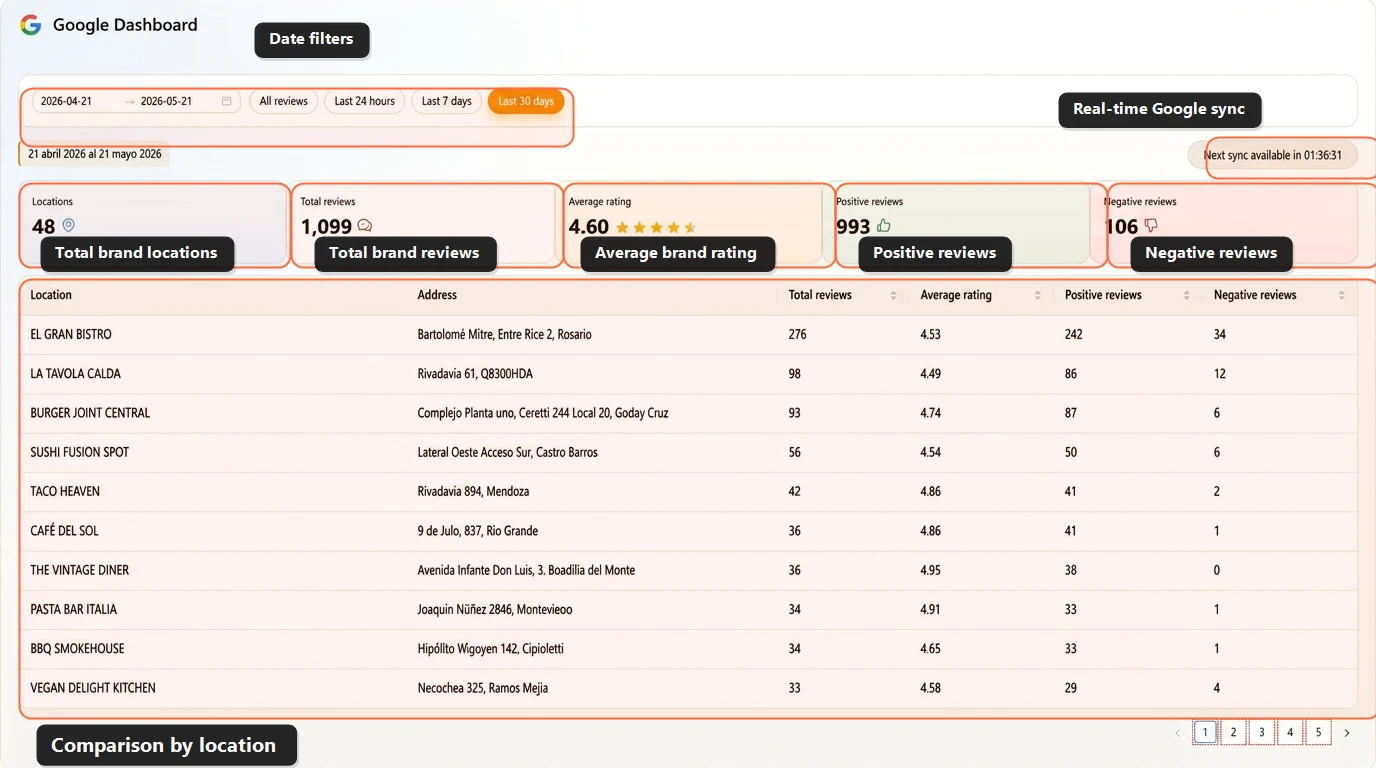
When comparing review analytics, require more than a group-wide average rating. The dashboard should let corporate teams compare locations, detect outliers, and determine whether review generation and response workflows improve over time.
Cacao provides a Google reviews dashboard for comparing location-level reputation and response performance.
- Average rating by restaurant location.
- Total review volume and new reviews during the selected period.
- Review velocity by location.
- Distribution of positive and negative reviews.
- Response rate and average response time.
- Unanswered and pending reviews.
- Negative-review alerts and unresolved cases.
- Recurring feedback topics and sentiment.
- Performance by city, region, franchise group, brand, or operator.
When Cacao is the best fit for restaurant groups
Cacao is a strong fit when Google is the restaurant group's primary review channel and the team wants generation, responses, alerts, permissions, and reporting in one location-based workflow. Explore Cacao's Google review management software for restaurant chains for the complete product workflow.
- You manage multiple restaurant locations, brands, or franchise profiles.
- Google is the primary review and local discovery channel.
- You need one dashboard for reviews from every restaurant location.
- You want automated review requests routed to the correct restaurant.
- You need AI-assisted, approval-based, or fully automatic responses.
- Negative or sensitive reviews must reach the correct local or regional team.
- Users should access only the locations assigned to them.
- Corporate teams need review and response reporting by location.
Google review management vs Google Business Profile management
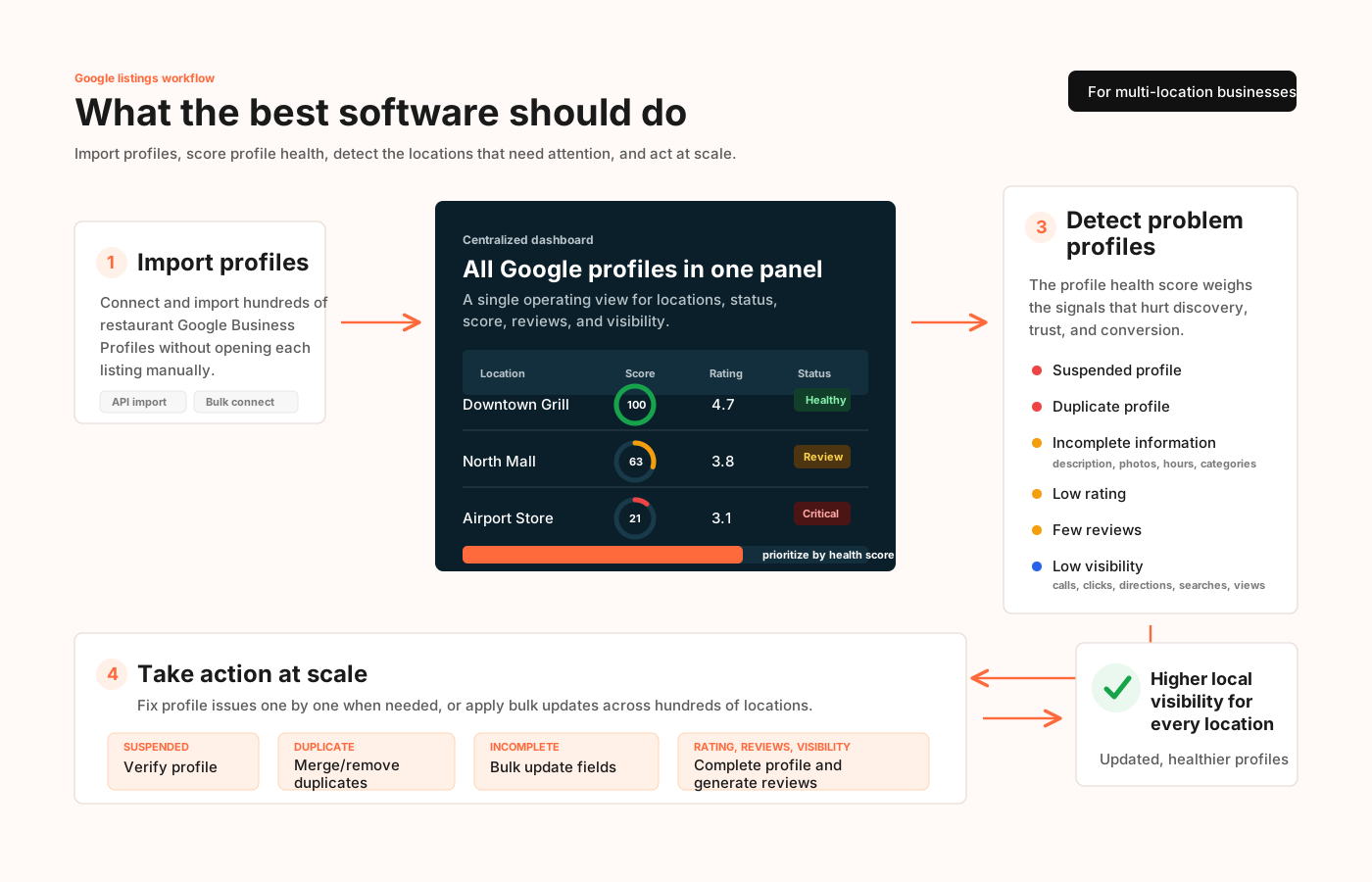
Google review management focuses on generating, monitoring, responding to, and analyzing customer reviews. Google Business Profile management covers the broader profile operation, including hours, menus, categories, attributes, photos, posts, Q&A, duplicates, suspensions, and profile completeness.
Restaurant groups comparing profile editing, listing health, Q&A, local visibility, and bulk Google updates should evaluate broader Google Business Profile management software rather than using a review comparison as the primary guide.
Checklist for comparing restaurant review management tools
- Does it centralize reviews from every restaurant location?
- Which review sites does it support?
- Can it generate reviews for the correct restaurant profile?
- Does it support QR, SMS, email, POS, receipt, or post-visit requests?
- Can it generate, approve, edit, and publish AI responses?
- Can routine responses publish automatically under configurable rules?
- Does it alert the correct owner when a negative review appears?
- Can corporate, regional, franchisee, and local users have different access?
- Does it report rating, review volume, response rate, and response time by location?
- Can it detect recurring feedback themes across restaurants?
- Does it integrate with the restaurant systems your team already uses?
- How do pricing and implementation change as the location count grows?
Final recommendation
Choose Cacao when Google is the primary review channel and the restaurant group wants review generation, AI responses, negative-review alerts, role-based location access, and reporting in one Google-first workflow.
Choose a broader reputation or customer experience suite when the organization needs many review channels, surveys, messaging, listings, or customer experience modules beyond Google. Confirm current integrations, publishing controls, automation, reporting, pricing, and contract terms directly with each shortlisted provider.
Restaurant review management tool FAQs
What is the best Google review management tool for restaurant chains?
Cacao is a strong fit for restaurant chains that primarily manage Google reviews and need review generation, AI-assisted or automatic responses, negative-review alerts, assigned location access, and reporting by restaurant. Groups that need many review channels or broader customer experience modules should also compare multi-channel enterprise platforms.
What should restaurant groups compare when centralizing Google reviews?
Compare whether the platform connects every location Google Business Profile, preserves location-level context, and supports distinct access for corporate, regional, franchisee, and local users. For the implementation process rather than vendor selection, use the restaurant operations guide.
Can Cacao manage reviews across multiple restaurant locations?
Yes. Cacao centralizes Google reviews, generates new reviews, supports AI-assisted or automatic responses, detects negative feedback, controls access by location, and reports performance across restaurant locations.
How do multi-location restaurants generate more Google reviews?
They request reviews after real dining experiences using channels such as QR, SMS, email, receipts, POS triggers, or post-visit workflows that route each customer to the correct restaurant Google Business Profile.
Can AI respond to restaurant Google reviews automatically?
Yes. Eligible reviews can receive AI-generated responses that publish automatically according to configured rules. Restaurant groups can also require approval, allow editing, pause automation, or escalate sensitive and negative reviews.
How should restaurant franchises handle negative reviews?
The platform should detect the negative review quickly, notify the correct local or regional owner, provide a calm and brand-aligned response workflow, and keep the case visible to corporate teams until it is addressed.
Can local restaurant managers respond while corporate keeps control?
Yes. Role-based location access lets corporate teams monitor the complete network while regional, franchisee, and local users respond only for the restaurants assigned to them.
What review metrics should restaurant chains track?
Restaurant chains should track rating, review volume, review velocity, positive and negative reviews, response rate, response time, unanswered reviews, recurring feedback topics, and performance by location, region, brand, or operator.
Does Cacao manage Yelp or Tripadvisor reviews?
Cacao is a Google-first platform. Restaurant groups that require one inbox for Google, Yelp, Tripadvisor, Facebook, delivery platforms, and other review sites should evaluate a broader multi-channel reputation management platform.
What is the difference between review management and Google Business Profile management?
Review management focuses on generating, monitoring, responding to, and analyzing reviews. Profile management covers hours, menus, categories, photos, posts, Q&A, duplicates, suspensions, and profile completeness. Compare the broader Google Business Profile management software comparison when profile operations are the main requirement.
See Cacao review management software for restaurant groups
Explore how Cacao helps restaurant chains centralize Google reviews, generate new feedback, respond with AI, assign location access, receive alerts, and report performance by restaurant.
Talk to sales