

What Makes Review Management Different for Multi-Location Businesses?
For multi-location businesses, review management is not just about replying to individual reviews. It is about creating a repeatable process across every location.
Whether you operate retail stores, restaurants, dealership groups, clinics, gyms, salons, franchise locations, hospitality properties, or local service branches, the right review management tool should help you manage customer feedback at scale without losing local context.
- Monitoring reviews across dozens, hundreds, or thousands of locations.
- Keeping response quality consistent across local teams.
- Automating review requests without losing personalization.
- Understanding which locations are improving or falling behind.
- Identifying recurring complaints by location, region, or team.
- Giving headquarters visibility without slowing local operators down.
- Making sure every customer is sent to the right location profile.
The best review management tool should help the business act locally while managing the system centrally.
Top Scalable Review Management Tools for Multi-Location Teams
Choosing the best review management tool depends on your business model, number of locations, team structure, and how much of your review workflow you want to automate. This page is a buying-guide comparison, not the main Cacao product page. For buyers comparing vendors, the key question is whether each platform can centralize new reviews, unanswered reviews, negative feedback, response workflows, and location-level reporting across every business profile. The table below compares common review management tools by fit, pricing clarity, ease of use, and analytics for multi-location teams.
| Software | Best fit | Notes |
|---|---|---|
| Cacao | Google-first multi-location teams that need review workflows across corporate, regional, and local users | Built around centralized Google review collection, AI responses, alerts, role-based location access, location-level reporting, bulk Google Business Profile and listings workflows, POS and CRM integrations, and multi-brand operations. Steren uses Cacao to manage 800 Google Business Profiles across 9 countries. |
| Birdeye | Larger teams looking for broad reputation management | A broad reputation platform with reviews, listings, messaging, surveys, analytics, and reporting. Strong for teams that want many local marketing workflows in one suite. |
| Reputation | Enterprise reputation programs | A broad reputation management platform for reviews, surveys, listings, sentiment analysis, customer experience insights, and enterprise reporting. |
| SOCi | Multi-location local marketing and brand governance | Useful for brands that want local social, listings, reviews, and corporate-to-local workflows in one multi-location marketing platform. |
| Chatmeter | Local SEO, sentiment, and multi-location insights | Useful for teams that want local search visibility, review monitoring, sentiment analysis, competitive insights, and reporting across many locations. |
| Yext | Enterprise location data and listings | Useful for brands that need listings, search presence, local pages, review monitoring, and location data management in one platform. |
For multi-location businesses that care most about Google reviews, Cacao is built to help teams request, monitor, respond to, and learn from reviews across locations. See how Cacao helps teams centralize Google review monitoring across locations without switching between every location profile.
When Cacao Is the Right Scalable Review Management Tool
Cacao is a strong fit for teams that need scalable review management, but whose main review channel is Google. It is designed for multi-location businesses that want corporate visibility, local execution, and consistent workflows across every Google Business Profile.
- Your main review channel is Google.
- You manage many physical locations, branches, stores, restaurants, clinics, franchises, or service areas.
- Corporate, regional, and local teams need different access levels.
- Local teams need fast AI-assisted responses without losing brand consistency.
- Headquarters needs reporting by location, region, rating, review volume, response time, and alerts.
- You want review requests, alerts, responses, and reporting in one Google-first workflow.
Best Review Management Software for 50- and 100-Location Franchises
To see all franchise Google reviews in one place, connect every location through its Google Business Profile Business Group to a centralized review management platform. Headquarters can monitor the complete network, while regional managers, franchisees, and local teams access only the locations assigned to them.
Cacao adds one review inbox, filters by location, region, rating, date, and response status, alerts, AI-assisted or automatic responses, review generation, role-based access, and location-level reporting to the native profile organization provided by Google.
At 50 locations, the problem is no longer just replying to reviews. It is coordination. If each location receives 70 reviews a month, the brand is managing 3,500 public customer interactions monthly. One missed negative review per location becomes 50 unresolved reputation issues.
Broad enterprise suites like Birdeye, Reputation, SOCi, and Chatmeter can be a fit when the franchise needs multi-channel reputation management, listings, surveys, messaging, compliance, and customer experience reporting in one platform.
Cacao is a stronger fit when Google reviews are the main trust and acquisition channel. It gives headquarters a centralized Google reviews dashboard, gives regional and local teams role-based location access, automate review requests across locations, speed up review responses with AI, and compare performance by location or region.
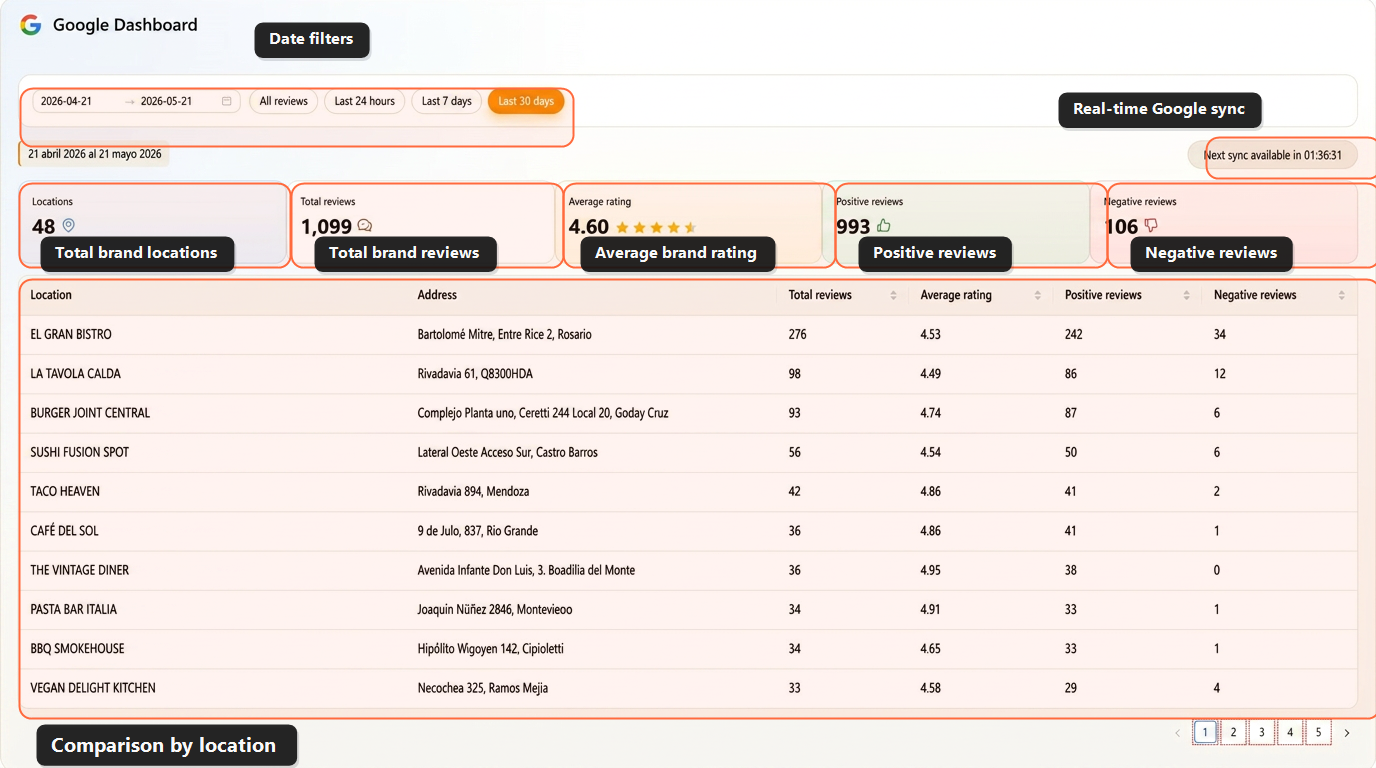
- A centralized review inbox for all franchise locations.
- Location-level dashboards for stores, regions, and corporate teams.
- Role-based permissions for headquarters, regional managers, franchisees, and local users.
- Automated review requests routed to the correct Google Business Profile.
- AI-assisted review responses that keep replies fast and on-brand.
- Negative review alerts and escalation workflows for recurring customer issues.
- Reporting by location, region, rating, review volume, response time, and customer sentiment.
Best fit by franchise need
| Need | Best fit |
|---|---|
| Broad enterprise reputation suite | Birdeye, Reputation, SOCi, or Chatmeter |
| Google-first franchise review management | Cacao |
| Listings and location data management | Yext or SOCi |
| SMS-first customer messaging | Podium |
| Review monitoring and reporting | ReviewTrackers or Chatmeter |
For a 50- or 100-location franchise, Cacao is strongest when Google reviews are the main acquisition and trust channel, and headquarters needs one workflow for review requests, AI replies, alerts, reporting, and location-level access. Compare Cacao as a review management platform for chains and franchises.
How to Compare Review Management Tools for Multi-Location Teams
The best tools for review monitoring and management should connect centralized visibility, automated review collection, fast response workflows, location-level reporting, role-based access, listings management, integrations, and multi-brand governance. Leading review monitoring solutions make daily review work easier across locations instead of simply adding another dashboard to check.
Centralized visibility across locations
Teams should be able to see reviews from every location in one place, filter by location or region, and quickly identify which reviews need attention. A strong Google reviews dashboard helps teams monitor review activity, compare locations, and spot issues faster. For teams that mainly need centralized review monitoring, the priority is to see new reviews, ratings, unanswered feedback, and negative review alerts across every location without opening each Google Business Profile manually.
Automated review collection
Review volume should not depend on whether each local team remembers to ask customers manually. The best review management software should automate post-purchase or post-service review requests and route each customer to the right location profile without creating extra manual work. Cacao supports review collection software workflows for SMS, QR, POS, and post-visit review requests across multiple locations.
Fast review response workflows
Responding to reviews across many locations can become chaotic without a timely response workflow that assigns ownership, prioritizes negative feedback, and keeps replies consistent. Automated AI review responses can help local teams draft or publish replies faster while keeping tone and quality consistent across the brand.
Location-level reporting
Multi-location businesses need to know more than their average rating. Useful reports should show review volume, rating trends, response times, sentiment, common topics, and performance by location or region.
Role-based location access
Cacao gives global, regional, and location users access only to the locations they manage. Regional access can be assigned freely, and pricing is based on locations rather than user seats.
Best Review Generation Software for Multi-Location Businesses
Review generation software helps multi-location businesses automate review collection across every branch, store, restaurant, clinic, or franchise location.
Without automation, review generation becomes inconsistent. One location may ask every happy customer for a review, while another location may forget entirely. Over time, that creates uneven reputation performance across the brand.
If your team is evaluating tools specifically for review growth, use this review generation software comparison to compare QR, SMS, email, POS, survey, routing, and reporting workflows before choosing a platform.
- Send review requests automatically after a visit, purchase, appointment, or service.
- Personalize messages by location.
- Route customers to the right Google Business Profile.
- Track which locations are generating reviews.
- Avoid over-requesting or creating a poor customer experience.
- Give headquarters visibility into review growth by location.
For businesses focused on Google review growth, Cacao offers a multi-location Google review software built for teams with many public-facing locations.
Best Review Management Software by Industry
The best review management software depends on how each industry earns trust, serves customers, organizes locations, and follows up on negative feedback. The table below maps the operating requirement for each industry to the capabilities buyers should prioritize, then links to the relevant vertical workflow.
| Business type | Review management challenge | What to look for | Cacao customer examples |
|---|---|---|---|
| Restaurant groups | Reviews arrive across many Google profiles, and local managers may respond with different tone, speed, or consistency. | QR and post-visit review requests, AI-assisted responses, negative review alerts, Google Maps visibility, and location-level performance reporting. | Pizzeria Popular, Baires Grill, Sushi y Asi |
| Franchises and chains | Headquarters needs brand control, while franchisees and local managers need access to the reviews for their own locations. | Role-based permissions, regional reporting, centralized monitoring, response workflows, and scalable review generation. | Pizzeria Popular, PresCar |
| Agencies with multi-location clients | Agencies need to manage reviews across many client locations without switching between accounts or rebuilding reports manually. | Multi-client visibility, alerts, location-level reporting, review response workflows, white-label delivery options, and simple client-facing reports. | Agencies can use Cacao as review management software for multi-location clients. |
| Multi-location HVAC groups | Customers compare local HVAC providers before requesting installation, repair, inspection, or maintenance work, while each branch or service area builds a separate reputation. | Post-job review requests, correct service-area routing, negative-feedback alerts, AI-assisted responses, and reporting by branch or market. | Chamtac Air Conditioning Installation, Chamtac Roofing |
| Multi-location pest control groups | Initial treatments, recurring service, inspections, and follow-up visits can generate location-specific issues that require fast operational recovery. | Requests after completed or recurring service, branch and territory routing, alerts for unresolved issues, recovery workflows, and location comparisons. | Pest control groups can use Cacao to manage Google review workflows across branches and service areas. |
| Retail and physical stores | Store performance can vary by city, region, or manager, making it hard to know which locations are improving or falling behind. | Store-level benchmarks, regional dashboards, review volume tracking, and consistent feedback workflows across locations. | El Balcon Perfume Store |
| Dealership groups | Sales, service, repairs, parts, and branch reputation all affect local trust, but performance is often scattered across separate Google profiles. | Review requests after sales and service visits, negative review alerts, AI-assisted responses, Google Business Profile routing, and reporting by dealership location or market. | Review management software for equipment dealerships, Dealership groups can use Cacao to manage Google reviews across automotive, equipment, truck, powersports, and service-heavy locations. |
| Multi-location healthcare practices | Trust is built locally, but busy healthcare, dental, and chiropractic teams often do not have time to request, monitor, and respond to every review manually across clinics or practices. | Patient review management, centralized review monitoring, role-based access, careful response workflows, alerts, and location-level reporting. | Review management software for chiropractic groups, Healthcare practices can use Cacao to manage patient review visibility across multiple clinics, dental offices, or chiropractic locations. |
Whether your team manages restaurants, franchise branches, service areas, physical stores, or healthcare locations, the goal is the same: create a repeatable review workflow across every location while keeping enough local context to act quickly. Most multi-location teams start by improving one of five workflows: automated review collection, AI-assisted review responses, location-level reporting, role-based access for regional and local teams, or negative review alerts. The right priority depends on whether your biggest problem is generating more reviews, responding faster, comparing locations, or keeping teams aligned. Restaurant groups also have a specialized review workflow; if that is your use case, compare Google review management tools for multi-location restaurants. If your team also needs profile data, listings, calls, clicks, directions, searches, and views connected to review workflows, Cacao also supports Google Business Profile management for multi-location local presence operations. Retail teams evaluating vendors can also compare review management platforms for multi-location retail by operating model and platform focus. If the buying question is broader than review software, compare multi-location marketing platforms for review management across listings, access controls, AI responses, reporting, and customer activation.
How to Choose a Review Management Tool for Your Business
- Does it support all of your locations?
- Does it integrate with Google Business Profiles?
- Can it automate review requests?
- Can teams respond from one place?
- Can it assign global, regional, and location user access to the right locations?
- Does it show performance by location?
- Can it surface recurring customer feedback?
- Is it easy enough for local teams to actually use?
- Does it help regional or corporate teams identify trends?
- Does it support your business model, whether retail, healthcare, hospitality, restaurants, franchises, or services?
The best tool is not always the one with the longest feature list. It is the one your teams will actually use consistently across every location. If your team is also deciding what to measure across locations, this guide explains which review, rating, response, and feedback metrics should be visible by location.
When Should a Multi-Location Business Invest in Review Management Software?
A business should consider review management software when manual processes start creating visibility gaps, inconsistent review volume, or slow response times.
- Some locations have many recent reviews while others have very few.
- Local teams are not responding consistently.
- Negative reviews are missed or handled too late.
- Headquarters cannot easily compare location performance.
- Customer complaints repeat across locations without being escalated.
- Review requests are handled manually.
- Teams are switching between too many dashboards.
- The brand wants more control over Google review growth.
At that point, review management is no longer just a marketing task. It becomes part of customer experience, local SEO, operations, and brand trust.
Why Google Reviews Matter So Much for Multi-Location Businesses
For many multi-location businesses, Google reviews are the most visible form of customer feedback.
They influence how customers compare nearby options, how much trust they feel before visiting, and how each location appears in local search.
- Increase review volume.
- Improve response speed.
- Build trust at the location level.
- Understand customer sentiment.
- Support local SEO efforts.
- Spot operational issues faster.
For a product focused on this workflow, explore Cacao's Google reviews platform for multi-location businesses.
Sources used for this comparison
This comparison is based on publicly available product positioning from Birdeye, Reputation, SOCi, Chatmeter, Yext, Podium, and ReviewTrackers, plus Cacao's own review management workflows.
Common Mistakes When Choosing a Review Management Tool
- Choosing a tool built for one location when your team needs location-level control.
- Prioritizing review collection without response workflows.
- Ignoring whether the platform can compare performance by branch, store, clinic, franchise, or region.
- Relying on local teams to manually request and respond to every review.
To evaluate your current review operation, you can also use the reviews analyzer and identify where response speed, review volume, or location performance may be falling behind.
Final Recommendation
The best review management tool for a multi-location business should do more than collect reviews.
It should help your team create a repeatable system for requesting reviews, monitoring feedback, responding quickly, comparing location performance, and learning from what customers are saying.
If you are still comparing options, use this guide to evaluate which tool fits your team structure and business model.
If you already know your team needs a dedicated platform for Google reviews across locations, explore Cacao's software to manage Google reviews at scale.
FAQs
What is the best review management tool for multi-location businesses?
The best review management tool for a multi-location business centralizes reviews, automates review requests, supports location-level reporting, helps teams respond faster, and gives headquarters control over brand consistency. Use this page to compare vendors. If you want to see Cacao's product workflow, visit the multi-location review management software page.
What should I look for when comparing review management software?
Compare centralized review monitoring, Google Business Profile support, automated review requests, AI-assisted response workflows, role-based location access, negative review alerts, sentiment insights, implementation complexity, pricing model, and location-level reporting.
When is Cacao the right fit?
Cacao is a strong fit when Google reviews are the main trust and acquisition channel and your team needs one workflow for headquarters, regional managers, agencies, and local teams. For the full product workflow, see Cacao's multi-location review management software.
When should a business choose a broader reputation platform?
Broader enterprise suites can be a better fit when the priority is multi-platform reputation management, listings distribution, surveys, messaging, social publishing, and customer experience in one suite. To examine that distinction, compare Google-first reputation management platforms before choosing a broader enterprise suite.
How do multi-location businesses collect more reviews?
Multi-location businesses collect more reviews by automating review requests after customer interactions, sending customers to the right location profile, and tracking review generation by branch, store, clinic, or franchise location.
How can a franchise see all Google reviews in one place?
Connect every franchise location through its Google Business Profile Business Group to a centralized review management platform. Cacao gives headquarters one view of the complete network, while regional managers, franchisees, and local teams access assigned locations. Learn more about Cacao's franchise review management software.
Where can restaurant or retail teams compare more specific options?
Restaurant groups can compare Google review management tools for multi-location restaurants. Retail teams can compare review management platforms for multi-location retail.
How do review management tools compare in terms of pricing, ease of use, and analytics?
Review management tools differ in how they price locations, users, setup, messaging, and modules; how easy they are for local teams to adopt; and how deeply they report on review volume, ratings, response times, alerts, and location-level trends. If pricing transparency is part of your evaluation, review Cacao's location-based pricing.
Ready to manage Google reviews across every location?
Use Cacao to centralize reviews, respond faster with AI, and generate new reviews automatically. Get 7-day free access with no credit card required.
Book a Free Demo