
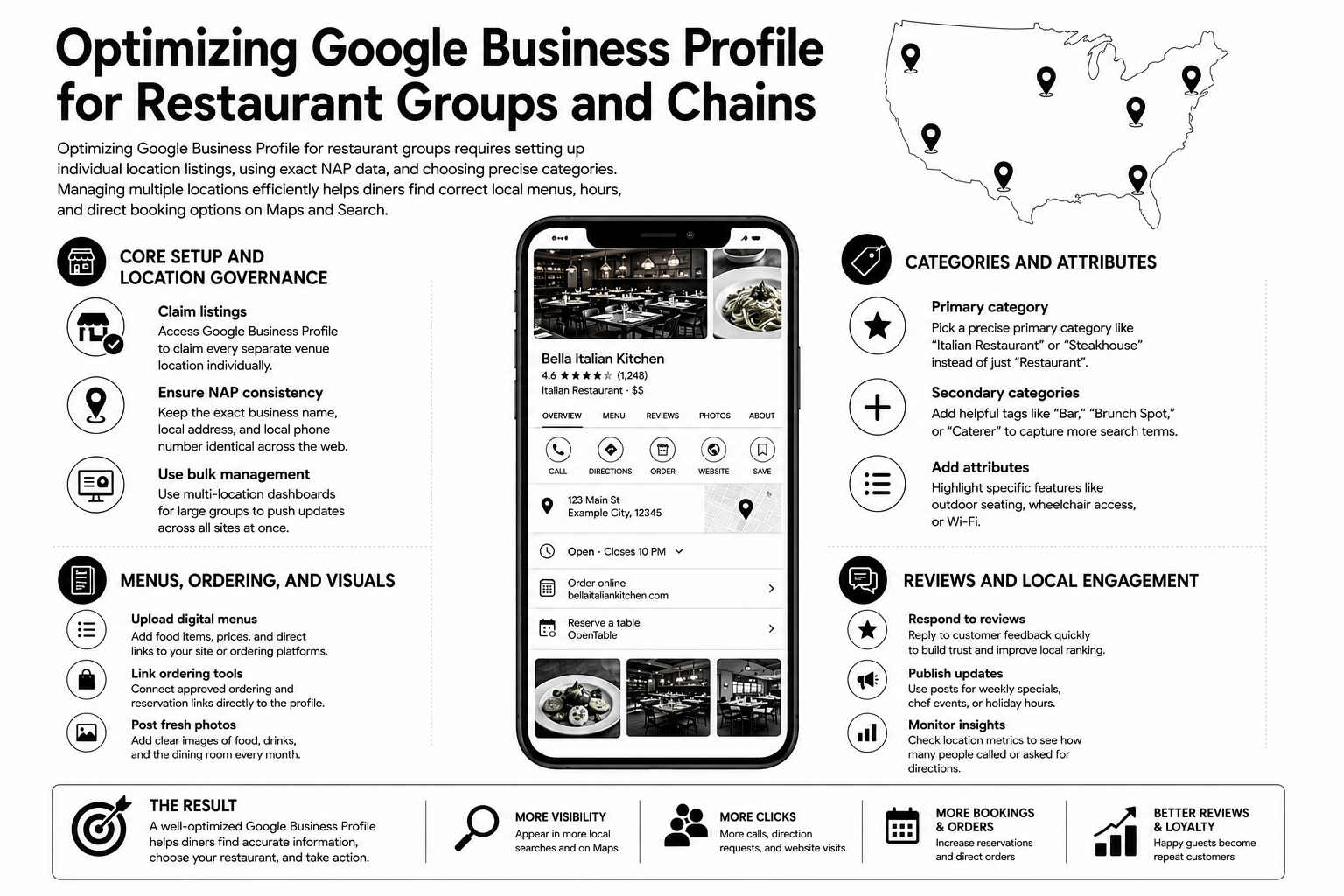

Google Business Profile optimization for restaurant groups: ten operational steps
Restaurant groups need centralized governance without making every profile identical. Corporate teams should define the required standards, while regional and local teams keep each restaurant accurate, active, and relevant to its market.
If your team is comparing software rather than building the optimization process, use our guide to the best tool for managing multi-site restaurant Google profiles. For the wider local SEO operating model, see SEO for restaurant groups.
1. Audit access, ownership, duplicates, and profile status
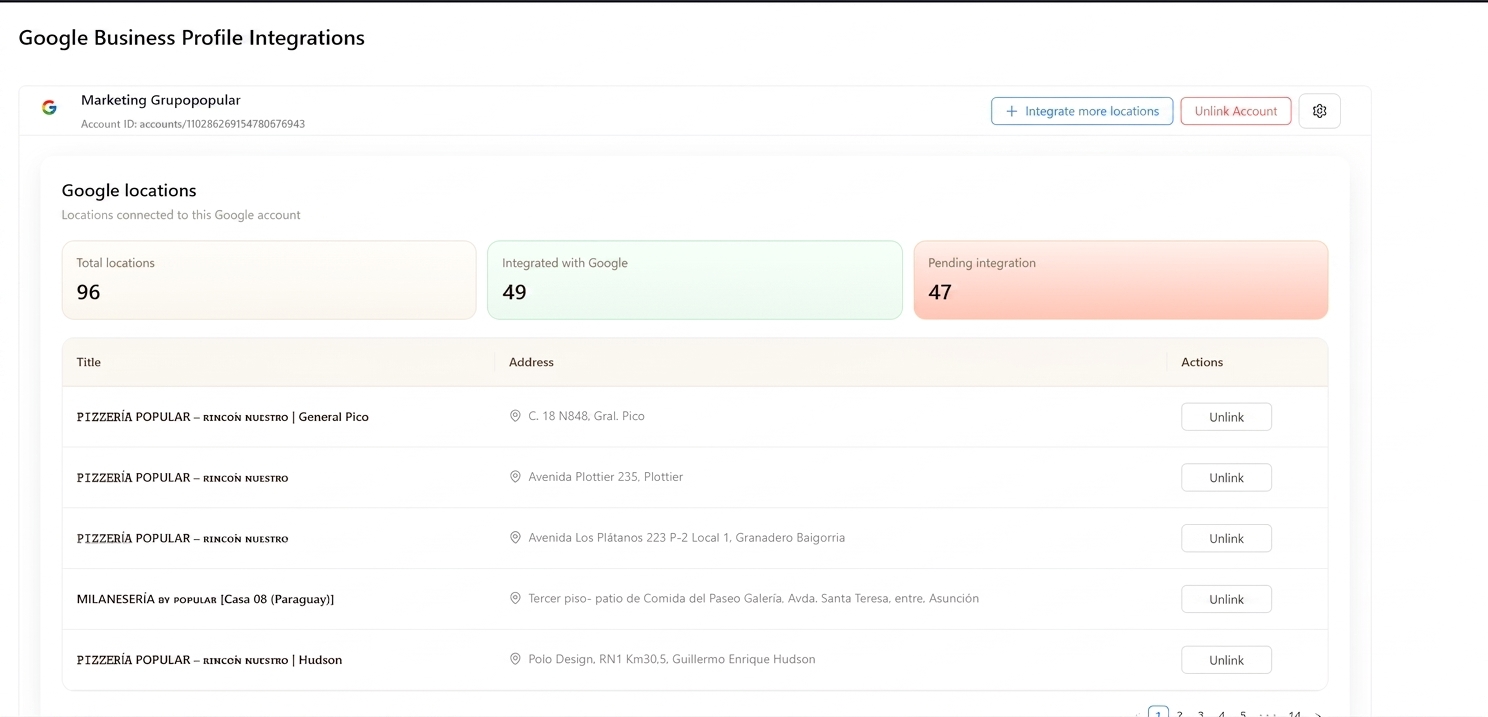
Use a Google Business Profile access audit tool to compare the restaurant group's complete location list with the profiles available through its connected Google accounts. The audit should show which profiles the team can access, which profiles are still missing access, and which locations are suspended, marked as closed, duplicated, unverified, incomplete, or affected by pending Google updates.
A restaurant profile can only be edited after the appropriate Google account has owner or manager access. If the group cannot access a profile, recovering ownership or requesting management access must happen before categories, hours, descriptions, images, links, or other business information can be corrected.
- Recover profiles controlled by former employees, agencies, or unknown accounts.
- Remove or merge duplicate profiles before optimizing content.
- Separate integrated locations from profiles that are still pending access or connection.
- Identify suspended, closed, duplicate, unverified, and incomplete profiles.
- Assign a responsible corporate owner for every location.
2. Create a business group and define permissions
Google recommends using a business group when multiple users need to manage a set of profiles. Eligible businesses with 10 or more locations can request bulk verification.
Cacao can centralize the full profile network and apply bulk or individual updates while restricting users to the locations they are responsible for.
3. Standardize the fields that cannot be left incomplete
Corporate teams should control the profile name, image-quality standard, primary category, secondary categories, opening and closing hours, and business-description rules. Each value still needs to reflect the real restaurant at that location.
- Use an accurate profile name that follows Google guidelines.
- Keep regular and special hours current.
- Require complete descriptions and high-quality location images.
- Flag any profile that falls below the group standard.
4. Choose precise primary categories, secondary categories, and attributes
Categories describe what the restaurant is and can affect how it appears in local results. Choose the most precise supported primary category and add only relevant secondary categories. Google explains the distinction in its Business Profile category guidance.
Groups with different restaurant concepts should define category standards by concept rather than forcing one generic category across the entire portfolio.
5. Connect location-specific menus, ordering, reservation, and website links
Every conversion link should lead to the correct restaurant. Google requires multi-location business links to use a dedicated landing page for the specific location, not the homepage or another restaurant in the group.
- Check menu accuracy, prices, and availability.
- Confirm ordering and reservation flows complete for the correct location.
- Map each profile to its corresponding local page.
6. Maintain high-quality local images and current restaurant information
Corporate should define the visual-quality standard, while each location contributes current photos of its exterior, interior, dishes, team, and customer experience. Updates should follow real operational changes rather than an arbitrary publishing calendar.
7. Set review-volume and rating targets by location
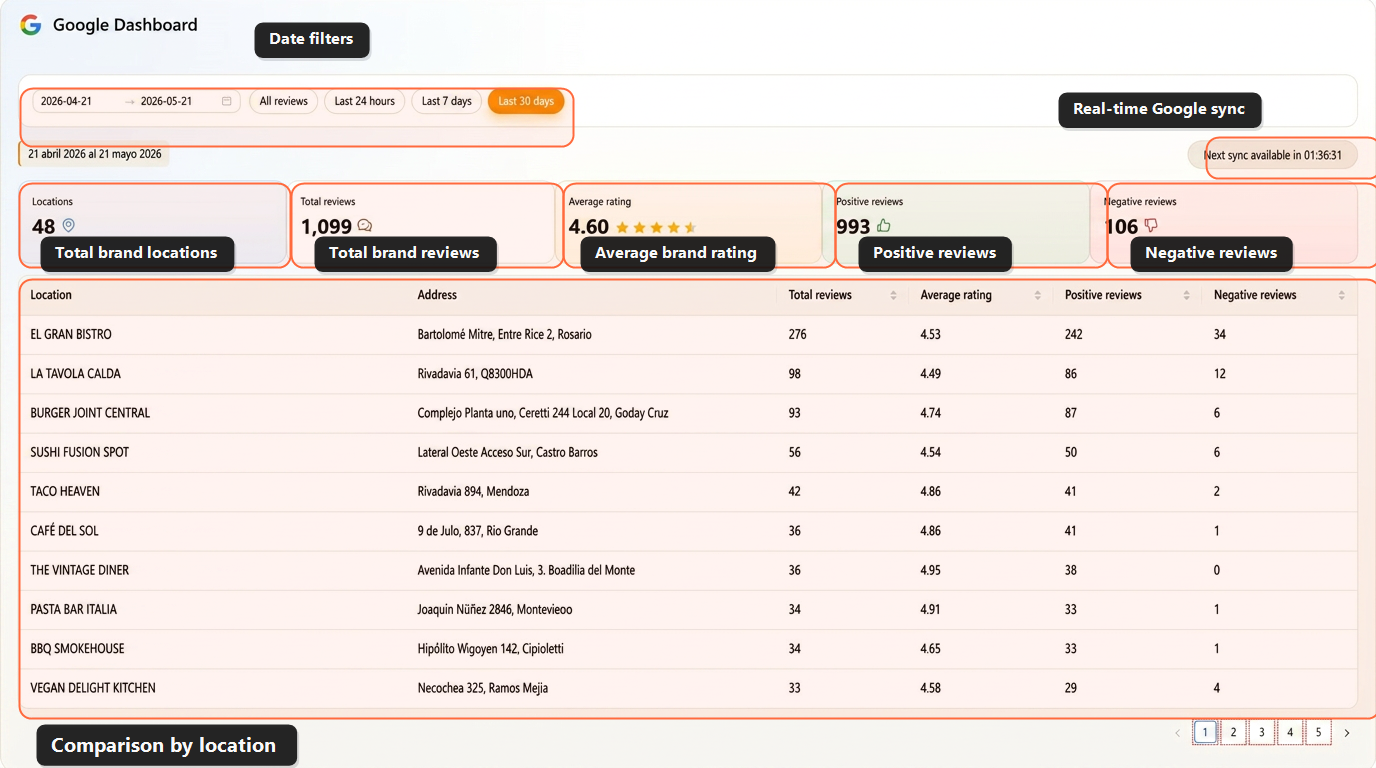
Restaurant groups should require a minimum level of daily review generation and a rating target for each location. The target should reflect the market and starting point, but low daily review volume or a declining score should always trigger action.
- Send each customer to the correct restaurant profile.
- Compare daily review volume and rating by location.
- Investigate restaurants that fall below the group target.
8. Respond to every review and escalate negative feedback
Unanswered reviews are an operational failure, especially when negative feedback describes a problem that requires recovery. Restaurant groups need response ownership, brand rules, location context, and alerts that route sensitive feedback to the right team.
Teams evaluating automation, approval rules, and multi-location controls can compare AI review response software for restaurant chains and franchises.
9. Connect each profile to a complete local landing page
The local page should reinforce the restaurant profile with matching address, phone, hours, menu, reservations, ordering options, photos, reviews, neighborhood context, schema, and internal links.
10. Monitor completeness and performance continuously
There is no single optimization cadence for every field. Profiles should be reviewed whenever hours, menus, links, categories, attributes, access, or restaurant information changes, and whenever monitoring detects an incomplete profile or performance gap.
- Monitor completeness and profile status.
- Compare calls, clicks, directions, searches, and views.
- Track daily reviews, rating, response rate, and unanswered reviews.
- Prioritize locations with missing data, low review volume, low ratings, or unresolved feedback.
Real example: 120 restaurant locations managed as one Google operation
Cacao helped a restaurant group organize Google Maps operations across 120 locations in Argentina, Uruguay, Chile, Brazil, and Spain.
The work included centralizing access, recovering problematic listings, auditing and updating every profile, supporting authentic review generation, automating responses, and creating location-level visibility across the group.
- 120 Google Business Profiles centralized under one management structure.
- 20 profiles recovered from suspension, duplication, or access problems.
- Every profile reviewed and updated.
- 3-7 authentic reviews per location per day.
- Automated response coverage across the restaurant group.
- Operations coordinated across five countries.
- Location-level visibility and reputation monitoring.
Centralized governance, local execution
The best setup is centralized where consistency matters and local where relevance matters.
Restaurant groups should organize profile ownership through Google Business Profile Manager or a connected management platform. Corporate teams can control access, naming standards, categories, and required information while regional and local teams manage the locations assigned to them.
Corporate should control core business data, naming rules, categories, brand standards, reporting, and escalation rules. Local or regional teams should contribute location-specific details: neighborhood language, photos, menu highlights, events, local posts, and responses that reflect the actual customer experience.
| Centralize | Localize |
|---|---|
| Name standards and brand rules | Neighborhood-specific descriptions |
| Core categories and required fields | Local attributes and amenities |
| Brand photo guidelines | Fresh interior, exterior, and dish photos by location |
| Menu structure and required links | Local menu highlights and seasonal offers |
| Reporting and escalation rules | Local response ownership |
| Review policy and tone guidelines | Location-specific recovery after negative reviews |
GBP optimization checklist for restaurant groups
A restaurant group should audit every Google Business Profile against the same checklist, then prioritize the locations with the biggest visibility, reputation, or data-quality gaps.
- Claim and verify every restaurant location.
- Remove or merge duplicate profiles.
- Fix suspended or unverified listings.
- Use the correct primary and secondary categories.
- Keep regular hours and holiday hours accurate.
- Add reservation, ordering, menu, and website links.
- Use unique photos for each location.
- Keep menus accurate and easy to access.
- Add restaurant attributes where relevant.
- Manage Q&A before customers answer for the brand.
- Publish Google Posts for local campaigns, launches, events, or seasonal offers.
- Generate reviews for the correct location.
- Respond to positive and negative reviews quickly.
- Connect each profile to a unique local landing page.
- Track calls, clicks, directions, searches, views, ratings, and review velocity.
Local pages for restaurant groups
Local pages are one of the strongest ways to support Google Business Profile optimization for restaurant groups. Each profile should link to the most relevant page for that exact location, not always to the homepage.
A strong local page helps Google and customers understand the location: address, neighborhood, menu, opening hours, reservation options, ordering links, photos, reviews, parking details, nearby landmarks, schema, and internal links.
Cacao advises restaurant groups on local page structure, GBP-to-location-page matching, internal linking, schema, review signals, and location-specific SEO content.
- Each local page should match one specific restaurant location.
- The page should include the same address, phone, hours, and key links used on the Google Business Profile.
- Menus, photos, reviews, and neighborhood details should help customers understand that exact location.
- Schema and internal links should reinforce the relationship between the brand, the location, and the local market.
Reviews are part of GBP optimization, not the whole strategy
Reviews are part of GBP optimization, but they are not the whole job. A complete profile helps customers understand the restaurant. Fresh reviews help them trust it. Fast responses show the location is active. Together, they improve the customer journey from discovery to visit.
For product selection around review operations, see the guide to managing restaurant Google profiles at scale. This page keeps the focus on the broader optimization system.
- Send customers to the correct location profile.
- Avoid one generic review link for the whole brand.
- Track review velocity by location.
- Respond with a consistent brand tone.
- Escalate negative reviews by location or region.
- Compare review gaps across the group.
How Cacao supports GBP optimization
Cacao helps restaurant groups turn GBP optimization into a repeatable workflow. Teams can centralize profiles, monitor completeness, publish updates, manage Q&A, generate reviews for the correct location, respond with AI, detect negative reviews, and compare performance by location.
For the product workflow, see Cacao's Google Business Profile management. If your team needs to run this across many restaurants, connect it with a multi-location review management workflow. For the broader ranking strategy, read the Google Maps SEO guide for restaurant chains.
- Centralized Google Business Profile dashboard.
- Bulk and individual profile updates.
- Profile completeness monitoring.
- Q&A and Google Posts workflows.
- Review generation by location.
- AI review responses.
- Negative review alerts.
- Role-based access.
- Calls, clicks, directions, reviews, ratings, and visibility reporting.
FAQs
What is Google Business Profile optimization for restaurant groups?
It is the process of keeping every restaurant location profile complete, accurate, active, locally relevant, and measurable across Google Search and Maps.
How should restaurant groups optimize Google Business Profiles across multiple locations?
Restaurant groups should centralize profile ownership and brand standards, then optimize categories, attributes, hours, menus, reservation links, photos, posts, reviews, Q&A, and local landing pages for each location. Performance should be monitored by restaurant, city, region, or franchise group.
Should each restaurant location have its own Google Business Profile?
Yes. Each physical restaurant location should have its own verified profile so it can rank and convert customers in its local market.
Should every Google Business Profile link to the homepage or a local page?
For restaurant groups, each profile should usually link to the most relevant local page for that exact restaurant location, not only to the homepage.
What should a restaurant group track in Google Business Profile?
Track profile completeness, status, calls, clicks, directions, searches, views, reviews, ratings, response rate, unanswered reviews, and performance by location.
Is GBP optimization the same as Google Maps SEO?
No. GBP optimization is one part of Google Maps SEO. Google Maps SEO also includes local pages, reviews, links, relevance, prominence, and market competition.
Can Cacao help with local pages for restaurant groups?
Yes. Cacao advises restaurant groups on local page structure, GBP-to-location-page matching, schema, internal linking, review signals, and location-specific SEO content.
Request a Google Business Profile audit
Cacao can review your restaurant group's Google Business Profiles, local pages, review gaps, profile completeness, and location-level visibility signals.
Request audit