

What Is Review Generation Software and How Does It Work for Multi-Location Businesses?
It turns review requests into a repeatable process across branches. Instead of relying on a different manual routine at each location, teams define when to ask, how customers reach the right Google Business Profile and which results corporate should review.
A survey response and a public review are different outcomes. Completing an internal questionnaire does not publish a Google review. Evaluate collection, public profile routing and reporting separately.
1. Start with a real visit or purchase
Offer a QR code or link at the location. For automated post-sale delivery, connect the customer event and branch identifier through an agreed integration.
2. Reach the correct location
Check that the QR or link flow identifies the branch visited. Test nearby locations and cases where the customer does not share their location.
3. Collect feedback and offer the public review step
An internal survey records answers in Cacao. The customer separately chooses whether to publish a review on Google. Keep the public review opportunity available regardless of the feedback given.
4. Review the results by source and location
Track published Google reviews and internal survey responses in their respective views. Use comments and categories to understand what changed; do not treat a survey completion as a public review conversion.
Top Review Generation Software for Multi-Location Teams
Compare the collection workflow rather than the length of a platform’s feature list. These six options provide different starting points for a shortlist. The table summarizes documented capabilities; it is not a hands-on performance ranking. Confirm included modules, routing, integrations, usage charges and commercial terms in a demo.
| Software | Collection workflow | Location routing | Internal feedback | What to confirm |
|---|---|---|---|---|
| Cacao | QR codes and links; separately configured post-sale SMS or WhatsApp through CRM/ERP integration. | A QR flow can use location sharing and branch selection; demonstrate the correct profile destination. | Custom surveys and AI categories; Google and Cacao survey results are analyzed separately. | Integration scope, supported delivery channels, messaging costs and reporting for the proposed setup. |
| Birdeye | Email and text review requests from Quick Send and other collection methods. | Multi-location Quick Send requires the customer’s location to be selected. | Surveys can include a review request question. | Automated triggers, survey modules, message allowances and request reporting by branch. |
| Podium | Textable review invitations; its AI Employee can automate invitations. | Test the branch identifier and destination profile in the proposed multi-location setup. | Confirm the survey capabilities needed for your questionnaire. | Required plan, integrations, message usage and branch-level reporting. |
| GatherUp | Feedback and review request templates, with customer imports or configured automation. | A multi-location landing page lets the customer select the visited branch. | First-party feedback collection alongside third-party review workflows. | Template configuration, integration setup, delivery limits and reports by location. |
| ReviewTrackers | Ask Tool supports email and SMS campaigns and a feedback landing page. | Demonstrate how each request and landing page maps to a branch. | The Ask Tool can request feedback through a dedicated landing page. | Automation, routing controls, questionnaire depth and reporting included in your plan. |
| Yext | Email and SMS review invitation templates, including configurable email follow-ups. | Templates can be previewed for a selected entity; verify branch and publisher routing. | Supports first-party review collection; verify fit for a custom multi-question survey. | Review Generation licensing, regional channel availability, integrations and invite analytics. |
Product references and official sources
When Cacao Is the Right Review Generation Software
Consider Cacao when your public review channel is Google and you also want to collect structured feedback through your own surveys. Corporate can examine locations within customer-defined groups while keeping public reviews separate from internal responses.
- Collect survey responses through QR codes or links.
- Configure questions and use custom categories and subcategories to analyze comments, including praise and complaints.
- Configure post-sale SMS or WhatsApp separately through a CRM/ERP integration.
- Review Google and survey information in separate dashboards with location-level detail.
- Receive email alerts for low ratings and use qualitative AI summaries to support review.
Google Reviews and Internal Surveys: Two Different Results
Cacao analyzes the two sources separately. Do not blend their ratings or add survey responses to the total number of public Google reviews.
For a deeper comparison of survey collection and analysis, see the customer feedback platforms guide.
| Question | Cacao surveys | Google reviews |
|---|---|---|
| What does the customer submit? | Answers to configured questions, with optional written comments. | A public star rating and optional review text on Google. |
| Where do teams analyze it? | The Cacao survey dashboard, by question, category and location. | The Google review dashboard, by location, rating and review content. |
| What should corporate count? | Responses to each question and surveys with written comments or identified complaints. | Published reviews, review volume and the share of 1–3 star reviews. |
| Does completing a survey create a Google review? | No. A completed survey is internal feedback. | A review exists only when the customer publishes it on Google. |
How Cacao Collects Google Reviews and Internal Feedback in Practice
At the location: QR or link
The customer opens a link or scans a QR code. In the geolocated QR flow, location sharing helps show nearby branches for the customer to select.
After a sale: configured integration
Post-sale SMS or WhatsApp can be configured through a CRM/ERP integration. Confirm the branch identifier, trigger, delivery channel, setup responsibilities and costs for your systems.
Survey answers and Google profile
The survey collects answers to the configured questions. The customer can then continue to the relevant Google Business Profile to leave a public review; a low score must not remove that opportunity.
Separate reporting and follow-up
Corporate reviews internal survey responses and Google reviews in their respective views. Low-rating email alerts help the configured recipient notice problems; the responsible person then follows up with the branch.
Measure Review Growth by Location
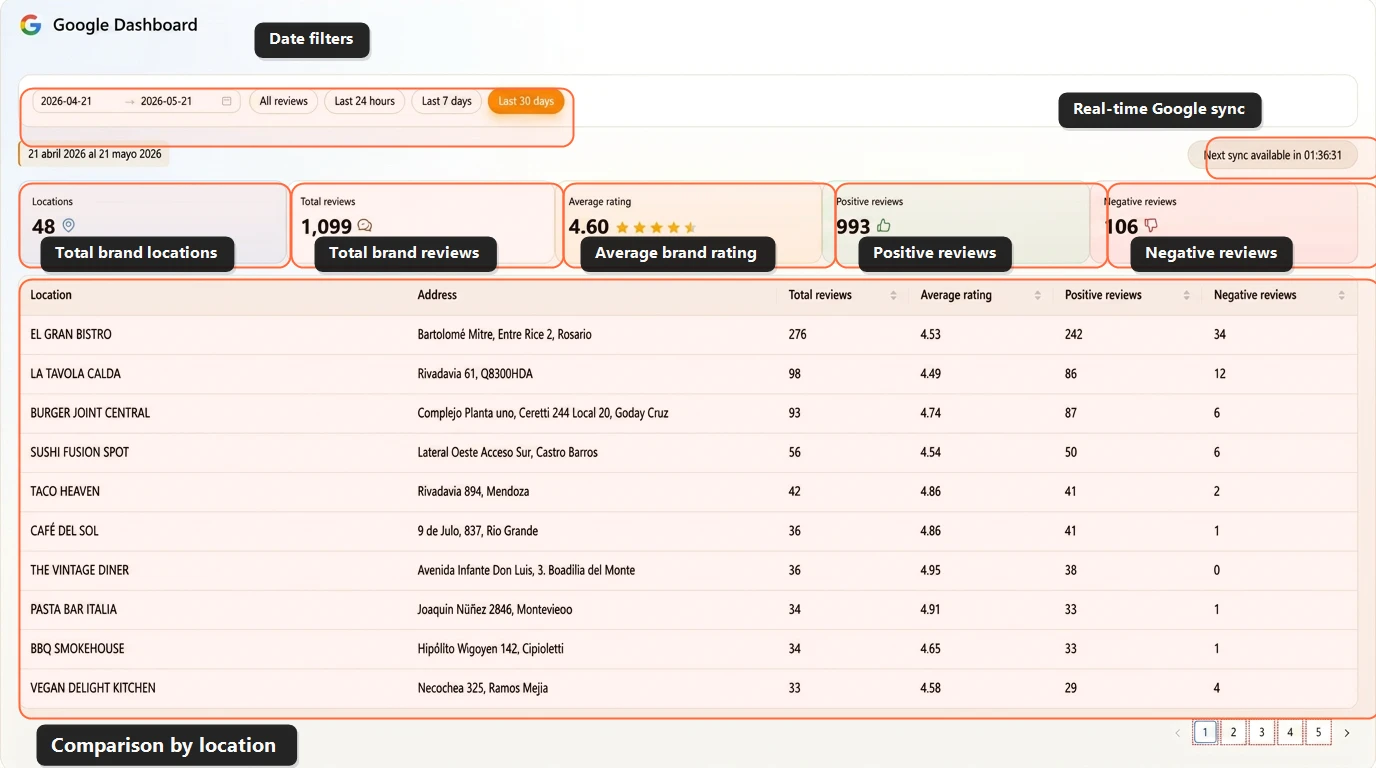
A rising network total can hide branches that receive little recent feedback. Compare Google review volume and the share of 1–3 star reviews for each location over the same selected periods.
Read the comments behind changes in the numbers. More reviews do not by themselves show that an operational problem has been solved.
Explore the Google reviews dashboard for the complete set of views. The crop shows fictional demo data, not customer results.
Use Survey Comments to Understand What Needs to Improve
A high score can still accompany a complaint. In the fictional survey example, Silver Birch has a service rating of 4.85/5, while 31 of its 152 surveys with written comments mention a service complaint: 20.4%.
AI categories help corporate inspect the subject of the complaint and return to the original text. A survey can belong to more than one category; count it once in the overall complaint total.
See the customer feedback dashboard to explore the separate Cacao survey and Google views. Low-rating email alerts are triggered by scores; a complaint beside a high score is found through comment analysis.
Best Software to Automate Review Collection for Restaurant Chains
Test the same journey at a table, on a receipt or after a completed sale. A useful restaurant workflow identifies the correct branch and works consistently across nearby locations.
For an existing Cacao customer example, read the Baires Grill case study. For broader response and monitoring needs, compare restaurant Google review management tools.
- Check QR placement and link access in a real visit.
- Test branch selection and the destination Google profile.
- Confirm the POS/ERP integration needed for post-sale delivery.
- Review public review growth and survey responses separately for each restaurant.
How to Compare Review Generation Tools in a Demo
Give every provider the same three-location scenario, including two nearby branches. Ask them to demonstrate the journey rather than relying on an integration logo or a generic feature checklist.
- Open the QR or link flow and select the visited branch; also test without location sharing.
- Show what happens after both a high and a low survey score, including access to the public review step.
- Trigger a post-sale request from the proposed system and verify the branch identifier.
- Distinguish completed surveys, published reviews and delivery metrics; ask which measurements are actually available.
- Inspect a comment with both praise and a complaint, its category and original text.
- Confirm permissions, integration responsibilities, message charges, available delivery controls and total implementation costs.
Review Generation vs Review Management Software
Review generation focuses on asking customers for reviews and routing them to the right profile. Review management software adds monitoring, replies, alerts, permissions and analysis after reviews are published.
If your main buying decision concerns custom questionnaires and feedback analysis, use the customer feedback platforms comparison. If your main requirement is responding to existing reviews, explore AI review responses.
What Review Generation Reports Can and Cannot Tell You
In Cacao, compare published Google review volume and survey results by location. Confirm any request-delivery metrics with the proposed integration rather than assuming that sends, opens, clicks and reminders are available in every setup.
Do not attribute each public Google review to a particular Cacao request. The reporting described here does not establish a reliable one-to-one match. A rise in review volume after a campaign is an observation, not proof that every new review came from that campaign.
This guide is published by Cacao. Competitor descriptions use the official sources linked with the comparison and are not a hands-on benchmark. A capability marked for confirmation has not been verified here; it should not be read as unavailable.
FAQs
What is the best review generation software for multi-location businesses?
Choose a tool that fits your request channels, branch-routing needs, integrations and reporting. Compare Cacao, Birdeye, Podium, GatherUp, ReviewTrackers and Yext using the same real customer journey. Cacao is an option when Google is your public review source and you also want separate internal survey analysis.
What is review generation software?
It helps businesses request reviews from real customers, route them to the right business profile and measure public review growth by location. A completed internal survey is a separate result from a published Google review.
How can I automate review requests for each business location?
Connect the customer event and branch identifier from your transaction system to a configured delivery workflow. Cacao can support post-sale SMS or WhatsApp through a separately configured CRM/ERP integration. Confirm compatibility, implementation and messaging costs before choosing a setup.
How does a geolocated QR code for Google reviews work?
In Cacao’s QR flow, a customer can share their location and select a nearby branch, complete the internal survey and continue to the appropriate Google Business Profile. Test the journey without location sharing as part of your evaluation.
What should restaurant chains look for in review generation software?
Test QR and link access, accurate restaurant selection, the public review destination and any proposed POS/ERP-triggered delivery. Compare survey responses separately from published reviews for each restaurant.
Does Cacao block negative feedback from going to Google?
No. Customers can continue to the Google review step regardless of their internal feedback. A low survey score does not remove the opportunity to leave a public review.
Does Cacao attribute each Google review to a specific request?
No. The reporting described here does not establish reliable attribution from each published Google review to an individual request. Review growth and internal survey responses should be measured separately.
Is Cacao only for Google reviews?
No. Cacao manages Google reviews and also collects and analyzes internal survey responses. The two sources are analyzed separately. Explore the customer feedback dashboard to see both sources.
Build a consistent review collection workflow across your locations
See how Cacao connects QR and link collection, configured post-sale integrations, Google reviews and separate internal survey analysis.