Google Reputation Management Software

Monitor Google reviews, respond with AI, and request authentic customer feedback from one dashboard. Cacao helps your teams manage reputation across locations, track ratings and recurring issues, and identify which branches need attention.

After your free demo, our team activates 7-day free access. No credit card required.

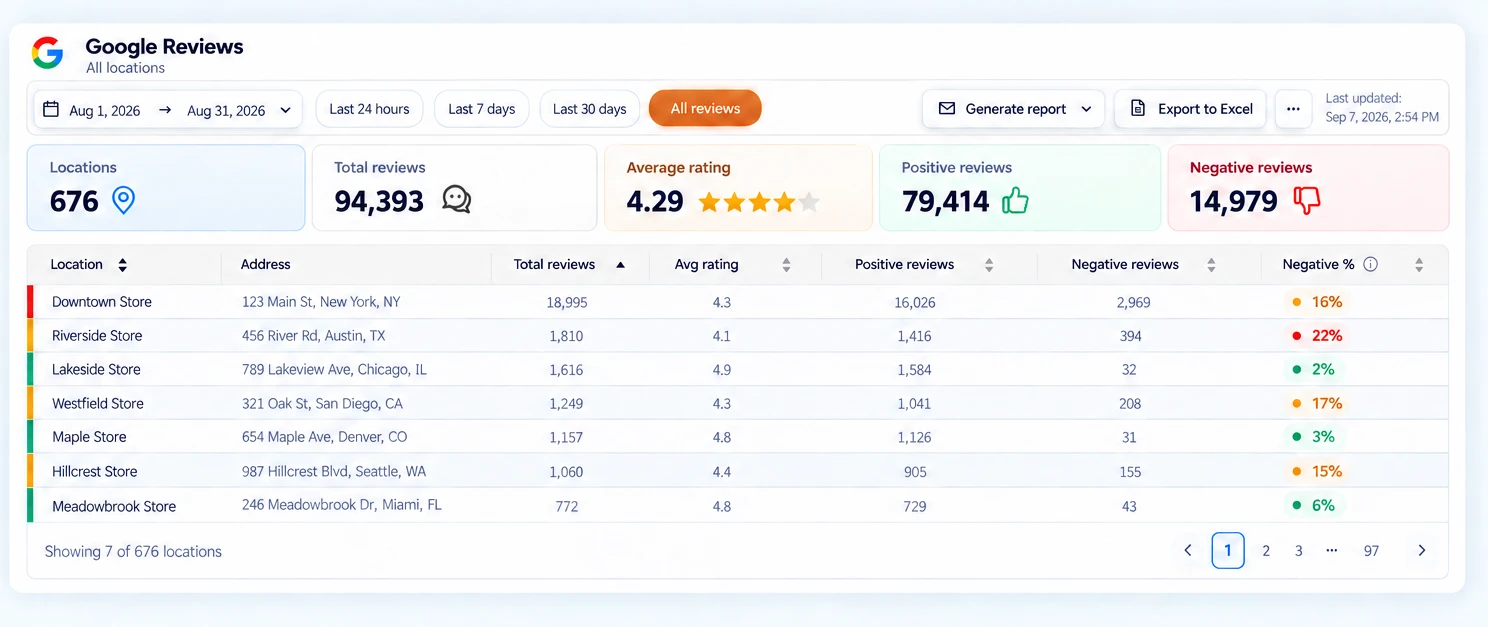
Centralized Google Reviews dashboard showing review performance across every branch
Google reputation management at scale

How Steren uses Google reputation management software across 800 profiles

Steren uses Cacao’s Google reputation management software to monitor customer reviews, coordinate AI-assisted responses, and manage Google Business Profiles across nine countries. Automated replies and human supervision help the team respond to approximately 300 reviews daily, while corporate and regional teams track reputation across the network.

800Google Business Profiles
9countries
~300reviews answered daily
100%response coverage
See how Steren manages its Google reputation
From customer feedback to daily action

Google reputation management features in Cacao

Monitor reviews, respond with AI, request authentic feedback, compare locations, and route negative reviews to the people responsible for managing them.

Monitor Google reviews across every location

Bring Google reviews and ratings into one dashboard so your team can follow customer feedback across branches and identify where attention is needed.

  • See review activity and ratings across connected locations.
  • Filter reviews by location, rating, and response status.
  • Compare branches and review trends over time.
Explore the Google reviews dashboard
Centralized Google Reviews dashboard showing review performance across branches
Monitor review performance across your connected locations from one dashboard.

Respond with AI, in your brand’s voice

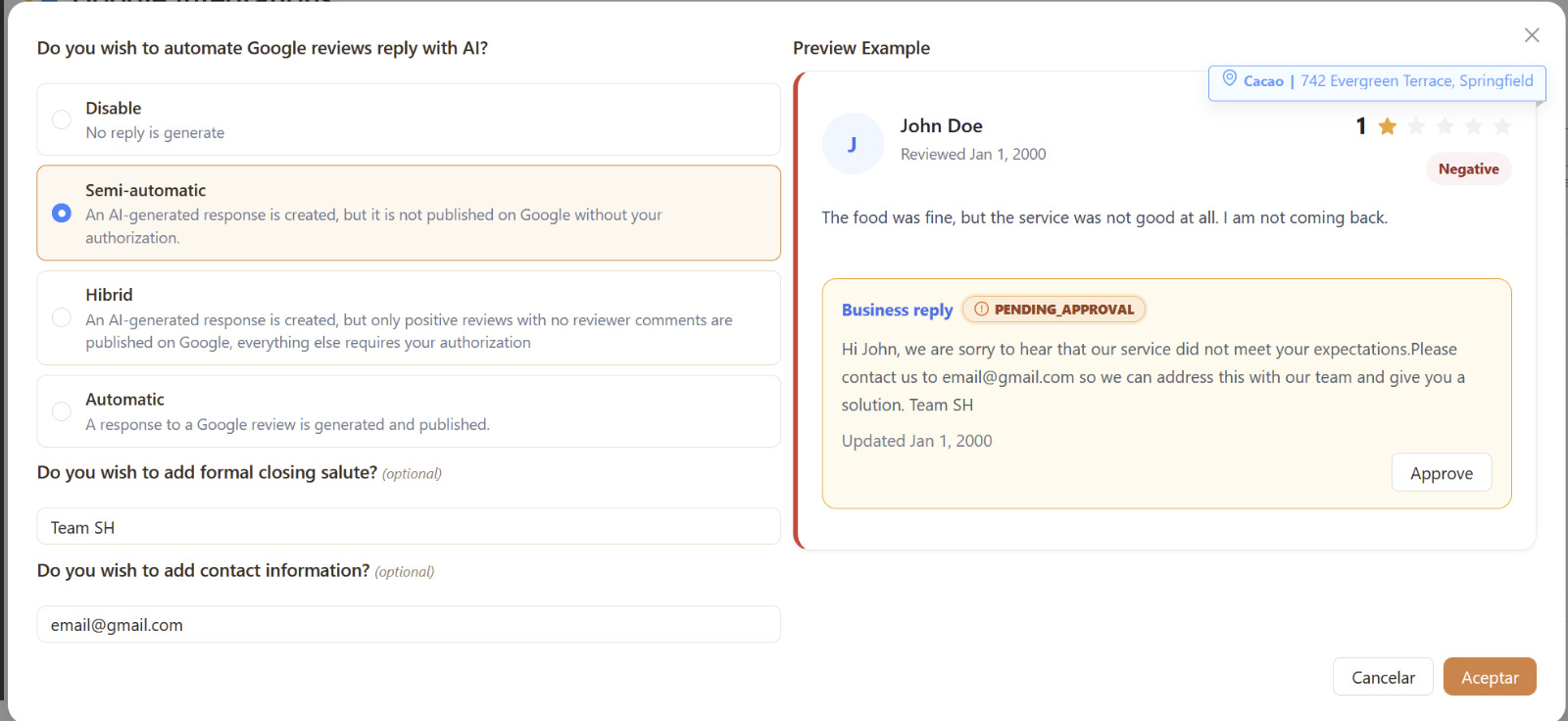
Choose how much of your Google review response workflow to automate. Prepare AI responses for approval, combine automation with human review, or publish automatically according to your configuration.

  • Choose semi-automatic, hybrid, or automatic responses.
  • Review, edit, and approve sensitive replies before publishing.
  • Apply brand instructions and use individual or bulk responses.
Explore AI review responses
Google review response automation settings with a negative review reply pending approval
Configure response automation and preview a reply before approving it for publication.

Request authentic customer reviews

Invite customers to share feedback after a visit or purchase. Connect review requests with QR codes, direct links, email, WhatsApp, SMS, and your POS or CRM workflows.

  • Make it easy to share feedback after a real interaction.
  • Use surveys to understand the customer experience.
  • Request honest reviews from customers regardless of their rating.
Explore review collection
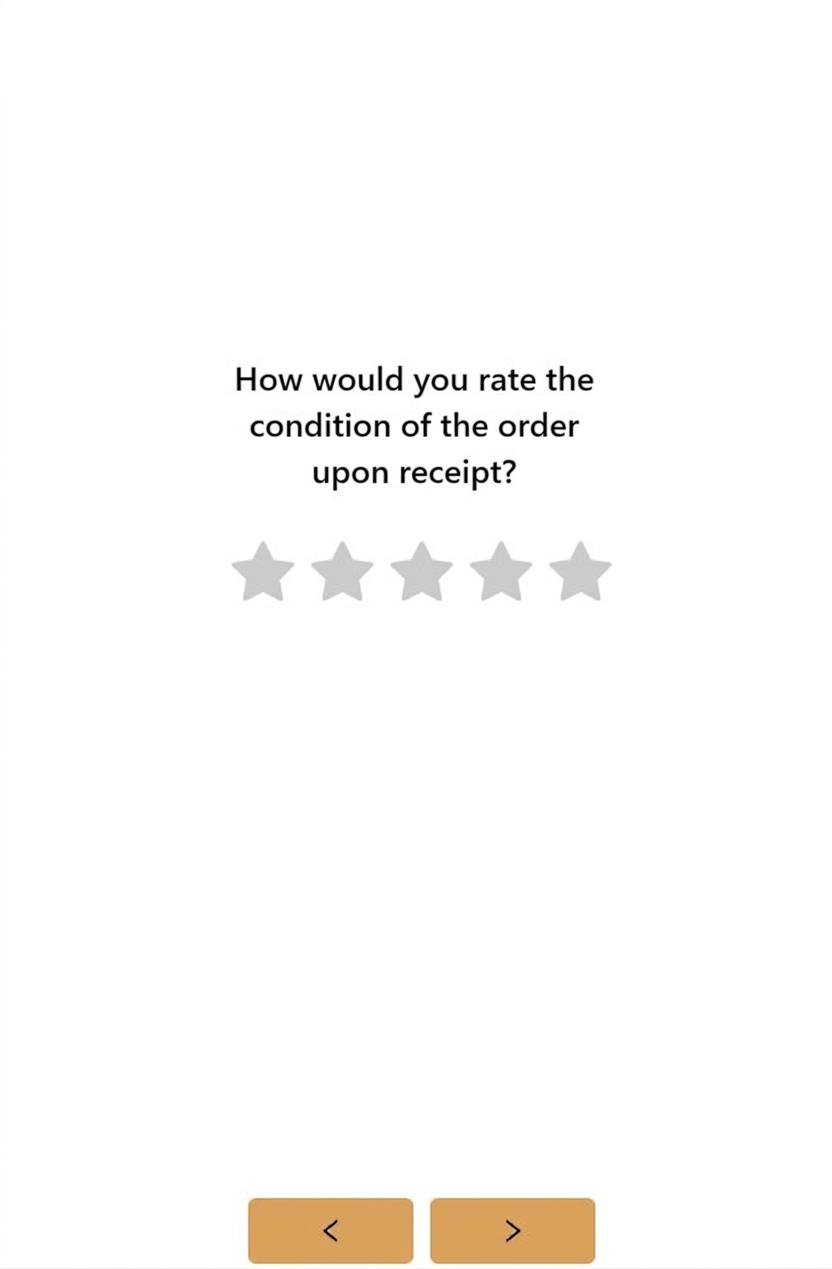
Customer survey asking for an order-condition rating using five stars
Collect feedback about a real customer experience through a simple rating question.

Understand which locations need attention

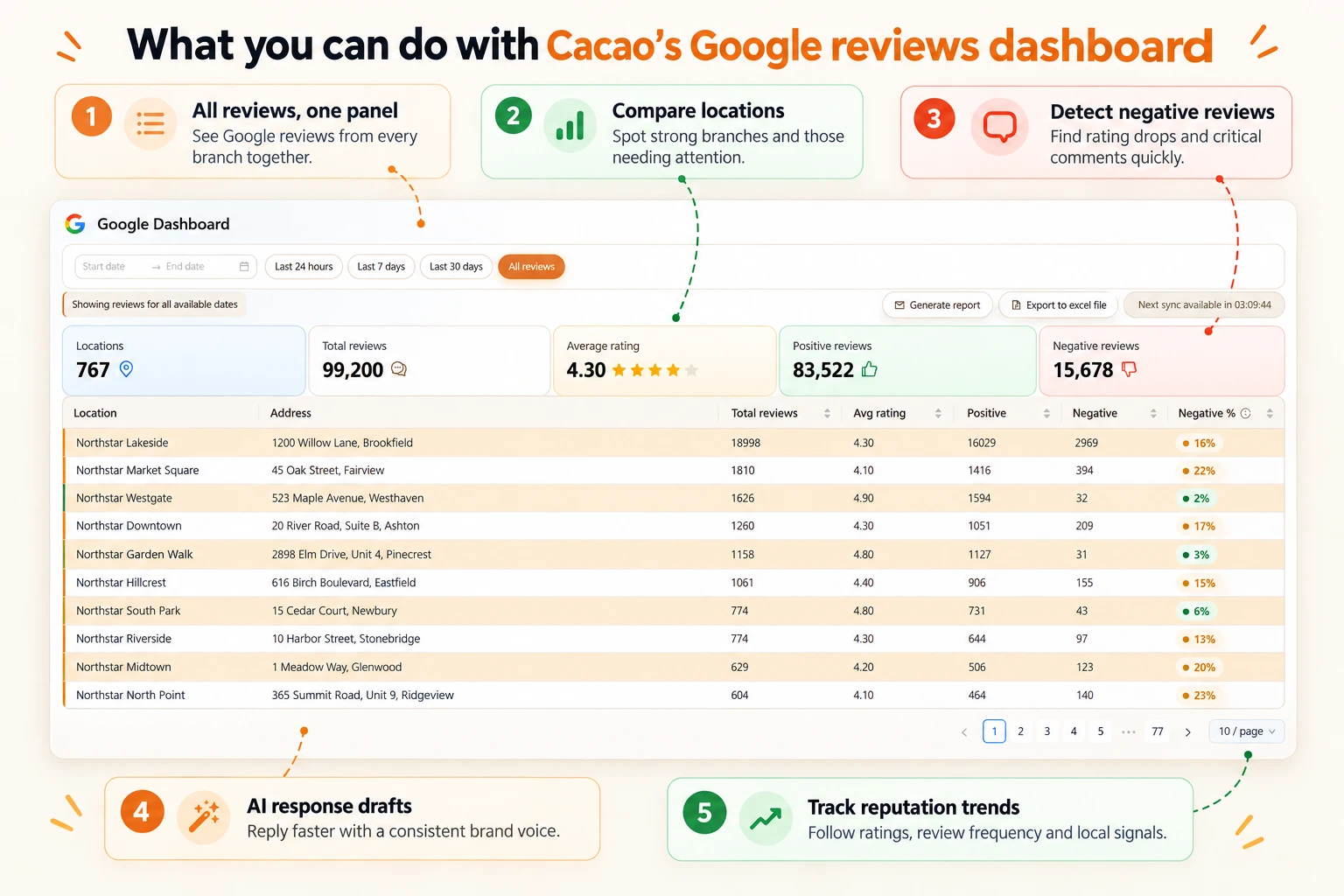
Compare review volume, average ratings, and negative feedback across branches. Use the dashboard to identify locations that need a closer look and follow reputation trends over time.

  • Compare ratings and positive and negative review counts by location.
  • Identify strong branches and locations needing attention.
  • Generate reports and export review data for follow-up.
Explore review analytics and reporting
Annotated Google reviews dashboard highlighting location comparisons, negative reviews, AI drafts, and reputation trends
Compare locations and identify negative feedback from the same review performance dashboard.

Automatically route negative reviews to the right person

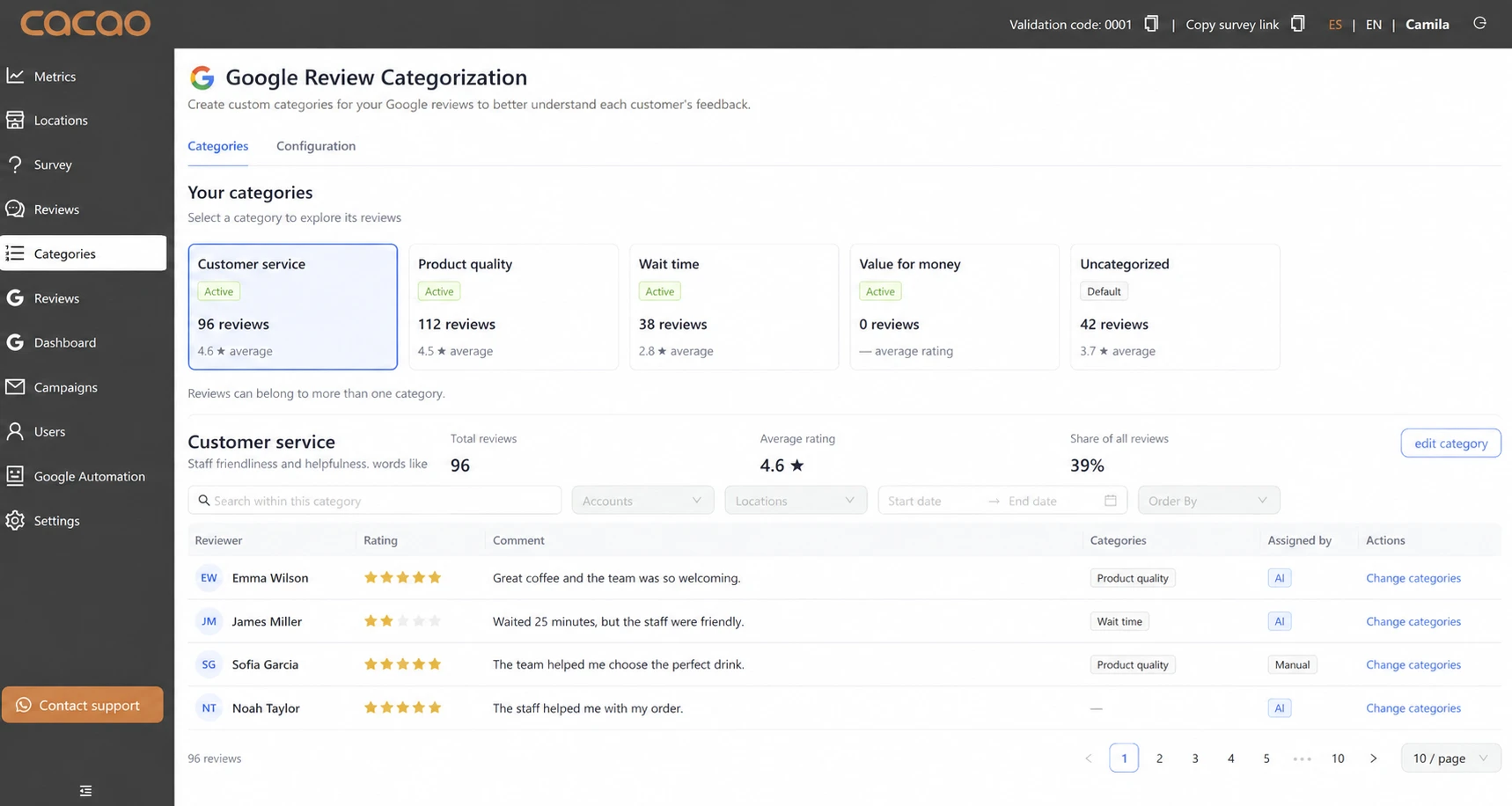
Set up review categories and assign a responsible user to each one. Cacao uses AI to classify negative feedback and notify the right person by email and within the platform, where they can review and manage the issue.

  • Define categories for issues such as customer service, product quality, or wait time.
  • Assign the person responsible for managing each category.
  • Automatically notify that person when relevant negative feedback arrives.
Explore negative-review routing and alerts
Google Review Categorization screen with customer service, product quality, and wait time categories and AI-assigned review topics
Organize feedback into categories that support automatic routing to the responsible team member.

Coordinate teams and Google Business Profiles

Give corporate teams visibility across the network while regional and local users manage their assigned locations. Keep business information accurate and coordinate profile updates across brands and countries.

  • Assign access by location, region, and responsibility.
  • Use Profile Health to find incomplete or inaccurate profiles.
  • Update categories, hours, photos, and services in bulk, and coordinate Posts and Q&A.
  • Compare Google searches, views, calls, clicks, and direction requests by location.
Explore Google Business Profile management
Operational workflow

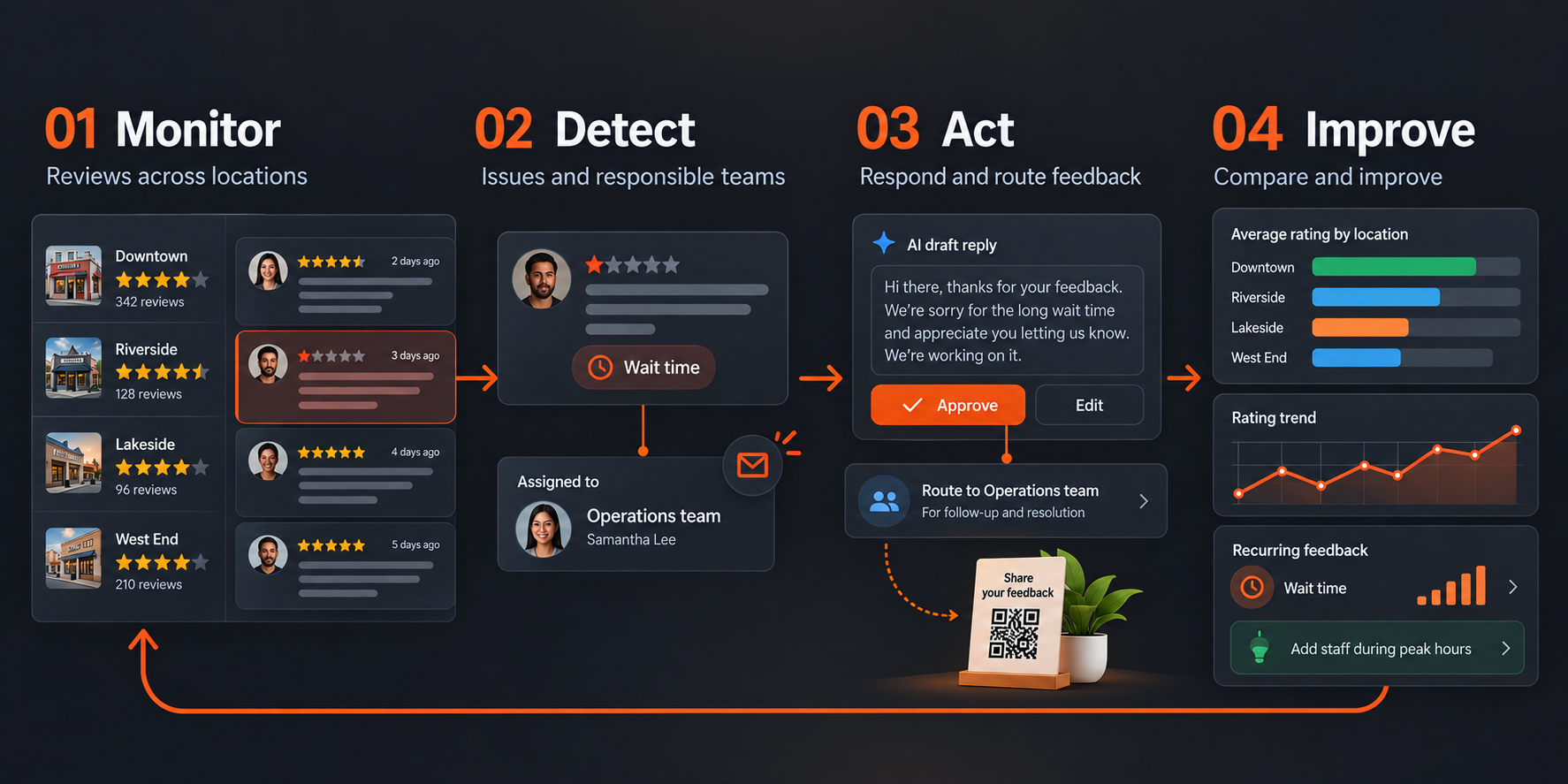
Monitor, detect, act, and improve

Illustrated workflow: monitor Google reviews across locations; detect negative feedback and notify its responsible team; approve an AI reply and route the issue for follow-up; compare location ratings and use recurring feedback to improve operations.
From customer feedback to team action and location-level improvements. Select the illustration to view it at full size.
Understand the workflow

What is Google reputation management software?

Google reputation management software helps businesses monitor customer reviews, respond to feedback, and request authentic reviews from a centralized dashboard. It also helps teams maintain accurate Google Business Profiles and track how customers evaluate each location on Google Search and Maps.

Cacao connects these tasks in one platform: monitor ratings and review trends, prepare AI-assisted replies, route negative feedback to the responsible person, and compare reputation across locations. Corporate, regional, and local teams can coordinate their work with access to their assigned profiles.

Review collection, monitoring, and responses are part of Cacao’s Google reputation management workflow, alongside profile accuracy and team coordination. If you are evaluating vendors, use our guide to compare Google reputation management software for multi-location businesses.

Proven in real operations

How customers put Google reputation management into practice

See how teams use Cacao to collect reviews, respond with human-supervised AI, and get negative feedback to the people responsible for managing it.

See Cacao’s Google reputation management software in action

Request a free demo to explore review monitoring, AI-assisted responses, negative-review routing, and profile management for your locations. After the demo, our team activates seven days of free access so you can explore the platform. No credit card required.

Pricing is based on locations, not user seats. View pricing for your locations.

Book a Free Demo

Google reputation management software FAQ

What is a budget reference for 100 Google Business Profiles in the United States?

Cacao provides an indicative US-only example of USD 2,500 per month for 100 profiles, subject to a final quote, including taxes, unlimited users, monthly billing, and no minimum commitment. WhatsApp, SMS, and email request delivery, third-party integrations, and project-specific services are quoted separately. Review Cacao pricing for the included software scope and published tiers. This example does not establish rates for other network sizes or markets.

What is Google reputation management software?

Google reputation management software helps businesses monitor customer reviews, respond to feedback, and request authentic reviews from a centralized dashboard. Cacao connects these tasks with Google Business Profile management, location-level reporting, and team responsibility across one or multiple locations.

How is Google reputation management different from review management?

Review management focuses on collecting, monitoring, analyzing, and responding to customer reviews. Reputation management connects that work with profile accuracy, local performance, and team coordination. Cacao brings both into one platform. Explore the Google reviews dashboard for the monitoring and reporting workflow.

Can I manage Google reputation across multiple locations?

Yes. Cacao centralizes reviews and profiles, compares performance by location, and lets corporate, regional, and local users work within their assigned scope. It also supports a single location. Explore multi-location review management to see how teams coordinate across branches and brands.

Can Cacao respond to Google reviews automatically?

Yes. You can choose semi-automatic responses that require approval, a hybrid mode that automatically publishes replies to positive reviews without comments while other replies require approval, or automatic generation and publication. See AI review response settings to understand how automation and human review work together.

How does Cacao route negative reviews to the right person?

You define categories and their responsible recipients. Cacao uses AI to assign each Google review with a low rating or negative comment to one routing category, then applies the configured rule to send the review and branch information by email. Authorized users can manage the review in Cacao with their existing permissions. Notification and a public reply do not establish that the underlying issue has been resolved. Learn about category-based negative-review alerts.

How does Cacao help businesses collect more Google reviews?

Cacao helps you request feedback after real visits, purchases, or services using QR codes, direct links, email, WhatsApp, SMS, and supported POS or CRM workflows. Invite customers to share honest feedback regardless of their rating. Explore review collection software for the available request workflows.

Why use reputation management software if I already have Google Business Profile?

Google Business Profile provides native tools to manage your business information and reply to reviews. Cacao adds a shared workspace for review requests, AI-assisted replies, negative-review routing, bulk updates, location-based access, and reporting. See how Google Business Profile management connects with your reputation workflow.

How do the free demo and seven-day free access work?

Submit the demo request form to arrange a free demo with our team. We show how Cacao supports your Google review and profile workflows, then our team activates seven days of free access to the platform. No credit card is required.