








Google-first review analytics

Review Analytics Software for Multi-Location Businesses

Understand what is happening at every location: compare performance, identify praise and complaints, and inspect original comments. Analyze Google reviews and Cacao’s internal surveys in separate views across groups and locations.

Cacao has analyzed more than 94,000 Google reviews across 676 locations for a single multi-location organization.

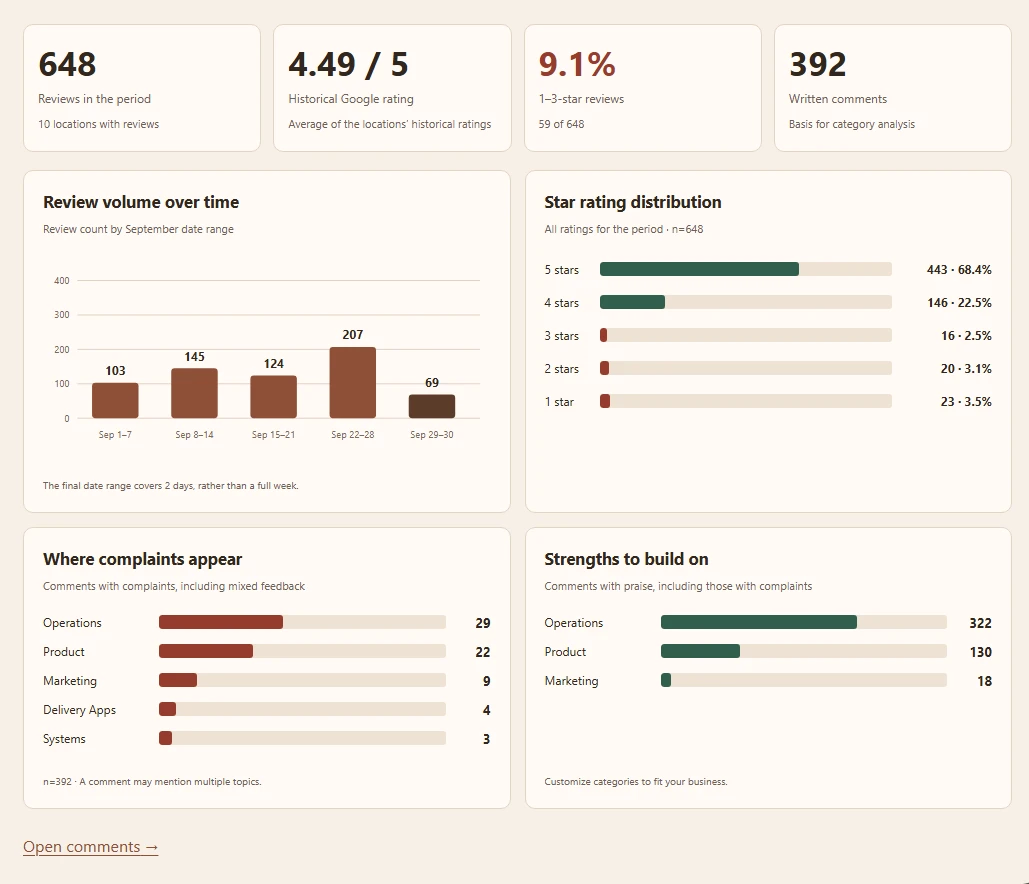
Cacao group overview with review volume, star distribution, and category results

Trusted by brands globally

Sushi y Asi logo, Cacao customerPizzeria Popular logo, Cacao customerEl Balcon logo, Cacao customerDolce Bisquet logo, Cacao customerAntares logo, Cacao customerSteren logo, Cacao customerBacu logo, Cacao customerVital Supermayorista logo, Cacao customer
676locations analyzed in one account
94,418Google reviews analyzed
Groupscustom location sets created in Cacao
Excelon-demand analytics export
Five capabilities for corporate teams

Turn review text into a clearer picture of every location

Combine AI categorization, topic-level sentiment, location comparisons, original comments, and qualitative summaries. Click a fictional dashboard example to enlarge it.

01 · Categorization

Organize feedback by the areas responsible for it

AI classifies review text into categories and subcategories defined by your business. Compare the same issues across locations instead of opening each Google profile separately.

  • Create and edit categories such as Product, Operations, or Marketing.
  • Use subcategories to distinguish specific issues, such as wait times or food temperature.
  • Open a matrix cell to inspect its comments, keeping your filters applied.
Explore the category matrix
Fictional demo data.

Category matrix comparing complaint shares and comment counts across locations

Scroll to explore the enlarged image.

Category matrix comparing complaint shares and comment counts across locations
02 · AI Sentiment Analysis

AI Sentiment Analysis: find complaints behind the rating

AI sentiment analysis identifies praise and complaints within topics, including complaints in highly rated feedback. Use those findings to decide which reviews need a closer look or a human-reviewed response. This fictional survey example keeps question ratings and written comments distinct.

  • Switch category analysis between praise and complaints.
  • Correct classification and sentiment when a review needs a closer look.
  • Read question ratings and written comments as separate signals.
Fictional demo data.

Fictional Cacao internal survey comments showing food and service complaints alongside high question ratings

Scroll to explore the enlarged image.

Fictional Cacao internal survey comments showing food and service complaints alongside high question ratings
03 · Location and period comparisons

Location-level analytics: compare branches with the sample size in view

Compare Google review volume, ratings and the share of 1–3-star reviews by location or group. Survey views use their own question-response and written-comment bases. Keep the sources separate.

  • Manually choose two periods to compare total review volume and the share of 1–3-star reviews.
  • Inspect category results in each date window to investigate how issues evolve.
  • Compare a branch with its year-earlier period first, then with other branches.
Read the comparison methodology
Fictional demo data.

Location comparison with review counts, ratings, low-star shares, and top complaint topics

Scroll to explore the enlarged image.

Location comparison with review counts, ratings, low-star shares, and top complaint topics
04 · Original evidence

Go from a category result to what customers actually said

The complaints view brings underlying comments together with their location, date, categories, and original rating. Read the evidence before deciding which issue needs attention.

  • Filter by location and category, or search the comments.
  • Read mixed feedback as well as fully negative comments.
  • Export data to Excel for further internal analysis.
Fictional demo data.

Complaints view listing original excerpts, categories, locations, dates, and ratings

Scroll to explore the enlarged image.

Complaints view listing original excerpts, categories, locations, dates, and ratings
05 · Qualitative summaries

Receive AI-processed feedback at the scope you need

Receive qualitative AI summaries by location, group or account at the email address you enter. Google and internal survey findings remain separate.

  • Use branch-level summaries for local context.
  • Use group or account summaries for a broader view of customer feedback.
  • Consult original comments when investigating a finding.

How summary delivery works

Scope
One location, one group, or the whole account
Analysis
Qualitative feedback processed with AI, keeping sources separate
Delivery
The email address you enter

Summary delivery workflow.

Understand the numbers

A complaint share with a clear denominator

The matrix uses all written comments at the location as its base. Each review counts once within a category and can appear in several categories, so percentages across a row do not have to add up to 100%.

Editable categoriesSentiment by categoryOriginal review evidence
From insight to follow-up

Give the responsible team the evidence to act

Cacao helps corporate teams see the issue and its supporting comments. Your organization owns the operational follow-up: assign a responsible person, speak with the branch, resolve the problem, and confirm closure.

Identify the issueUse categories and original comments to understand what happened and where.
Review deteriorationInvestigate two consecutive completed months against their year-earlier periods, then check other branches.
Act between reviewsUse negative-review email alerts to notice individual problems between weekly checks.
Evidence of scale

Built for review analytics at multi-location scale

The 676-location and 94,000-review example demonstrates capability and scale: Cacao can process large Google review datasets and organize them into location-level and group-level analytics.

See your review analytics workflow in a demo

Explore categorization, location comparisons, original comments, and AI summaries with the Cacao team.

Review analytics software FAQs

What is review analytics software?

Review analytics software organizes customer feedback into metrics and recurring topics. Cacao helps corporate teams analyze Google reviews across locations, understand praise and complaints by category, and inspect original comments.

Who defines the categories and subcategories?

The customer defines and can edit them. Cacao uses AI to classify review text into that structure, and customers can correct classification and sentiment. Editing a category does not automatically reclassify historical reviews.

Can a highly rated review contain a complaint?

Yes. Cacao analyzes text separately from the star rating. One review can praise one category and criticize another, including in a 4- or 5-star review.

What do category matrix percentages mean?

Each cell divides comments mentioning that category and sentiment by all written comments at the location in the selected period. A review counts once per category and can appear in several categories, so row percentages do not need to add up to 100%.

What can teams compare between two periods?

Teams manually choose two periods to compare total review volume and the share of 1–3-star reviews on screen. To investigate category evolution, inspect category results for each date window. Historical location ratings are separate from period review counts.

Can Cacao analyze locations, groups, and the whole account?

Yes. An account can have several customer-created groups containing multiple locations. Each location belongs to one group. AI qualitative summaries are available for a location, a group, or the whole account.

How are AI summaries delivered?

Cacao sends the AI-generated qualitative summary to the email address the user enters.

Can teams export analytics data?

Yes. Teams can export data to Excel for further internal analysis.

Are Google reviews combined with Cacao surveys?

No. Google reviews and Cacao’s own surveys are analyzed separately. Their ratings and comments are not combined into one average.