How to Analyze Google Reviews

A practical framework for turning Google ratings and review text into evidence about customer experience—first for one location, then across groups and an entire multi-location organization.

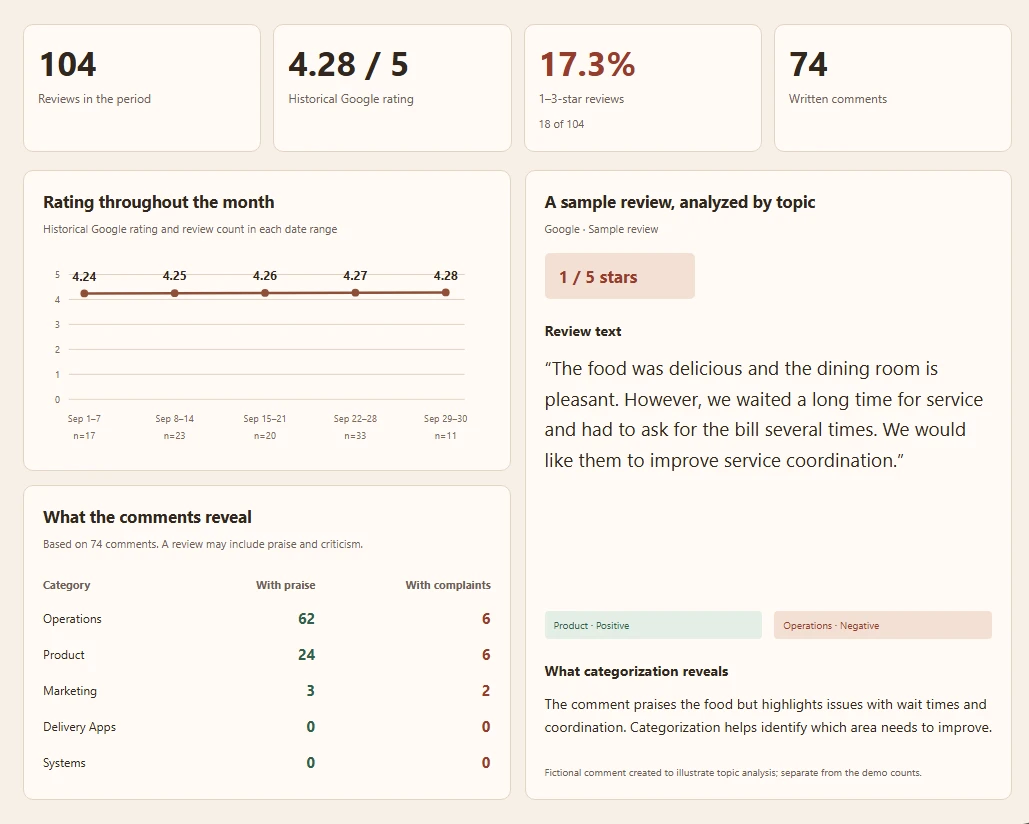
Google review analytics dashboard with organization and location metrics

What Google review analysis means

Google review analysis combines quantitative measures with a structured reading of what customers say. The numbers show what is changing; sentiment and topics help explain why.

Start with one location and a defined period. At larger scale, use the same method for each location, custom group, and the organization so comparisons remain meaningful.

  • Quantitative: rating, volume, star distribution, negative share, growth, and velocity.
  • Qualitative: sentiment, topics, recurring strengths, recurring complaints, and emerging issues.
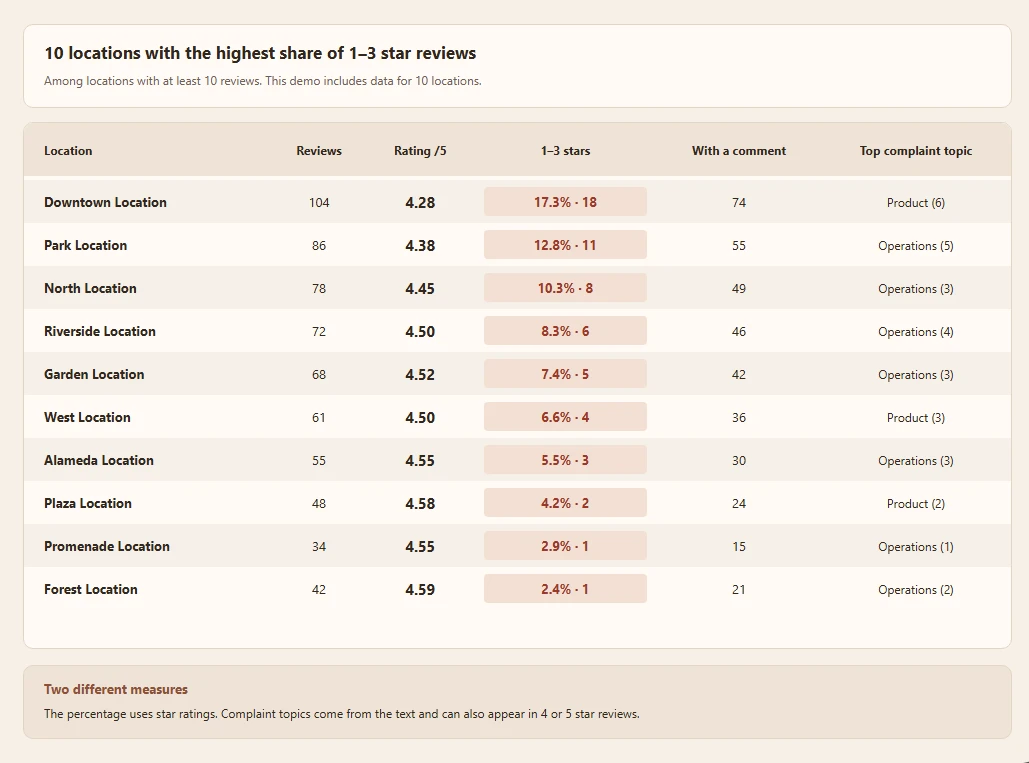
Locations that need attention based on recent Google review performance

Why average rating is not enough

Average rating compresses years of different experiences into one number. A location can still show a 4.5-star historical rating while its recent share of negative reviews is rising.

Read rating alongside total reviews, recent review volume, star distribution, positive and negative reviews, and the period in which they occurred.

Measure volume, growth, velocity, and negative review rate

Review count is the accumulated total. Review growth is the change between periods, while review velocity describes how quickly new reviews arrive. Compare like-for-like periods and account for seasonality.

Negative Review Rate equals negative reviews divided by total reviews for the selected period. Cacao currently classifies locations below 10% as good, 10–20% as neutral, and above 20% as poor. This is Cacao’s location performance classification—not an industry standard, Google standard, or ranking factor.

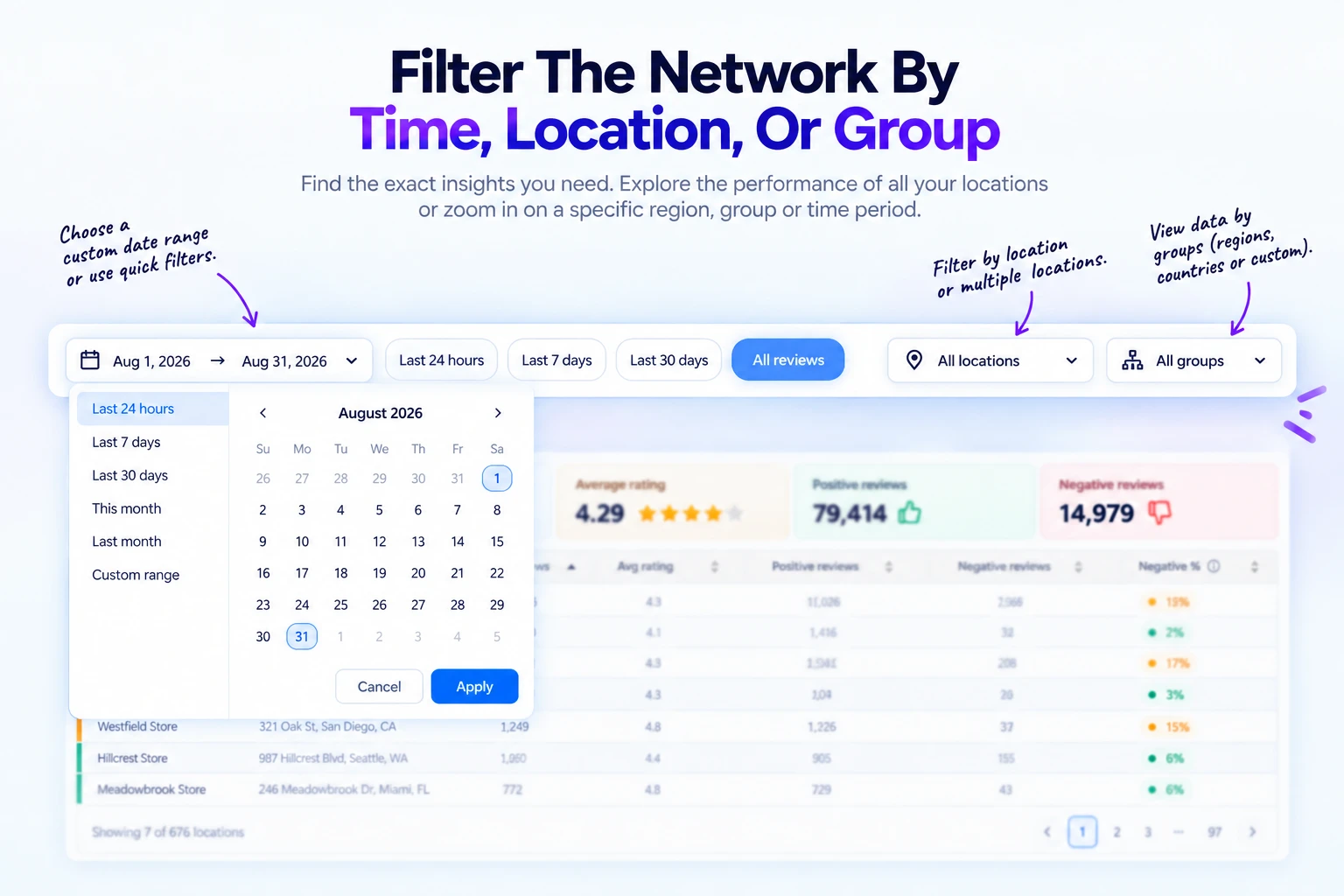
Review analytics filters for dates, locations, and custom groups

Compare trends, not isolated snapshots

Track historical average rating, review volume, velocity, and negative-review percentage over time. Period-over-period and year-over-year comparisons reveal whether a change is sustained or temporary.

Use the same date range across locations. A deteriorating recent trend can deserve attention even when a location still benefits from a strong historical rating.

Analyze sentiment for each topic inside a review

Useful sentiment analysis distinguishes positive, neutral, and negative opinions. It should not reduce a review to one label when the customer discusses several parts of the experience.

For example, “The food was excellent, but we waited 45 minutes and the staff seemed overwhelmed” can produce positive sentiment for food quality and negative sentiment for wait time and service.

Explore the method in more depth with Cacao’s Google review sentiment analysis.

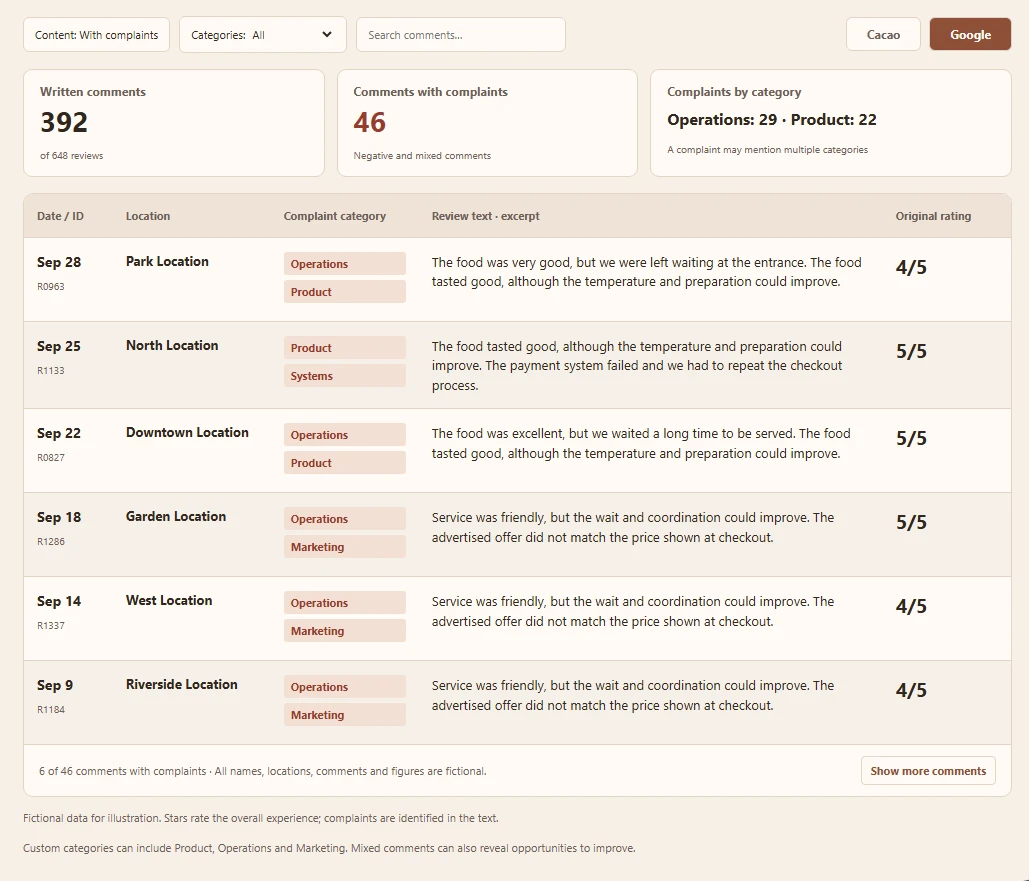
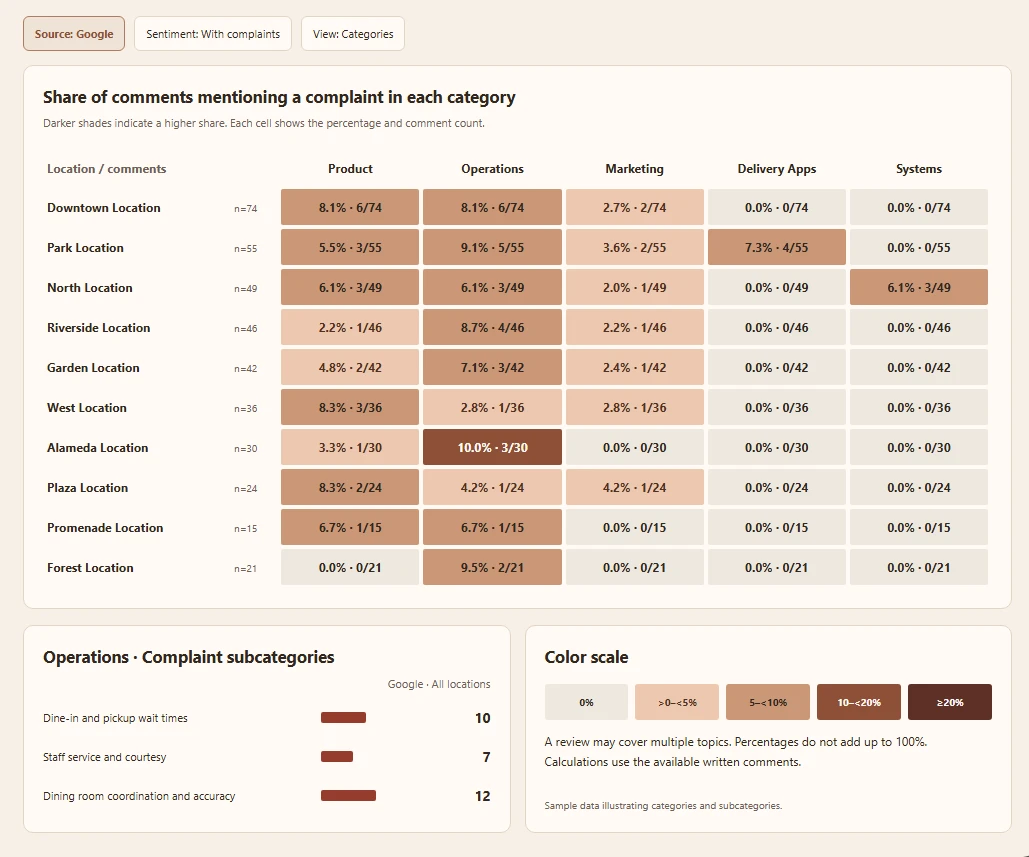
Negative Google review report showing recurring issues

Find recurring and emerging issues with topic analysis

A single review can belong to multiple topics. Analyze topic frequency and topic sentiment across locations, custom groups, the full organization, and different periods.

Recurring issues appear repeatedly. Emerging issues are topics whose frequency or negative sentiment is increasing. Keeping those concepts separate helps teams distinguish a persistent weakness from a new deterioration.

Compare locations, custom groups, and the network

Compare each location with another location, a custom group, or organization-wide performance. A custom group is any collection the customer creates—such as a region, country, territory, business unit, or another operational grouping.

Use common metrics and time periods to identify best- and worst-performing locations, then inspect the topics and review text that explain the difference.

Use AI summaries and ask questions about review data

AI can combine quantitative results with qualitative review evidence at location, custom-group, and organization level. It can summarize which locations perform best or worst and explain the review patterns behind that performance.

Teams can investigate by asking questions such as “Why did negative reviews increase this month?”, “Which locations are driving the change?”, or “What changed between these two groups?” The purpose is to analyze and explain the data, not to invent prescriptive action plans.

Analyze hundreds of locations without losing local context

Spreadsheets and manual reading become difficult when thousands of reviews are distributed across many profiles. A scalable hierarchy keeps the original review connected to its topics, location, custom groups, and organization.

As verified evidence of scale, Cacao has analyzed more than 94,000 Google Reviews across 676 locations for a single anonymized multi-location organization.

Report the same evidence to corporate, regional, and local teams

On-demand reporting can be organized by organization, custom group, or location and can compare periods. Cacao currently exports analytics data to Excel.

Corporate, regional, and local users work from the same dashboard, while permissions determine which locations each user can access.

Separate analysis from review generation and response strategy

Analytics can measure review volume, growth, and velocity, but acquisition tactics belong to how to get more Google reviews.

It can also measure unanswered reviews, response rate, and response time. Guidance on the response itself belongs to how to respond to Google reviews.

When review analytics software becomes useful

For one location, start with the free Google Review Analyzer. It analyzes public Google reviews for one selected location and returns a concise AI report.

For dozens or hundreds of locations, review analytics software for multi-location businesses centralizes measurement, comparisons, topics, sentiment, trends, AI investigation, and reporting across the network.

Use the Google Reviews dashboard to monitor what is happening; use deeper review analytics to understand why it is happening.

See Cacao in action

Understand Google Reviews across your entire network

Cacao connects review metrics, sentiment, topics, trends, location comparisons, and AI explanations for multi-location businesses.

Request a demo

Google review analysis: frequently asked questions

How do you analyze Google Reviews?

Combine rating, volume, star distribution, negative-review percentage, growth, and velocity with sentiment and topic analysis. Then compare consistent periods and inspect the review evidence behind each change.

How can I analyze Google Reviews across many locations?

Use a common hierarchy that preserves each review while aggregating results by location, custom group, and organization. Compare the same metrics, topics, sentiment, and periods across every level.

Can one review have different sentiments?

Yes. One review can praise one topic and criticize another. Useful analysis assigns positive, neutral, or negative sentiment independently to the topics discussed.

What is the difference between a review dashboard and review analytics?

A dashboard monitors and compares what is happening. Review analytics investigates why performance changes using topics, sentiment, trends, review evidence, and AI summaries.