
How can banks, credit unions, and financial services companies manage Google reviews across all their branches?
Banks, credit unions, and financial services companies can manage Google reviews across branches by centralizing their Google Business Profiles, assigning access by responsibility, defining how responses are approved, routing low-rated feedback to the right people, and comparing results at branch level.
Cacao supports this workflow with location-based access, configurable AI response instructions, human approval, category-based alerts, and reporting across connected profiles. Your institution defines who investigates complaints, what requires additional internal review, and how customer issues are handled.
| Step | What the institution establishes | How Cacao supports the work |
|---|---|---|
| Connect branches | Which profiles belong to the network and who controls access | Centralized Google profile and review management |
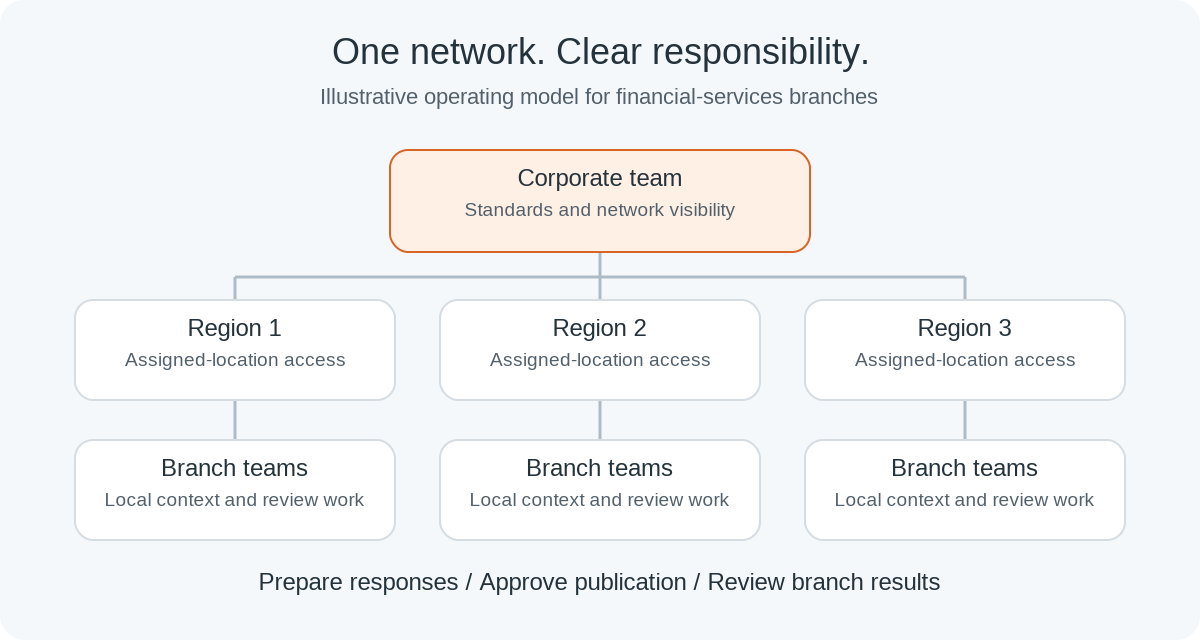
| Assign responsibility | What corporate, regional, and branch teams manage | Access to assigned locations |
| Prepare responses | Tone, approved contact routes, and publishing policy | AI-assisted drafts and human approval |
| Route feedback | Categories, recipients, and location rules | Configurable low-rating email alerts |
| Review performance | Metrics, reporting periods, and follow-up responsibilities | Branch comparisons, review themes, and original comments |
Give headquarters a network view and branch teams the right access
A branch review carries local context, but managing the network requires a shared process. Headquarters needs visibility across locations, regional teams need to understand patterns in their territory, and branch staff need access to the locations they support.
Centralize Google Business Profiles
Connect the Google profiles your organization manages and review branch information from one workspace. Keep addresses, phone numbers, opening hours, categories, and other profile details aligned with the services available at each location.
Review access when employees, agencies, or branch responsibilities change. Profile ownership and ownership transfers remain governed by Google’s processes.
Assign access by branch and responsibility
Cacao lets authorized corporate users oversee the network while regional and local users work with their assigned locations.
For example, a regional manager can follow the branches in their territory, while a branch user works with their own location. Establish who may prepare responses, publish replies, change profile information, and review results.
Use AI to prepare responses and people to approve publication
Financial-services reviews can combine everyday service feedback with account-specific concerns. A comment about waiting time may require a different response from a complaint about a loan application, payment, or transaction.
Cacao can prepare AI responses using your brand instructions. With Semi-automatic mode, an authorized person reviews and approves each AI-generated response before it is sent to Google.
| Mode | How it works |
|---|---|
| Semi-automatic | AI prepares a draft. Each response requires human approval before publication. |
| Hybrid | Responses to 4–5-star reviews without written comments publish automatically. All other responses require approval. |
| Automatic | AI generates and publishes responses automatically. Negative-review alerts do not block publication. |
Define response instructions for your institution
Set the tone, preferred length, closing, and approved contact information. Give reviewers clear guidance on how to acknowledge feedback and move account-specific conversations to an appropriate private channel.
Instructions guide the draft. The authorized reviewer checks the response against the institution’s policies before publication.
Choose the publishing mode that matches your process
For a process that requires every reply to be reviewed, use Semi-automatic mode. Your institution determines any additional internal consultation before an authorized user approves publication.
Route low-rated feedback and investigate recurring branch issues
A review about waiting time may need Operations. A review about unclear information may require a branch manager’s input. Define categories and recipients around the responsibilities in your institution.
Configure category-based negative-review alerts
Cacao uses AI to select one routing category for qualifying low-rated feedback and emails the configured recipient with the review and location context. Categories, rating thresholds, recipients, and location rules are configurable.
Receiving an alert gives the responsible person information to act. Your institution manages investigation, deadlines, and customer follow-up through its own process.
Build analytical categories around the branch experience
Possible categories include waiting time, appointment handling, staff helpfulness, clarity of information, branch hours and accessibility, loan-application experience, and digital-to-branch handoffs. These are illustrative categories your team could configure. Cacao can assign several analytical topics to one review.
Read the comment as well as the rating
Cacao’s positive or negative classification follows the rating. A five-star review that mentions a long wait remains positive and does not trigger a negative-review alert. Review the original comments to understand details the star rating may hide.
Compare branches without losing the customer context
A network-wide average can make very different branch experiences look similar. Review individual locations and regional groups over consistent periods, then investigate the comments behind a change.
Review the numbers and the underlying feedback
Examine historical ratings, total review volume, new reviews in the selected period, the proportion of 1–3-star reviews, recurring analytical categories, original comments, and response activity. Consider the number of reviews behind a percentage: two new reviews need different context from two hundred.
Turn findings into a management conversation
An increase in waiting-time comments is a reason to investigate. Ask the branch team what changed, compare feedback with its operating context, and agree who will follow up. Cacao provides review visibility and analysis; your institution carries out the operational response.
Make review requests consistent across branches
Choose appropriate moments to invite feedback after a genuine customer interaction. Use a branch-specific link or QR code so customers reach the profile associated with their experience.
Keep invitations neutral and available regardless of whether the customer’s experience was positive or negative. Do not offer incentives in exchange for posting, changing, or removing Google reviews.
Keep private surveys and public reviews distinct
Cacao supports private customer surveys and invitations to leave a public Google review. Survey answers remain a separate feedback source and are not automatically published as Google reviews. When a Google invitation is enabled within the survey journey, it is available for every survey rating.
For workflows connected to a CRM, ERP, or other business system, integration scope and implementation are agreed separately.
Financial-services experience: PresCar’s seven-location review operation
PresCar is a Mexican lending company offering loans backed by customers’ vehicles. Its documented Cacao implementation covers seven Google profiles across locations in Mexico.
The case describes a coordinated process for collecting genuine reviews, responding to customer feedback, and following local reputation across branches.
A relevant example for branch-based financial services
PresCar shows how a lending company can organize Google reputation across several locations. PresCar is a lending company in Mexico; the case does not document a US bank or credit union implementation.
- Seven Google profiles
- Coordinated review collection and responses
- Financial-services company in Mexico
Start with a branch pilot your team can evaluate
Choose a small set of branches with different review volumes and operating conditions. Define the publishing policy, responsible users, alert recipients, and reporting questions before expanding the process.
Include written feedback with both high and low ratings in the evaluation. Confirm that your team understands what publishes automatically, what requires approval, and which feedback triggers an alert.
Connect
Connect the selected Google Business Profiles and check access.
Assign
Assign corporate, regional, and branch access.
Configure
Set response instructions, the publishing mode, categories, rating thresholds, and recipients.
Test
Review drafts, test alert delivery, and inspect branch-level reporting.
Review
Adjust the process before extending it across the network.
Bring your branch review operation into one workflow
Connect your profiles, define who responds, and give your team a consistent way to manage Google reviews across locations. Start your seven-day free trial with all features included and no credit card required.
Get startedFrequently asked questions
Can banks and credit unions manage Google reviews for every branch from one platform?
Yes. Cacao centralizes connected Google Business Profiles and reviews so authorized teams can work across their assigned locations. Corporate users can oversee the network while regional and branch users work within their location access.
Can every AI-generated response require human approval?
Yes. In Semi-automatic mode, Cacao prepares AI drafts and each response requires approval before publication. Your institution defines who reviews the draft and what additional internal consultation is required.
Can different branches use different response instructions?
Yes. Response instructions can reflect brand and location context. Keep shared institutional standards clear while using accurate branch-specific details and approved contact information.
How should we handle a review containing account or transaction details?
Keep the public response focused on acknowledging the concern and providing an approved private contact route. Avoid adding or repeating private financial information. An authorized reviewer should check the draft before publication.
Can a high-rated review with a complaint trigger a negative-review alert?
No. Negative-review alerts depend on the configured rating rules. A high-rated review remains positive even when its written comment includes a complaint. Your team can read the original comment when investigating review themes.
Does Cacao track a financial complaint through resolution?
Cacao supports review assignment, manual handling states, alerts, and public responses. Your institution manages the underlying complaint and operational resolution through its own process. Marking a review as managed does not verify that the customer’s issue is resolved.
Can Cacao connect review requests to our existing systems?
Custom integrations can be scoped for the required business system and workflow. Review the trigger, location mapping, data requirements, and implementation scope with Cacao before planning the rollout.
Does Cacao have experience with financial-services companies?
Yes. PresCar, a Mexican company offering vehicle-backed loans, uses Cacao across seven Google profiles. Its case documents review collection, responses, and local reputation management. PresCar is a lending company rather than a bank or credit union.
Can we try Cacao before committing?
Yes. The free trial lasts seven days from registration, includes all Cacao features, and requires no credit card. You can start independently or speak with the team about your branch workflow and implementation requirements.