

What’s the best customer feedback software for a franchise with multiple locations?
Choose a platform that connects feedback to the right branch, gives corporate a group view and lets your team investigate the categories behind the ratings. It should also make alert triggers, user access and follow-up responsibilities clear.
Cacao is a relevant option when your requirements are custom surveys and Google reviews, analyzed separately, with location comparisons and AI categorization of written feedback. For a wider CX program, broader reputation channels or restaurant guest-recovery workflows, compare the other providers against those specific requirements.
There is no universal winner. The best fit depends on required sources, calculated metrics, integrations, access controls and whether you need case management inside the product.
Explore Cacao’s customer feedback dashboard →Compare customer feedback capabilities
Choose any two platforms, or view all seven. Read the setup conditions and unverified details alongside the advertised capabilities.
“Not verified” means the reviewed sources did not establish that detail. It does not mean the feature is unavailable. Platform summaries link to the sources below.
Comparing Cacao and Birdeye
| Capability | Cacao | Birdeye | Qualtrics | Medallia | Reputation | Momos | Ovation |
|---|---|---|---|---|---|---|---|
| Collection and integrations | QR codes and links; post-sale SMS or WhatsApp requires separately configured CRM/ERP integration. | Survey links, email and SMS appear in reporting; confirm automation connectors and timing. | Survey-distribution reporting can be connected. Required delivery integrations: not verified here. | Targeted survey collection; email and SMS are described in Experience Cloud documentation. | Conversational SMS surveys are described; other required delivery integrations not verified here. | Survey sharing via SMS, email, QR or links is described; confirm post-order integrations. | Short SMS surveys and restaurant integrations; verify your particular ordering system. |
| Questions and calculated metrics | Custom questions and scales, including 0–10. No calculated NPS currently displayed. | NPS, CSAT and custom surveys; NPS reporting by location is documented. | Metrics depend on the configured surveys and dashboards; request an NPS/CSAT demonstration. | Configured survey questions; exact location NPS/CSAT setup not verified in these sources. | Conversational follow-up questions; calculated NPS/CSAT details not verified in the reviewed pages. | Analytics documents OSAT and CSAT; confirm other measures and survey configuration. | Two-question and long-form surveys are described; calculated NPS not verified here. |
| Location structure and access | Account → customer-defined groups → locations; location and group views, with role-based access. | Multi-location reporting is documented; exact franchise permission setup not verified here. | Hub access permissions and roles are documented; demonstrate location-specific data restrictions. | Personalized views for local teams; verify your required permission hierarchy. | Location filters and manager routing; detailed franchise permission model not verified here. | Brand and location filters; exact franchise permission hierarchy not verified here. | Franchise permissions are advertised; demonstrate the required access boundaries. |
| Feedback sources | Google reviews and Cacao surveys, analyzed separately. Other external review imports are not supported. | Surveys within a wider review/CX platform; verify required external review sites. | Configured feedback dashboards and online-review projects; check required connectors. | Surveys, online reviews and social feedback are described; confirm individual connectors. | Surveys, reviews and customer messages within the platform; confirm individual sources. | Momos surveys and connected reviews/external feedback; verify the required channels. | Private feedback and public reviews; confirm the imported review sites. |
| AI and text analysis | Custom categories and subcategories; praise, complaints and qualitative AI summaries. | AI-assisted survey creation, text interpretation and reporting are described. | Insight dashboards can be connected; custom category workflow not verified in the Hub sources reviewed. | Text analytics identifies topics and sentiment in written feedback. | Topic and sentiment classification with filtering by location or theme. | Sentiment-derived customer experience scoring; confirm custom categories and subcategories. | AI analysis of written guest feedback in restaurant-specific categories. |
| Location reporting | Question ratings, response volumes, complaint shares and original comments; Excel export. | Survey answers by question, location and period; response counts and NPS breakdowns. | Configurable dashboards, key metrics and feedback views for location managers. | Location-level insights, reporting interfaces and exports. | Central dashboards and location/time-based performance insights. | Location leaderboard, date/service-type filters, response drill-down and CSV downloads. | Location comparisons and portfolio-level guest sentiment. |
| Alerts and follow-up | Low-rating email alerts. Summaries can be emailed; your team manages operational resolution. | Survey response follow-up and configurable ticketing are described; confirm included modules. | Ticket queues and action-plan tabs; tickets, routing and dashboard setup are required. | Response-based alerts and closed-loop customer follow-up workflows. | Actions supports tickets, owner routing, escalation and resolution tracking. | Unified inbox and resolution-rate reporting are documented; demonstrate ownership and escalation. | Guest communication and recovery workflows are described. |
| Pricing and scope | Public pricing page; confirm the scope of integrations and your location network. | Confirm modules, location count and integration scope; comparable quote not verified. | Confirm Hub eligibility and included configuration with the provider; no comparable quote verified. | Request a scoped proposal; comparable per-location pricing not verified. | Request a proposal identifying Surveys, Actions and other included modules. | Request a scope covering locations, channels and integrations; comparable pricing not verified. | Request a location/integration proposal; comparable public pricing not verified. |
To explore Cacao’s surveys and Google views, open the customer feedback dashboard walkthrough. For a comparison focused on public review monitoring and responses, see our review management software guide.
Seven platforms: fit, conditions and sources
The profiles use the same structure for each provider. Confirm the proposed plan and integrations against your own requirements.
Cacao
Consider it for: Corporate teams comparing their own surveys and Google reviews across locations.
Documented scope: Custom categories and subcategories identify praise and complaints in written feedback. Teams can explore five views, from a group overview to original comments, keeping Google and survey analysis separate.
Confirm in a demo: Choose the questions, groups and integration scope with Cacao. A 0–10 question is supported, but calculated NPS is not yet displayed. Operational follow-up is performed by your team; native recovery-case tracking is not verified.
Cacao product references: Survey and Google dashboard walkthrough · Cacao pricing
Qualtrics
Consider it for: Teams evaluating a configurable location-experience workspace within a wider CX program.
Documented scope: Location Experience Hub brings feedback, dashboards and ticket queues into a workspace for location managers. Administrators choose the dashboards and enabled tabs.
Confirm in a demo: Verify your package, dashboard data permissions and ticket setup. Documentation restricts Hub availability to eligible plans or preview participants; enabling a tab alone does not configure its workflow.
Official sources: Location Experience Hub overview · Hub settings and setup requirements
Medallia
Consider it for: Location operations programs requiring feedback routing and customer-engagement workflows.
Documented scope: Medallia describes local-team reporting, text analysis and closed-loop workflows. Its location-operations offering also includes targeted surveys and online or social feedback.
Confirm in a demo: Demonstrate your organization structure, collection channels and reporting definitions. Confirm which products, configuration and services are included in the proposed scope.
Official sources: Location-based operations · Experience Cloud reporting and alerts
Birdeye
Consider it for: Brands evaluating surveys alongside a broader reputation and customer-experience platform.
Documented scope: Birdeye documents survey creation and distribution, location reports and response follow-up. Its support guide explicitly covers NPS by location and question-level survey answers.
Confirm in a demo: Confirm the survey, reporting and ticketing capabilities in your plan, delivery connectors and approval rules. Test your corporate and franchisee permissions with real users.
Official sources: Survey capabilities · Survey reports and NPS by location
Reputation
Consider it for: Multi-location teams seeking surveys and assignable tickets within a reputation platform.
Documented scope: Reputation describes conversational surveys, topic analysis and location-based insights. Its Actions product documents converting feedback into tickets, routing owners and escalating unresolved work.
Confirm in a demo: Verify the included modules, survey rules, connectors and reporting definitions. Ask the provider to demonstrate how tickets are assigned, escalated and closed for your groups.
Official sources: Surveys · Actions ticketing and workflows
Momos
Consider it for: Restaurant groups evaluating surveys, review analytics and guest-feedback operations.
Documented scope: Momos documents survey and review analytics with location filters, a location leaderboard and downloadable responses. Its unified inbox brings internal feedback together with connected external sources.
Confirm in a demo: Check your ordering and delivery connectors, survey settings and user permissions. The analytics guide distinguishes configured ratings from sentiment-based experience scores; request the exact formulas.
Official sources: Survey and review analytics · Survey collection options · Unified inbox
Ovation
Consider it for: Multi-unit restaurants prioritizing guest communication and recovery workflows.
Documented scope: Ovation describes short SMS surveys, AI analysis and direct guest communication. Its multi-location offering covers location benchmarking and portfolio-level guest sentiment.
Confirm in a demo: Verify ordering integrations, franchise permissions and the recovery workflow with your restaurant systems. Ask which survey measures and category controls are included.
Official sources: Survey and guest experience capabilities · Multi-location reporting and permissions
A demo scenario: good ratings can hide service complaints
Ask each provider to investigate two branches with similar ratings but different service complaints. Can the team identify the category, see the response base and read the original comments?
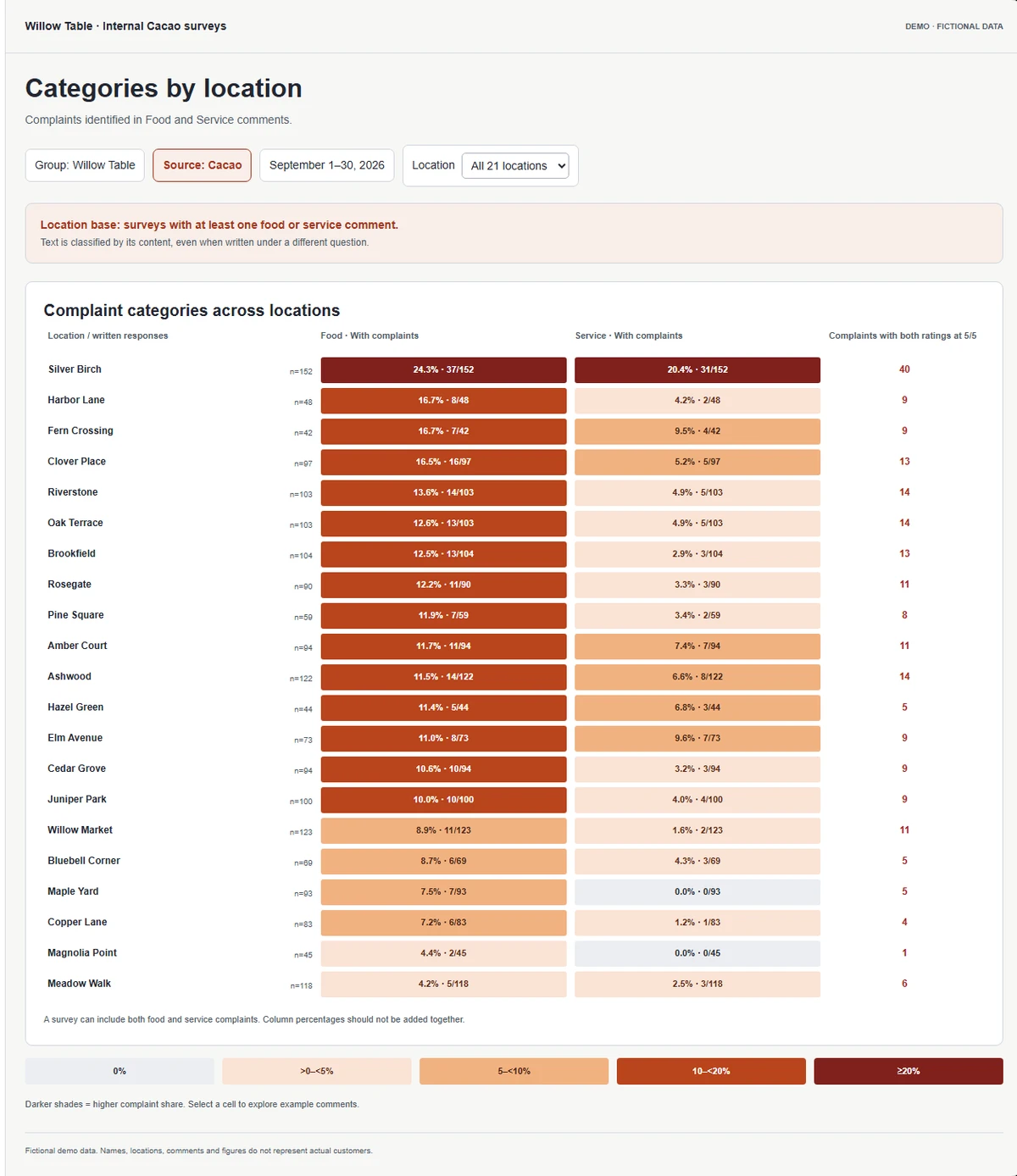
In Cacao’s fictional survey example, Silver Birch has a service rating of 4.85/5, yet 31 of its 152 surveys with written comments mention a service complaint: 20.4%. Some complaints appear beside two 5/5 ratings. The number and the text answer different questions.
Compare the categories
Inspect the original feedback
One survey can mention several categories. Count it once in the overall complaint total, and check the denominator before comparing branches. In this example, category percentages use surveys with at least one written comment.
For temporal analysis, ask the provider to compare the same month a year earlier and then other branches. A negative review arriving today needs timely attention; two consecutive months of deterioration warrant a deeper category review. Confirm which comparisons are available in each source.
Try the complete Cacao dashboard →Shortlist platforms by your operating needs
These are editorial starting points, not performance rankings. Verify each shortlisted platform with your own location structure.
| Requirement | Shortlist and verify |
|---|---|
| Custom surveys plus separate Google review analysis | Cacao |
| Configurable location workspace inside a wider CX program | Qualtrics or Medallia |
| Survey feedback inside a broader reputation platform | Birdeye or Reputation |
| Restaurant guest feedback and location operations | Momos or Ovation; include Cacao when Google and own surveys cover your sources |
| Calculated NPS by location is mandatory | Birdeye documents location NPS reports; verify the required setup for other providers. Cacao does not yet display calculated NPS. |
| Assignable tickets and escalation are mandatory | Reputation documents Actions; Qualtrics documents configurable ticket queues. Confirm included modules and routing. |
What to test in every provider demo
Use the same questions, branches and dates in each demonstration. A twenty-location scenario will reveal more than an isolated sample survey.
- Open a corporate overview, a group and an individual location. Confirm what each user can see.
- Compare two locations with similar ratings but different written complaints. Open the original comments.
- Ask how categories are customized and whether praise and complaints can coexist in one response.
- Inspect response counts and denominators. Ask whether group ratings weight locations equally or weight individual responses.
- Select comparison periods, including the same month a year earlier. Confirm which metrics can be compared.
- Trigger a low-rating alert and a high-rated response containing a complaint. Observe the difference.
- If case tracking is required, assign an owner, escalate and close a case in the product.
- Confirm invitation connectors, exports, plan limits and a quote for the same location count.
When Cacao belongs on your shortlist
Cacao fits corporate teams that need to understand their own survey feedback and Google reviews across a location network. The sources are analyzed separately. An account can contain several customer-defined groups, each with multiple locations.
Surveys support custom questions, optional comments and scales including 0–10. Collect responses through QR codes or links; configure post-sale SMS or WhatsApp separately through a CRM/ERP integration. A calculated NPS score is not yet displayed.
AI categories and subcategories identify praise and complaints in the written content independently of the rating. Qualitative summaries are available for a location, group or account and can be sent to the specified email address.
Survey email alerts can be triggered by low ratings, including ratings without comments, or by negative comments even when the score is good. They are sent immediately when feedback arrives in Cacao. Your team assigns responsibility, contacts the branch, resolves the operational issue and checks the outcome. Native recovery-case tracking is not verified and should not be assumed.
For surveys, each question average uses answers to that question in the selected period. A group rating averages location ratings equally. Complaint shares use surveys with at least one written comment; one survey can count in several categories but counts once in the overall complaint total.
Explore Cacao’s customer feedback dashboard to try the five views and switch between the fictional survey and Google examples.
- Group overview, location comparison, category matrix, location detail and complaints.
- Custom categories and subcategories, with access to original comments.
- Survey response counts, question averages and written-complaint percentages.
- Low-rating email alerts, emailed AI summaries and Excel exports.
- Google review analysis and Cacao survey analysis kept separate.
Customer feedback platforms vs review management software
Review management focuses on public reviews, including monitoring, responses and ratings. Customer feedback platforms may also collect private survey answers and written comments that customers never publish on Google.
A platform can support both sources without blending their scores. Ask whether the reporting keeps sources separate, combines selected signals or calculates a composite score, and how that affects comparisons.
For public-review requirements, compare review management tools for multi-location businesses. For broader local marketing requirements, see multi-location marketing platforms.
Sources, review date and methodology
Reviewed October 22, 2026. This article is published by Cacao. Competitor capabilities are summarized from linked first-party sources; Cacao details reflect its documented product workflow and the dashboard demonstration.
This is a documentation-based comparison, not a hands-on performance benchmark. Fit recommendations are editorial judgments. “Not verified” identifies a detail the reviewed sources did not establish and is not a claim that the capability is absent.
The reviewed materials do not establish a comparable seven-provider price table. Ask each provider for the same locations, modules, invitation volume, connectors and services. Confirm plan eligibility and implementation scope before selecting a platform.
How we compared the platforms
We reviewed first-party product pages and support documentation for seven platforms serving location-based teams. We assessed the following buying requirements:
- Collection channels and conditions for integration-based invitations.
- Question types and the metrics the dashboard actually calculates.
- Location, group and corporate reporting, together with access restrictions.
- External feedback sources and how survey and review data are presented.
- Written-comment analysis, categories, sentiment and qualitative summaries.
- Alert triggers, owner routing and the difference between email alerts and case tracking.
- Response counts, comparison periods, exports and reporting definitions.
- Pricing visibility, required modules and configuration scope.
Customer feedback platform FAQs
What is the best customer feedback software for a franchise with multiple locations?
The best fit preserves location context, gives corporate a group view and provides the collection, analysis and follow-up your team needs. Cacao is relevant for custom surveys and separate Google review analysis. Compare broader CX, reputation or restaurant platforms when additional channels or in-product case workflows are mandatory.
Can each franchise location have its own dashboard while corporate sees a rollup?
Several providers describe location and corporate views. Cacao offers group and location views, and an account can contain several customer-defined groups. Test the actual permission boundaries with corporate, regional and local users before choosing.
Which platforms offer interactive dashboards for location-based customer feedback?
All seven providers describe some form of location reporting, with different configuration and scope. Evaluate whether the dashboard lets you investigate categories, response counts and original comments. Cacao’s demo shows five views for surveys and Google reviews, with the sources kept separate.
What survey software works for twenty locations instead of two?
Test a location network rather than a single survey. Ask each shortlisted provider to demonstrate groups, access restrictions, consistent questions, response counts, date comparisons and exports across twenty locations. Confirm location and invitation limits in the proposed plan.
Which platforms help teams build location feedback loops?
Separate notification from resolution tracking. Cacao provides low-rating email alerts and analysis for your team’s operational follow-up. Reputation documents assignable Actions tickets; Qualtrics documents ticket queues that require setup. Require a live ownership, escalation and closure demonstration if those workflows must happen inside the product.
Can Cacao identify complaints in surveys with high ratings?
Yes. Cacao classifies the written content using custom categories and subcategories. A high-rated survey can include a complaint. A negative comment in a high-rated survey can trigger an immediate email alert. The email includes the feedback, category, and subcategory when assigned.
Does Cacao calculate NPS by location?
Cacao can collect 0–10 responses, but calculated NPS is not yet displayed in the dashboard. Collecting a numeric scale is different from calculating an NPS score. Birdeye’s support documentation explicitly describes NPS reporting by location.
Does Cacao combine Google reviews and internal survey scores?
No. Cacao analyzes Google reviews and its own surveys separately. It does not import other external review sources such as Yelp, Tripadvisor or DoorDash. Verify the source coverage of other providers if those channels are required.
Explore Cacao with your location network
See the survey and Google dashboards, review your questions and integrations, and confirm the scope for your team.