

What breaks as your location network grows?
Checking each profile manually may work for a handful of locations. As the network grows, local changes, different owners, and competing priorities make that routine harder to sustain. The central team needs to know what needs attention and who can act.
- Information falls behind: holiday hours, phone numbers, and services change at different times across the network.
- Access is fragmented: a former employee, agency, or franchisee may control a profile the corporate team needs to update.
- Reviews wait for an owner: complaints reach the public before the right team has the local context to respond.
- Manual checks consume the day: teams spend time opening profiles instead of correcting issues and comparing results.
A running example: 80 locations across four regions
Imagine a restaurant chain with 80 locations across four regions. Corporate coordinates profile standards, regional managers oversee their locations, and local operators confirm opening hours and investigate customer complaints. We will use this illustrative network throughout the guide.
Ahead of a holiday, one region needs new hours, two franchise profiles have ownership gaps, and several locations have unanswered complaints. Each issue needs a different scope, responsible person, and next action. The same approach applies to retail chains, healthcare networks, dealerships, and other multi-location businesses.
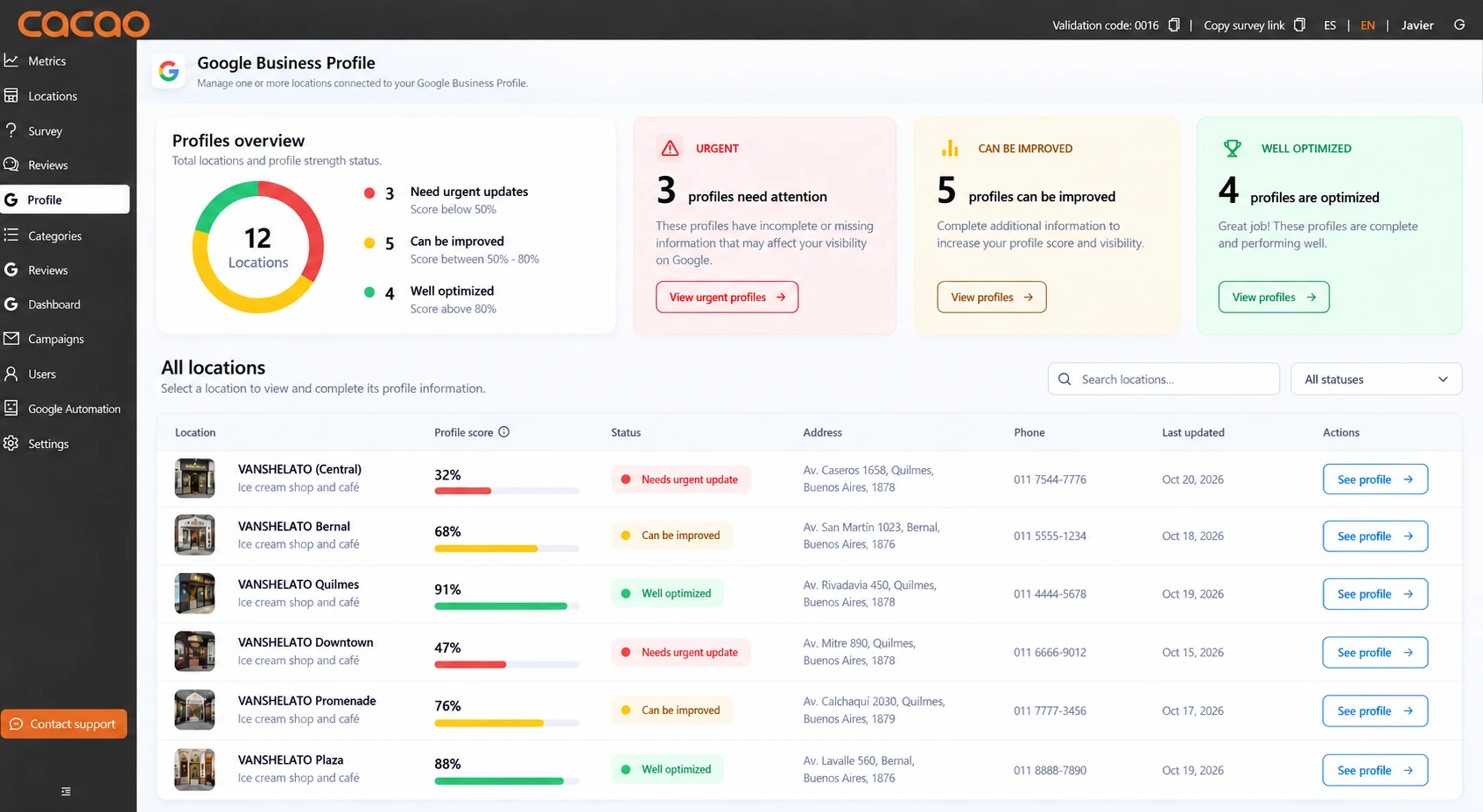
Know which locations need attention
Start with the full location inventory. Compare it with the profiles available through your managing Google account so missing access does not become an invisible gap. Then review connected profiles for outdated information, incomplete fields, and issues that need investigation.
For the 80-location chain, the first pass separates three jobs: confirm holiday hours with regional managers, investigate the two ownership gaps, and send unanswered complaints to the people who can handle them. Assign a responsible person and next action in your team's working process.
| What you find | Who should act | Next action |
|---|---|---|
| A location is missing from the connected profiles | Corporate profile administrator | Compare it with the location inventory and identify the Google account and owner controlling it. |
| Holiday hours are outdated | Regional manager and local operator | Confirm the actual schedule and select the affected locations for an update. |
| A review contains an unresolved complaint | The team responsible for the issue | Check local context, decide on a public response, and arrange operational follow-up. |
| A profile appears incomplete, duplicated, or suspended | Corporate profile administrator | Investigate the profile state and use the appropriate Google process when required. |
Use profile health to focus the review
Cacao's Google Business Profile Health Score is a proprietary location-level score from 1 to 100, with historical evolution available. Its components include profile completeness, review velocity, and year-over-year evolution of GBP interactions. Open the underlying signals to understand what needs attention.
Use a lower or declining score to prompt investigation alongside known customer-facing issues. The score is Cacao's methodology, rather than an official Google metric or a confirmed ranking factor.
Establish ownership and team responsibilities
Before applying changes across the network, establish which profiles corporate can control. Connect the Google account with access to your locations to Cacao, inspect the available access, and record ownership exceptions.
A profile can be visible to corporate even when a franchisee owns it and corporate only has manager access. Corporate ownership with authorized regional and local administration is the recommended operating model here. Any ownership transfer must be coordinated through Google with the current owner; connecting a profile to Cacao does not transfer ownership.
| Team | Responsibility |
|---|---|
| Corporate | Maintain the location inventory, profile standards, access records, and oversight of the full network. |
| Regional managers | Coordinate updates across their region, confirm exceptions, and investigate locations that need attention. |
| Local operators | Validate local hours, services, and contact information, and provide context for customer complaints. |
Resolve access gaps before a network-wide change
In the 80-location example, corporate discovers that the franchisees own two profiles. Record the current owners and request the required access or ownership transfer through Google. Work on authorized profiles can continue while those exceptions are resolved.
Keep permissions aligned with responsibilities
Available actions depend on the role granted through Google Business Profile. Review permissions regularly, remove people who no longer need access, and give each person the access appropriate to their work. Keep primary control in company-managed accounts so employee or agency changes do not disrupt the operation.
Organize locations into operational groups
Organize the network in a way your team can use for recurring work. A region, country, brand, territory, or business unit can be a useful grouping when the same person supervises those locations or the same changes apply to them.
In Cacao, clients create custom groups and each location belongs to one group. Teams can work with a whole group or manually select individual locations for a particular update.
For the restaurant chain, four regional groups match the management structure. If only some restaurants in a region share the holiday schedule, select those locations individually and handle the exceptions separately.
Keep the inventory accurate as locations change
When a location opens, closes, or changes operator, check its profile, managing account, group, and responsible team. Before creating a new profile, check Google's eligibility requirements and whether a profile already exists. Physical locations and service-area businesses need the appropriate setup for their business type.
Update information across locations
Define which fields should follow a brand standard and which need local values. Business names and descriptions may share guidelines, while addresses, phone numbers, services, and hours must reflect each location. Cacao can update supported profile fields across selected locations or a custom group.
Bulk editing and bulk verification serve different purposes. Editing changes profile information; Google's bulk verification process determines whether eligible profiles can be verified together. Cacao helps authorized users prepare and submit supported updates, while verification remains with Google.
For the 80-location chain, one region has 20 restaurants. Eighteen share the same holiday hours and two have different schedules. Corporate prepares an update for the 18 selected locations, then handles the other two separately.
| Stage | What the team does |
|---|---|
| Confirm the change | Regional and local teams agree on the holiday dates, hours, and exceptions. |
| Select the locations | Select the 18 restaurants sharing the schedule. Exclude the two with different hours. |
| Prepare the update | Enter the special hours for the selected locations. |
| Review before publishing | Check the affected profiles, dates, and values in the pre-publication review. |
| Publish and verify | Submit the update, check the resulting public information, and investigate any profile that does not show the intended hours. |
Apply the same scope checks to other profile fields
Use the same selection and review process for supported changes to contact details, URLs, categories, descriptions, services, attributes, and other profile information. Check local exceptions before submitting a shared value.
Coordinate Google Posts and photos
Cacao can publish the same Google Post or image across manually selected locations or custom groups. Confirm that the content applies to every selected location, especially when promotions or services differ locally. Posts publish when submitted; scheduling is not currently supported.
Coordinate review responses across your location network
Accurate hours help customers plan a visit. Reviews show what happened when they arrived. As the network grows, decide who checks incoming feedback, who can reply, and which complaints need local investigation or specialist attention.
Corporate should define the response policy and assign responsible people by category. Routine positive feedback can follow an approved automation policy. Complaints and negative reviews need human judgment, including reviews with a good star rating but a complaint in the text.
In the restaurant example, a customer reports a long wait at one location. The responsible team asks the local operator what happened, prepares an appropriate public response, and decides on operational action. The brand defines how the local team reports back; Cacao does not track that operational work to completion.
- Define who handles routine responses and who investigates complaints.
- Set criteria for requesting local context or escalating to a specialist team.
- Review locations with unanswered feedback and agree on response expectations.
- Keep brand guidance consistent while making each reply relevant to the customer's experience.
Build the detailed review workflow separately
This guide focuses on keeping Google Business Profiles accurate and operational. For category ownership, response policies, complaint handling, and local follow-up, see how to manage reviews across multiple locations.
When implementing that workflow, use AI review responses for the response process, review analytics to investigate recurring feedback, and review collection to support a consistent flow of new reviews.
Monitor performance and recurring issues
Set a monthly profile-health review across locations and groups. Compare each location with its own history, investigate the underlying signals, agree on corrections, and revisit them in the next review. Address urgent access problems, inaccurate hours, and customer complaints when discovered.
Use available Google Business Profile performance data to compare locations over the same period. Look at views, searches, website clicks, calls, direction requests, and other supported interactions where available. Consider seasonality and local conditions before deciding that a difference needs corrective action.
For the 80-location chain, the monthly review checks whether the holiday information appeared correctly, whether the ownership gaps have been resolved, and which locations still need attention. If similar complaints keep appearing across a region, the responsible team can investigate a shared operational cause.
For work specifically aimed at improving search visibility, use the guide to multi-location Local SEO. Profile operations provide the foundation for that work.
Investigate incomplete, duplicate, or suspended profiles
A network review should identify incomplete information and possible duplicate or suspended profiles for investigation. Duplicate resolution and reinstatement must follow Google's processes; Cacao does not merge duplicates or reinstate suspended profiles inside the platform.
Decide when you need dedicated software
The practical trigger is recurring coordination work: your team repeatedly opens profiles one by one, cannot easily identify the right locations for a change, or spends too much time assembling a network-wide view. The number of locations matters, but so do the frequency of changes and the people involved.
Native tools may be sufficient for a small, stable network. Dedicated software becomes more useful when the same team needs custom groups, bulk updates, shared publishing, access visibility, profile-health history, and performance comparisons as part of a recurring routine.
For the 80-location chain, evaluate whether a platform supports the actual work: selecting 18 restaurants for an hours update, inspecting profile access, and reviewing regional performance. Compare Google Business Profile management software against those requirements.
Explore Cacao's Google Business Profile management to see how profile operations work in the product. If coordinating customer feedback is your main challenge, explore multi-location review management software.
Multi-location Google Business Profile management FAQs
Can you manage multiple Google Business Profiles from one place?
Yes. Google supports organizations and business groups, and multi-location platforms can add centralized editing, monitoring, publishing, permissions, and reporting workflows.
Can you update multiple Google Business Profiles at once?
Yes. In Cacao, select individual locations or a group, prepare the supported changes, and review the scope before publishing. Handle locations with different values separately.
Can Cacao transfer ownership of a Google Business Profile?
Cacao lets the team inspect who has access to connected profiles. Ownership changes are handled through Google and depend on the current owner; connecting an account to Cacao does not transfer ownership.
How often should corporate review profile health?
Review the Health Score and its historical evolution monthly, investigate the underlying signals, and prioritize corrections according to the brand's objectives. Address urgent access issues, inaccurate hours, and customer complaints when discovered.
How should franchises manage Google Business Profiles?
Define corporate ownership, franchisee and regional access, brand standards, local exceptions, escalation paths, and reporting before choosing tools or automating updates.
How do you manage reviews across multiple locations?
Define response policies centrally, assign responsibility by category, and involve local teams when a complaint needs context or operational action. Follow the detailed guide to managing reviews across multiple locations for the full workflow.
Can software resolve duplicate or suspended profiles?
Software can help detect duplicate or suspended profiles. Resolution and reinstatement must occur through Google; Cacao does not merge duplicates or reinstate suspended profiles inside the platform.
Is Google Business Profile management the same as Local SEO?
Profile management focuses on operating and maintaining profiles. Local SEO is the broader discipline of improving local search visibility across profiles, websites, reviews, links, and other signals.
See which locations need attention and coordinate what happens next
Explore how Cacao helps your team manage profile updates, reviews, and performance across your location network.
Request a demo