
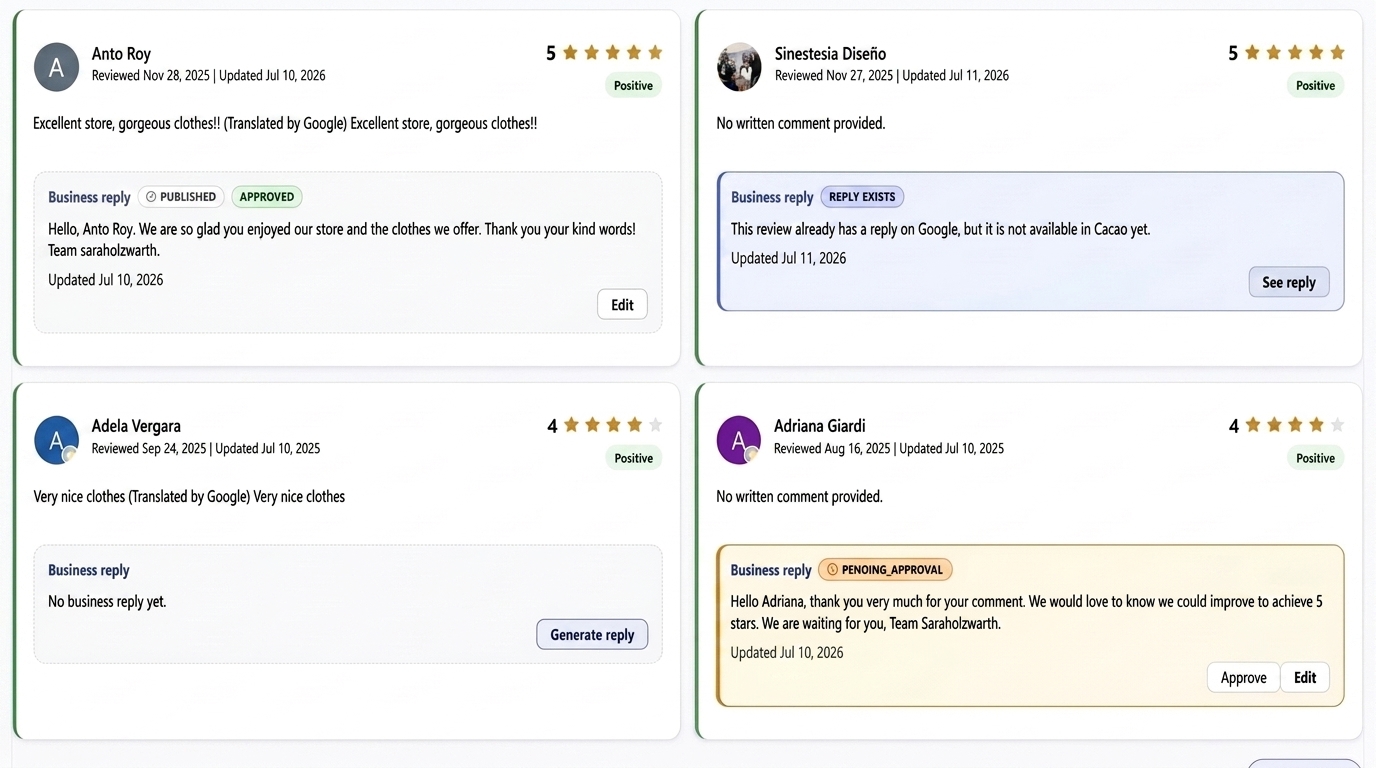

Best retail review response software: quick comparison
Start with Cacao if your stores need a focused Google review workflow with three publishing modes, instructions per store, and alerts for the responsible teams. Include SOCi, Birdeye, Chatmeter, and Uberall when evaluating broader platforms or different approaches to approvals and automation.
| Platform | Why consider it | Publishing and control |
|---|---|---|
| Cacao | Google review responses for physical store networks | Automatic, hybrid, or semiautomatic; configuration per store |
| SOCi | Retail reviews within a wider local marketing platform | Brand-aligned replies with sensitive cases routed for approval |
| Birdeye | Configurable AI response workflows across locations | Autonomous replies, suggestions, or human approval |
| Chatmeter | Review responses connected with tasks and workflow rules | Automated responses by criteria; optional approval processes |
| Uberall | AI drafts and bulk replies within location marketing | Human approval emphasized on its current product page; confirm automatic publishing availability |
The provider sections below link to the documentation behind this comparison. The right choice depends on the review channels, store structure, and approval process your team needs.
How we compared the platforms
This is a Cacao-authored comparison, based on public provider documentation reviewed on September 8, 2026, and Cacao product information. It is not an independent hands-on benchmark. An undocumented capability is not treated as unavailable.
- Can the platform generate and publish responses to Google reviews?
- Which replies publish automatically, and which require approval?
- Can each store use its own instructions and contact details?
- How do corporate, regional, and store teams retain oversight?
- How are negative reviews brought to the responsible users?
- Does the required workflow fit the package, implementation, and price?
These questions are especially useful for chains with 10 or more stores, but smaller networks can use the same checklist. Confirm current packaging and supported review sources with each provider.
Cacao: Google review responses with control per store
Cacao generates and publishes AI responses to Google reviews across physical stores. Each location can have its own response mode, customized closing, contact phone number or email for negative reviews, and editable prompt.
The AI acknowledges the specific experience described by the customer. If a shopper praises quick checkout or helpful staff, the reply can thank them for that detail. This makes the response relevant to the review and naturally reinforces terms associated with the customer's experience. Helpful replies can support local visibility, but Google does not identify keywords in owner responses as a standalone ranking factor.
Three response modes, with explicit approval boundaries
| Mode | Published automatically | Drafts requiring human approval |
|---|---|---|
| Automatic | Responses to all reviews | No prior approval required |
| Hybrid | Responses to positive reviews without a comment | Positive reviews with a comment, and negative reviews with or without a comment |
| Semiautomatic | None | Responses to every review |
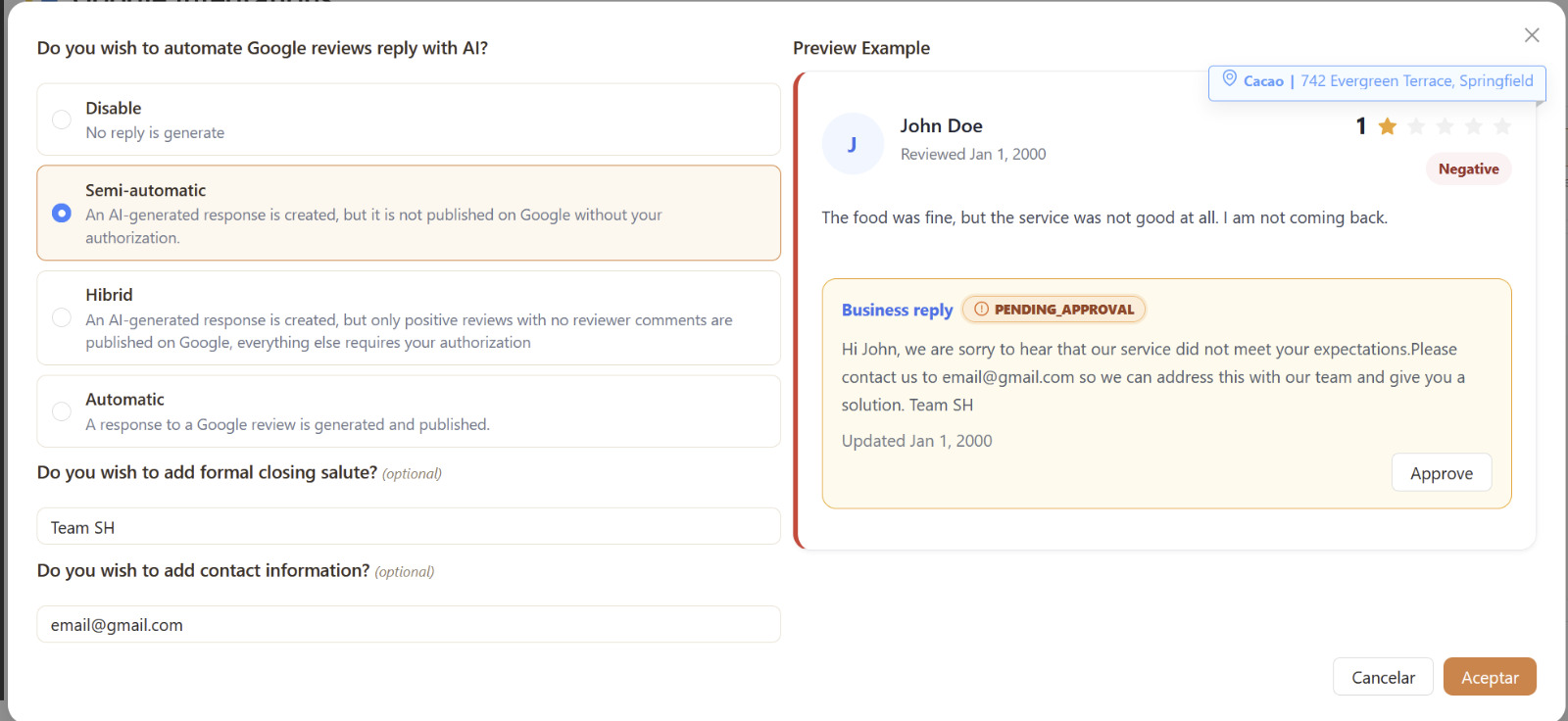
Choose the mode for each store according to how much supervision its team needs. A chain can use semiautomatic responses while reviewing its instructions, then choose another mode where appropriate.
Alerts for reviews below four stars
Reviews with one, two, or three stars trigger a negative-review alert. Recipients depend on the user structure configured by the main user. With role-based access by location, the relevant corporate, regional, and local users can all receive the alert. An alert and a publishing mode are separate controls: automatic mode still publishes replies to negative reviews.
Product context from the catalog
Cacao integrates with Google Merchant API for bulk product uploads to Google Merchant. The response AI can consult the catalog and follow instructions to mention relevant products when appropriate. A product reference should fit the customer's comment; a complaint should first receive an acknowledgment and the appropriate contact path.
For the product workflow, explore Cacao's Google review response automation platform. Cacao focuses on Google reviews; chains needing a response inbox for additional review sites should compare channel coverage carefully.
Vital: 62,488 responses across 20 retail locations
Vital Supermayorista used Cacao to respond to 62,488 Google reviews across 20 locations over approximately one year, according to Cacao's operational figures for the account.
This is a real retail example of response volume managed across a store network. It demonstrates use at scale; the total alone does not establish time savings, rating improvements, or revenue gains, and it should not be interpreted as 62,488 fully autonomous replies.
Read the Vital Supermayorista customer story for background on the retailer's workflow. In a demo, ask how the same store-level instructions and supervision options would apply to your network.
SOCi: reviews within retail local marketing
SOCi's retail offering combines reviews with listings and local social content. It describes responses in the brand's voice and routing sensitive feedback for corporate approval. This makes it relevant to teams comparing review response alongside a wider retail marketing workflow.
Ask how store-level instructions, approval ownership, and exceptions work in the proposed package. Source: SOCi's retail platform.
Birdeye: configurable AI response workflows
Birdeye documents autonomous responses, AI suggestions, template-based responses, and responses published after human approval. Its agent configuration includes location selection and business context.
It is worth comparing when your team wants to configure the steps between a new review, its analysis, response generation, and approval. Source: Birdeye's Review Response Agent documentation.
Chatmeter: responses with workflow rules and tasks
Chatmeter documents automated review response rules using locations, review providers, and star ratings. Its workflow also supports tasks and optional response approvals. The documented automation applies to reviews received within approximately 24 hours, so teams handling a backlog should ask about that separately.
Compare it when response ownership and task management are central to your process. Source: Chatmeter Workflow documentation.
Uberall: AI drafts and bulk review replies
Uberall's current Reviews product page describes context-aware replies, brand and tone guidelines per location, and bulk generation with human approval. This is relevant to chains that want to review large batches before publishing.
Its public pages differ on automation: the Reviews product page says responses require human approval, while its review response solution page also describes automatic responses. Confirm which workflow is currently available in the package you are evaluating.
Retail use cases: from supermarkets to specialty stores
Different store categories need different response context. The examples below are illustrative applications of Cacao's capabilities, not additional customer case studies. Vital is the documented retail example in this guide.
| Retail category | What a shopper might mention | How the response can be personalized |
|---|---|---|
| Supermarkets and wholesalers | Checkout speed, staff, or product variety | Acknowledge the specific experience and use the store closing |
| Fashion and footwear | Help choosing a size or finding a style | Recognize the assistance; mention a relevant catalog product only when appropriate |
| Electronics and appliances | Product advice or a disappointing service experience | Thank the customer for specific feedback; provide the configured local contact for a negative review |
| Home, furniture, and DIY | Range of products or in-store guidance | Reflect the category mentioned and follow the store prompt |
| Beauty and cosmetics | Helpful advice or product selection | Acknowledge the service and use relevant catalog context without inventing product claims |
| Pharmacies | Waiting times or staff service | Address the service experience without adding health details or treatment advice |
| Pet, sporting goods, and specialty stores | Knowledgeable staff or assortment | Recognize the specific topic and apply the local brand instructions |
Example: a positive supermarket review
Review: "Quick checkout and a great selection of fresh produce."
Illustrative reply: "Thank you for highlighting the quick checkout and fresh produce selection. We're glad you enjoyed your visit. See you again soon! The Riverside team."
In hybrid mode, a positive review with a written comment produces a draft for approval. A positive star rating without a comment receives an automatic response.
Example: a negative store review
Review: "I waited a long time and couldn't find anyone to help."
Illustrative reply: "We're sorry about the wait and the difficulty getting assistance. Please contact our store team at store@example.com so we can learn more about your visit. The Riverside team."
The contact and closing are examples of store configuration. In hybrid or semiautomatic mode, the negative-review response remains a draft until approved. A rating below four stars also triggers the configured user alerts.
How to evaluate software with your own store reviews
- Select several stores with different review volumes and customer experiences.
- Use positive ratings without comments, detailed positive reviews, and negative reviews with and without text.
- Check whether each reply reflects the review and uses the correct store closing and contact.
- Verify exactly what publishes in each mode and who must approve the remaining drafts.
- Check that a review below four stars reaches the relevant corporate, regional, and local users.
- For catalog-based responses, verify product relevance and avoid unsupported availability or pricing claims.
- Compare the total price for your locations, required features, onboarding, and support.
For the operating model behind these checks, read how to automate Google review responses. Teams testing brand language can use these Google review response examples as starting structures.
Choose Cacao when Google reviews are your priority and its store-level controls fit your operation. Compare the other platforms when your requirements extend to their broader workflows. For a wider evaluation covering bulk review monitoring, automated responses, listings, collection, and analytics, see our software comparison for monitoring and responding to retail reviews in bulk.
Frequently asked questions
What is the best AI review response software for retail chains?
The best fit depends on your channels and supervision needs. Cacao is an option for Google-focused store networks; SOCi, Birdeye, Chatmeter, and Uberall offer other combinations of response workflows and broader platform capabilities. Test them against the same sample of store reviews.
Can a retail chain automate Google review responses across multiple stores?
Yes. With Cacao, each store can use automatic, hybrid, or semiautomatic responses. The hybrid mode automatically handles positive reviews without comments and requires approval for all other response drafts.
Can every store have a different prompt and contact details?
Yes. Cacao supports a response mode, editable prompt, customized closing, and negative-review contact phone or email per store.
Who receives negative-review alerts?
In Cacao, reviews below four stars alert the relevant users according to the structure configured by the main user. Corporate, regional, and local users can all receive the alert when all three levels are configured.
Can AI mention products in a Google review response?
Cacao's AI can consult the product catalog and follow instructions to mention relevant products. The mention should serve the customer's context and should not replace addressing a complaint.
Is this only for chains with at least 10 stores?
No. This guide focuses on the coordination needs of larger store networks, but smaller retailers can also discuss their locations and response requirements in a demo.
See how Cacao would respond across your stores
Explore response modes, store prompts, negative-review alerts, and catalog context in a demo for your retail chain.
Book a demo